Friday, 3 April 2020

IC-7610 & WSJT-X

IC-7610 & FT8

In order to get my 7610 working with WSJT-X, I watched a few YouTube videos and used their menu settings. It worked. But I thought I could get better results, so I looked into it a little more.

One of the first things that I noticed was that the recommended setting for MENU/SET/CONNECTORS/USB/AF Output Level was "MIC/USB".  Now that setting worked fine, but a couple of days ago I noticed that the scope was showing a fairly wide TX spike. And then I noticed that if I spoke close to the desk-mic, the output increased. So basically, the mic was picking up (and transmitting) ambient sounds from the shack.

This was easily cured by choosing "USB" only from the menu and that cuts off the microphone, leaving a nice, clean data transmission.

For the benefit of anyone else who's just got an Icom IC-7610 and they're wanting to get it setup for WSJT-X, then please feel free to follow my guide below. This includes a couple of things which were not included in any video I watched.


These instructions assume that you have installed the necessary USB drivers and your radio is already working with your PC


PLEASE NOTE that I always work FT8 in "Split-Mode" and I recommend you do to. Be sure to edit the WSJT-X settings in the RADIO-Tab accordingly.


First thing is probably to RESET your radio back to its factory setting to be SURE that you don't have any oddball configurations within the menus from playing around earlier.

BEFORE YOU RESET make sure you save your current configuration so that you can get back to it later if need be.

Okay once you've done a reset, you'll need to re-enter your callsign into the radio (MENU, DISPLAY, MY-CALL).

So that your computer will still speak to your PC you need to go to CONNECTORS, CI-V, CI-V USB Echo, ON.


Now make sure that your COMPRESSION is switched OFF in the side-menu on your radio's main display. Then go to MENU, SET, CONNECTORS, USB AF/IF OUTPUT, and set it to 20%. Note that this setting will determine the strength of your received signal in WSJT-X. Ideally, it should be 30dB when there's only noise. Once everything's up and running, you can adjust this AF/IF OUTPUT to attain that figure, but for now it's better to start off low to avoid clipping.


Another very important adjustment is the ALC. Ideally, you want almost ZERO ALC and that's quite easy to achieve....

Go to MENU, SET, CONNECTORS, MOD INPUT, USB MOD LEVEL and set it to 15%.

If you are going to be using Data mode instead of the usual SideBand mode in FT8, you should also set DATA1 MOD to USB.

Okay, let's get back to the main radio screen. TUNE YOUR ANTENNA with the radio's built-in tuner. 

Switch the meters to ALC. Set your POWER to 15W (you can increase this later if your licence permits, but for now, just do the same as I did.

Find an empty part of the FT8 band using the WSJT-X waterfall and Click the TUNE button on the WSJT-X software and it will provide a carrier so that you can see your ALC reading on the radio (if you're in Split-Mode it will be the right-hand meter).

Hopefully the meter needle will not even budge because you already set the USB MOD LEVEL to 15%. If the needle does swing over, then reduce the USB MOD LEVEL a bit lower until there is no ALC reading (or next to none).


Now switch your meters to POWER and you will see that your power output is about two thirds of your radio's power-setting. That's fine for me - but if you have the licence for it, you can now increase the power to 20/30/40W or whatever you like. Recheck the ALC reading again

Click the WSJT-X TUNE button to stop transmitting the carrier.

So now you should have a tuned antenna with good SWR reading, a good ALC reading and the power you choose to use. 

Don't forget to check the RX Signal Strength meter in the lower left corner of WSJT-X to make sure you are averaging around 30dB and if not, increase the MENU, SET, CONNECTORS, USB AF/IF OUTPUT figure until you achieve that. Don't go too high!

FINALLY, be sure to save these settings with a relevant name such as "WSJT" so you can quickly change your radio for playing FT8, etc.

Spending today sorting this out has immediately reaped rewards by bagging my very first UNITED ARAB EMIRATES and my first PAKISTAN contacts! Very pleased :-)


That's it! 73.


RESPONSES :

Okay, so here I'll post details of any responses I get from people. And the first one is from Mike (VE9KK) in Canada. Mike says that he set his 7610 according to an instructional video posted by K0PIR. I've also seen that video and in it, Richard says we need ALC in digital modes...


ADDING ALC IN DIGI MODES

Well in other videos, people say we don't need ALC and should avoid anything but a mere 'flicker' of it. 


REDUCING ALC IN DIGI MODES

There's loads of these videos for the 7300 and 7610. Who knows best?? Not me! I have tried both ways and having cut the ALC right back on my 7610, I've just made some amazing contacts which I've not managed previously.

I guess you just gotta try each way and see what your results are with your radio, your antenna and your location. 


___________________


Saturday, 21 March 2020

WIRE ANTENNAS UK

END-FED LONG WIRE

Today the rain kept away! There was still a biting wind, but a few layers kept that at bay while I searched for a space in my back garden to erect a 66ft long wire. It's ended up running diagonally across the garden from a chimney at the front of my bungalow, to a 20ft scaffold pole which I erected in the opposite corner of the garden. 

The wife was not pleased and I don't think my neighbours will be either! The reason most people chose their houses around here is the fabulous view of Winter Hill and Rivington Pike, so having a big scaffold pole appear on the horizon (not to mention a Diamond X300), is not something to look forward to as far as they're concerned. But when you look around at everything else surrounding our homes like tall street-lamps and telegraph poles with spider's webs emenating from them, my scaffold pole doesn't look that bad.


Anyway, it's up now and it's staying up. The WireAntennas.co.uk  EFHW is really intended for portable use, but I think it's too heavy for that, and so that's why I'm using it as a base-antenna. During the installation, I removed the black winder and sealed the resulting holes with silicone. I also put sealant all around the case edges and even around all the connectors and mountings, internally and externally. It should be 100% waterproof!


The good thing about this new wire is that it's at a different orientation (NE to SW) to the G5RV's (N to S), which will hopefully bring in some new contacts. 

Once it was erected and connected to my external antenna switch, I had a quick play on the 7610 in FT8 mode. Using my 10W, I checked out PSK Reporter and saw that the furthest stations which heard my CQ's were a couple of operators in Brazil and BOTH stations contacted me and ended up in the log. Happy days!


10,000km on 10W


After playing FT8, I followed the advice of Jason from Bolton Wireless Club and ran WSPR to see on a map far my 10W was reaching - and I was impressed! The first report showed a contact in Argentina! I was very pleased.


And then.........


10169  MILES on 10W


After just one day of playing with this new antenna, I had managed to make contacts on the East & West coasts of America, all over Europe, Russia, Costa Rica, Japan, Australia and even the Antarctica on 10W!!!

I only had a very brief stab at SSB on 40M and got two German operators. I'll do more SSB later. At this point, I've only tried 40, 30 and 20M (which all tuned very quickly on the rig's internal ATU), so I'm going to have to try out the other bands. I'm guessing the MFJ-993B will match the long wire to 80M and who knows - maybe the topband? We'll see.

SPECIFICATION:
  • 64:1 unun
  • NO TUNER needed
  • NO counterpoise needed
  • Frequency coverage:07.00-30MHz
  • Resonant on 40/30/20/17/15/12/10m
  • Wire length ~ 66 feet 20.12 meters
  • Power Handling: 300 watts
  • Stainless Steel hardware
  • Stealth 1.5 mm black wire
  • Connector: SO-239

Friday, 20 March 2020

GRUNDIG YACHT BOY 210

70's FINERY


Click To Enlarge
Thought some visitors might like to see my olde-worlde radio from the 1970's. It's the beautiful (in my eyes) Grundig Yacht Boy 210. This was Grundig's flagship model and has been one of my favourite general-listening radios of all time. When I was a young lad, we had very basic listening options so when I went babysitting for my 'posh' auntie and uncle, I was bowled over by their amazing "Yacht Boy". It was a dream machine to me.

It 's a ten transistor radio covering the Medium and Long wavebands plus shortwave from 5.85 to 7.4 MHz and the full VHF/FM band from 87.5 to 108 MHz. Switchable AFC is incorporated and there is a rotary tone control for excellent sound from the large loudspeaker.

A switchable battery test meter is provided on the front panel. Sockets are provided for the connection of a VHF Dipole, AM Aerial & Earth, Earphone, Tape Recorder 5 pin DIN and external power supplies. Normal reception for Short Wave and VHV is from the built-in telescopic antenna (which is still in superb condition), while MW and LW reception is from the built in ferrite rod. The radio will work from 6 'D' size cells, a 9 Volt external power supply, or 240v mains.

Being almost half a century old, the audio is understandably 'wooly' compared to the sharpest radios of today, but it has a deep, relaxing tone which no modern radio can simulate and this makes it incredibly easy to listen to.

What a lovely thing to have around :-)


Grundig Yacht Boy 210 (1971)

So why even bother with this analogue antique? It probably seems ridiculous to some people when they have smart-speakers, iPhones, Spotify and such like.

Well yes, I understand that reaction to some degree - in fact, sat behind this 1971 relic is an Amazon Echo!! I have two Alexa's in the house, two smartphones, a music server with thousands of MP3's, a collection of laptops, tablets and desktops with music stored on them and still I turn to this old girl for relaxed listening.

The thing is with streaming on Spotify or Amazon Music, etc, you get exactly what you ask for. Just by speaking a few command words, you can stream the best of Gregory Porter or shuffle through Pink Floyd's discography, but YOU have to decide. And with so many songs and artists available to you, it's hard to choose - a bit like when you find yourself flicking through all those TV channels that you have on Freeview, Netflix, Prime, Now, etc.

What you don't get, is company!! You don't get the surprise of a forgotten track, you don't get local news or gossip, you don't get to hear people laughing in the studio and sharing a funny moment. Many young people don't even know how to use a radio...

CAN YOU USE A RADIO?
CLICK TO WATCH VIDEO

Analogue radio isn't going to be around forever and I just want to make the most of it. I want to revel in the soft tones of a vintage radio that's in great shape after 50 years of service, from a time when people made good stuff and other people valued it and looked after it.

Rock on, Grundig Yacht Boy!


Tuesday, 17 March 2020

TRY A LITTLE HELP

GO THE EXTRA MILE

When you're new to something, it's so nice to get a little help from someone. Without it, you can often end up feeling frustrated and maybe even a bit dumb! Depending on the complexity of the subject, it can even make you feel like quitting altogether.

I'm not just talking about being a newly licensed operator - it could be that you're an advanced operator trying something completely new such as digital modes. Whatever it is, it's made all the easier when someone steps up to the plate and says "Hey, can I help you with that"?

I recently identified someone as being a bit of an expert in one of the modes of operation and approached him for some help. Even though he was a local operator, he pretty much slammed his door in my face (no, I didn't really go knocking on his door, lol).

What would it take to just give up a few minutes of your time to save a fellow-ham hours, days or even weeks of struggling? It seems to me that there's not many people out there who are willing to offer their help to others, so I am vowing to myself to be different and to offer others help whenever I am able to.

Thankfully, I have found a couple of locals who went out of their way to help me in certain areas and boy what a difference it makes! It means that you can focus on the enjoyment of radio instead of getting hung up on the technicalities.

Don't get me wrong, learning is all part of the fun, but oftentimes, radio equipment has so many unusual vagaries to which logic does not apply, lol. A pointer in the right direction from a mentor can make all the difference.

A big thank you to all the helpers out there!


Monday, 16 March 2020

ALINCO DJ-X2000

WIDEBAND RECEIVER


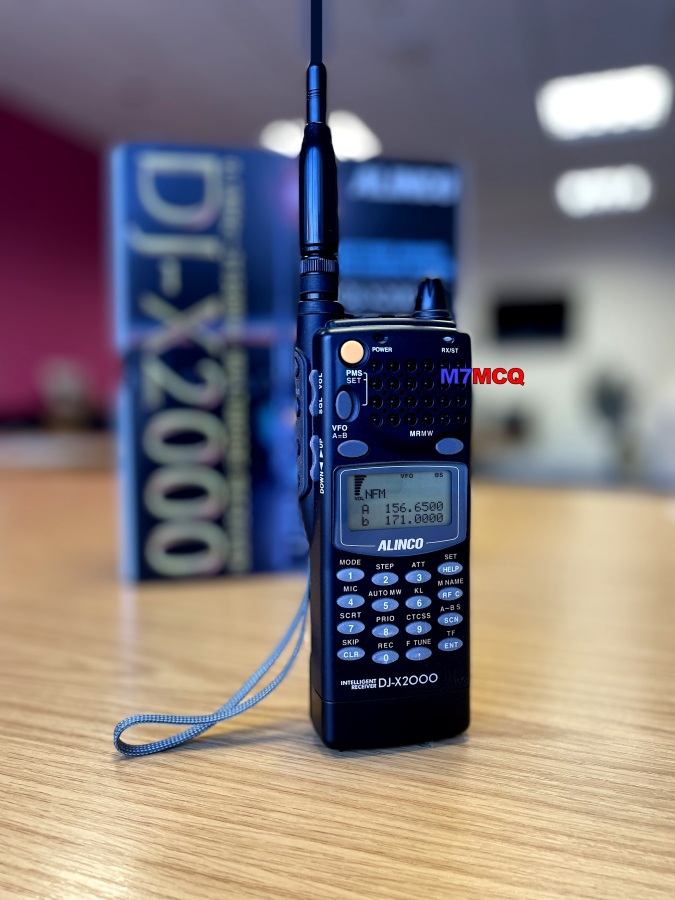
When I started this blog I mentioned that I had owned an Alinco DJ-X2000 and remembered it fondly as being "the most advanced scanner in the world". I think it was around 2001.  Well every time I see one in an auction, I usually put a cheeky bid in and I always lose out to someone else because these things still bring strong money, but this time I got lucky! So just like 15 years ago, I am the owner of Alinco's "Intelligent Receiver". 

This particular radio is in MINT+++ condition. It literally looks like it just came from Japan! Amazing condition, complete with all the original packaging and instruction manual. So glad I found this one.

Back in the day, they cost a lot of money and were considered to be the absolute king of scanners. 100 kHz-2150 MHz with no gaps, USB, LSB, CW, AM, FM, WFM, 2000 memories, built-in frequency counter, a bug-detector and digital memory to record audio.

Like new from the factory!!


In addition to the standard accessories which come in the original box, I also have an 
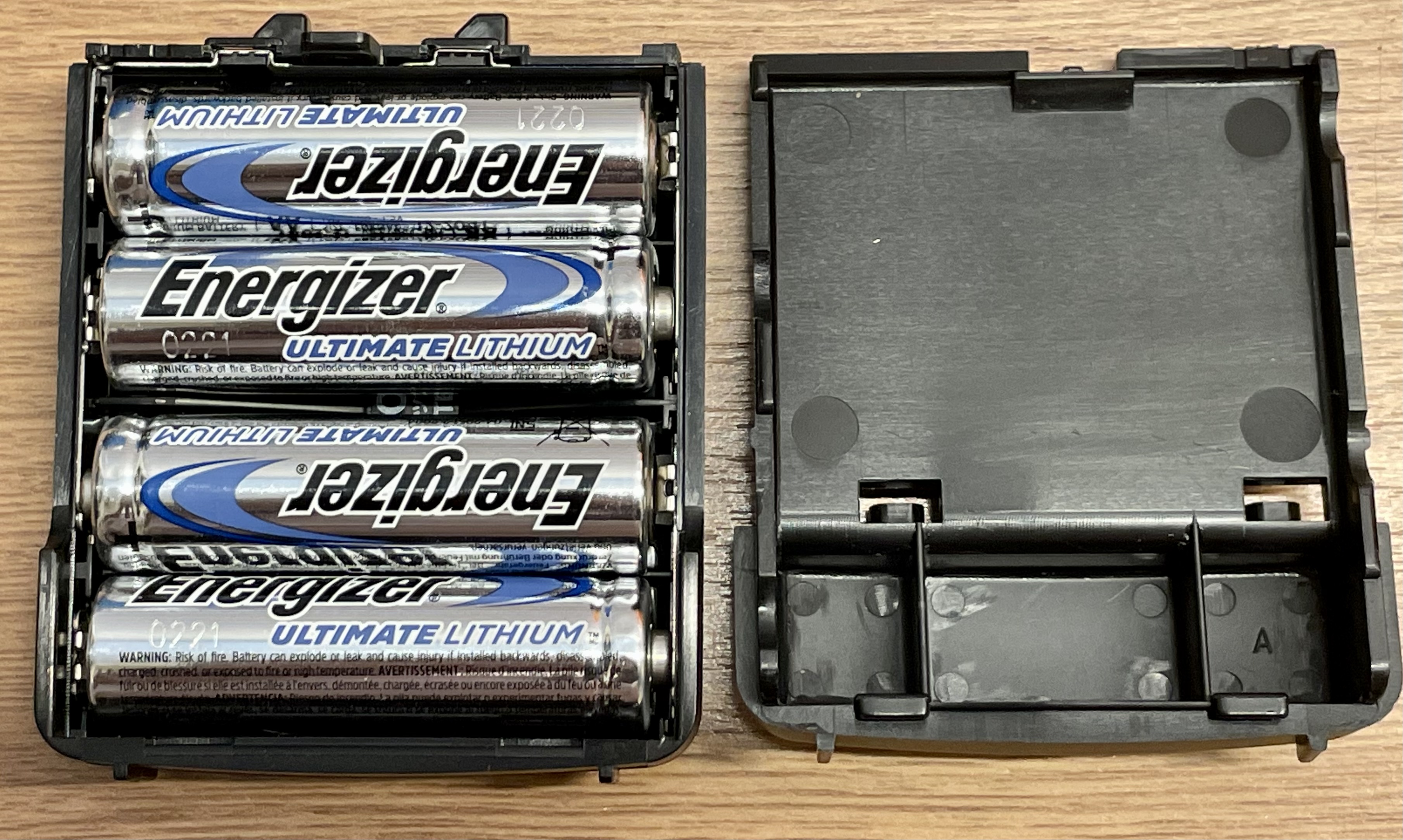
EDH-16 AA Battery Box which replaces the standard battery pack for extra convenience. I use Energizer Ultimate Lithium cells in it. They’re excellent, long life batteries, but regular AA’s can be used no problem.

 The NiCad which came with the radio is the 4.7V 700mAh EBP-37N. This isn't the smallest battery, but neither is it the largest.
  
 
It’s so nice to have an X2000 again after all these years and as soon as you start to use it, you soon realise why it was held in such high regard when it was launched.

Operating is it a joy and there's not really much need for the manual - you just kind of figure it out! The only thing that I'd say is not as good as I remember is the scanning speed; I always thought it was super-fast but it is in fact quite average. You certainly benefit from putting the frequencies into memory sorted in ascending order so that the radio isn't switching backwards and forwards all the time. It makes sense to do that anyway. Another thing that will slow down memory-scan times is switching from one mode to another. Personally, when scanning I tend to be scanning a particular band (eg. Civil AirBand), so there's no need to move out of AM mode anyway. 


Searching (as opposed to scanning) is actually very fast on the DJ-X2000E, but this is something I use very little. 
The supplied antenna is surprisingly good on most bands but the radio obviously benefits greatly from a dedicated antenna on HF frequencies such as an End Fed Half Wave. In fact, it also benefits from a COUPLER/ATU to "tune" (match) the antenna to get the best possible reception. For this (and when I am using my old AOR AR-3000A) I use an AT-1000 which I bought secondhand. You could obviously use any manual antenna-tuner. So many SWL'ers fail to benefit from matching their outdoor antenna to their radio and therefore miss out on a far superior signal.

If you're unable to accommodate an large outdoor antenna, you could always try something like an AOR SA-7000 which does a pretty good job of covering everything. Some discones also offer surprising results on HF. Big external antennas often mean you’ll have to switch the Attenuator on. 

So after 20 years of holding it in high regard, does the Alinco DJ-X2000 still make sense in 2022? Well yes, I guess it does. My own runs about 1k out of tune so it needs VFO realignment - not sure if that’s a big job or not. To be honest, it doesn’t really matter does it, for general listening. If you’re up a hill listening to a two Americans having a chinwag on 14.100 but the screen shows 14.101, do you really care?🤷‍♂️

 Sure, things have moved on and there's some pretty darned clever (and cheap) SDR receivers out there with amazing sensitivity, selectivity and stability but the DJ-X2000E can still hold its own and it can be purchased for crazy low prices on the used market. 


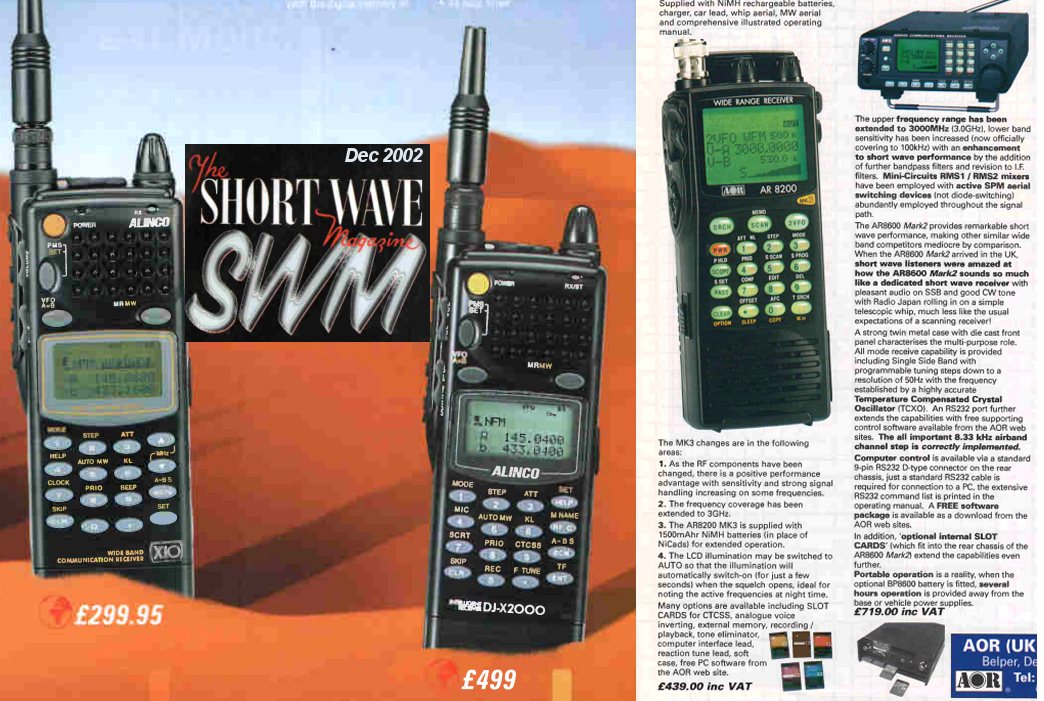
£500 in 2002 equates to around £830 in 2022
 
This isn't a receiver for aficionados or DXers, but it has decent sensitivity and a MASSIVE frequency range with no gaps! It's compact and handy to carry around wherever you go. It's a classic and you'll get a lot of listening pleasure from it for very few bucks!


Main Features DJ-X2000E
  • 100 KHz ~ 2150 MHz continuous coverage
  • 2000 memory channels in 50 banks, 40 channels per bank
  • WFM, NFM, AM, USB, LSB, CW modes in many different tuning steps, including user-programmable step.
  • Fast scan speed
  • Easy to read dot matrix LCD display
  • Alphanumeric channel names and name tag search engine
  • PC programmable (See software details below)
  • Help Navigation so powerful, you may never need the manual (enters directly to the set mode of relative parameters from the help menu!)
  • Two-mode "Bug" detector finds hidden transmitters
  • Instant search function locks onto the nearest, strongest signal (new circuit design, patent pending)
  • Frequency counter, accurate to 1 ppm, uses digital TCXO first time in the receiver industry.
  • Field Strength meter
  • S-meter activated beep alerts you to nearby calls
  • Record up to 160 seconds of audio in digital memory
  • Inversion decoder for scrambled audio
  • FM stereo receiver (requires optional stereo headphones)
  • CTCSS decoder/tone scan
  • Two-level attenuator reduces strong or interfering signals 6 or 20 dB
  • 24 hour timer
  • Use 10 ~16 VDC external power or internal batteries (an optional DC cable is required for external power source)
  • Battery level indicator and battery save feature
  • Ni-Cd battery and quick charger included.
  • New design rubber-duck antenna for better reception, especially at lower frequencies.

    Specifications DJ-X2000E
    • Receiving Range: 0.1000 to 2,149.999950MHz Continuous (ie No Gaps)
    • Mode: NFM/WFM(mono,stereo)/AM/CW/USB/LSB
    • Antenna imp.: 50 ohms
    • Antenna terminal: BNC
    • Supply voltage: DC 4.8V (Ni-Cd battery pack EBP-33,34,37N), DC 6V with EDH-16 AA battery case, DC 10-16V external power source.
    • Typical operation with Alkaline AA in EDH-16: 30hours (1:4 battery saver ON)
    • Current consumption: approx. 150mA in normal reception, approx. 50mA with 1:4 battery saver at 6Vdc power source
    • Operating temperature: -10 to 60 C or 14 to 140 F
    • Frequency stability: Within +/- 2.5 ppm at operating temperature range AF output: 100mW or more 10% THD
    • Channel steps: Auto, 50, 100, 200, 500Hz, 1, 2, 5, 6.25, 8.33, 9, 10, 12.5, 15, 20, 25, 30, 50, 100, 125, 150, 200, 250, 500KHz, user-programmable
    • Memory channels: 2,000 / 50banks, 40channels in each bank
    • Program-Scan: 20 pairs
    • Priority watch memory: 1
    • Dimension without projection: 57 x 150 x 27.5 mm
    • Weight: 200g
    • System: Triple-conv. Superheterodyne
      1st IF: 814.5MHz or 304.3MHz
      2nd IF: 45.05MHz
      3rd IF: 455KHz
    • Typical sensitivity:
      FM/WFM 12dB SINAD, AM/SSB/CW 10dB S/N
      • AM:
        0.1 to 5.0 MHz: 1.5uV
        5.0 to 900MHz: 1.0uV
      • SSB/CW:
        0.1 to 5.0 MHz: 0.6uV
        5.0 to 900MHz: 0.5uV
        900MHz up: 1.0uV
      • NFM:
        5.0 to 900MHz: 0.5uV
        900MHz up: 2.0uV
      • WFM:
        5.0 to 900MHz: 2.0uV
        900MHz up: 4.0uV


PERIOD UK ADVERTS…


DEC 2022:
I switched my radio on today and nothing!! I figured the battery must be flat, so I stood the radio in the Desktop Charger and got nothing again - no red light, no green light, zip!

On closer examination, I detected crackling sounds as I wiggled the power plug at the back of the charger, so I stripped it down (very simple) and examined the PCB. From that I determined that there was a bad joint on the pcb-mounted power-socket, so resoldered it and tried again - bingo! Everything worked fine. I'm expecting another 15 years service :-)

Repaired and ready for another 15yrs


Sunday, 15 March 2020

REMOTE OPERATION RS-BA1

ICOM's REMOTE SOFTWARE

The IC-7610 has a built-in server which means that you don't need to connect it to a computer in order to operate it from a remote location. All it requires is a connection to the internet - mine is connected via a wireless hub.

Curiosity drove me to learn more about remote operation and then a fellow club-member at WMRC gave a talk on the subject using Icom's own software (RS-BA1). I already had a "copy" of this software and had tried to get it working previously with my IC-7100. I failed miserably, even though I managed to get the software to operate the radio perfectly through a direct PC connection (USB Lead).

Anyway, onto the 7610. Unlike the 7100, the 7610 is a DUAL receiver rig, so the RS-BA1 software had to be upgraded to V2 in order to provide control over both receivers. Once installed, I managed to get to the same position as before - I could control the radio using a direct PC connection, but not remotely.

After much research on the internet, I found some radio-settings that needed changing. Voila!! The software worked almost perfectly! If I twiddled a dial or switch on the software, it reacted on the radio. Every single aspect worked perfectly - except transmit!!

Damn! I just couldn't figure it out. I was using my Surface Pro-7 tablet with Windows 10 64-bit, RS-BA1 V2, the RS-28 VFO Dial and a Logitech G533 Headset. I went onto a 7610 Technical Facebook Group and asked for help, but everything they suggested, I'd already tried.

And then for some reason (desperation) I tried one more setting and BOOM, it was sorted and my speech into the microphone finally produced some SSB modulation in the radio, using a dummy load. I was very pleased!

Being an M7, I can only operate remotely from the same general location as the radio, so I can enjoy using the brilliant RX capabilities of my Icom from somewhere nicer than the shack in the summer months. I can use the remote software by controlling the radio via a LAN. I'm not giving access to other operators - it's for personal use only.


Apparently, there's a few other ways of operating your radio remotely including remoterig.com so it's worth looking around. I only used the Icom software because it was custom written by the radio's manufacturer and I guess it can't get any better than that. My only gripe with the software is that it won't 'expand' beyond the size shown in the photo above. Very annoying!

UPDATE : 

Ooops! My bad. I didn't notice that Icom slipped in a new feature in V2 whereby you can increase the panel-size from "normal" to large". In large mode, it is in all fairness, big enough even on my relatively hi-res screen.


Tuesday, 10 March 2020

RADIO CLUBS

MULTIPLE CHOICE

When it comes to joining a radio club, there's usually a few to choose from (in the UK at least) and it's important to remember that you don't have to limit yourself to just one.


I wanted to join BURY RADIO SOCIETY because I could see from their FaceBook pages that they were an extremely active club with lots of interesting stuff going on all the time. Sadly, there's a great big hill between my QTH and theirs. My car can drive over the hill, but my radio transmissions cannot, so it means that I can't hear any of their members on the weekly net. There's not much point joining if you can't even communicate with those involved. Such a shame.


Closer to home is BOLTON WIRELESS CLUB and they too are quite active and rather than weekly, they opt for fortnightly meetings, which suits me perfectly. They're a friendly bunch and the club works from a well lit, heated community center. Every time I've visited so far, they've had something going on, be it a Table-Top-Sale or an Educational Talk. Joining was an easy decision.


About 12 miles away from my QTH is the WEST MANCHESTER RADIO CLUB and it is here that I took my Foundation exam. The club meets every Thursday at a working man's club where the drink flows freely, lol. Again, another nice bunch of people, but the weekly meets are more of a social night than a radio night. That's nice too for a change now and again, but as a newcomer, I'm obviously keen to learn more about radio stuff. The WMRC have a very well equipped shack and some great antennas erected at the site.

Whether the club's regular meets are to educate, experiment or socialise, all the clubs still have Field Days, Rallies, Contests and other interesting stuff to do throughout the year, so you can join as many as you like and cherry-pick the best parts from each club. 

Needless to say, if you join a club, you will be expected to be a fairly active member and show some interest in club activities and help out when there's a bit of physical work to do (assuming you're able-bodied). All too many people join a club (any type of club) and avoid giving anything back. While not everyone can afford to bear the responsibility of being on the Committee or taking on a role such as Treasurer, everyone can do something to be a productive and helpful member.

So I'm a member of two clubs and enjoy both of them for different reasons. I don't think people should restrict themselves to one club if it doesn't meet all their needs. Join two and that way you're not only getting what you want from club membership, but you're also meeting more people, making more friends and benefiting from a wider range of knowledge.