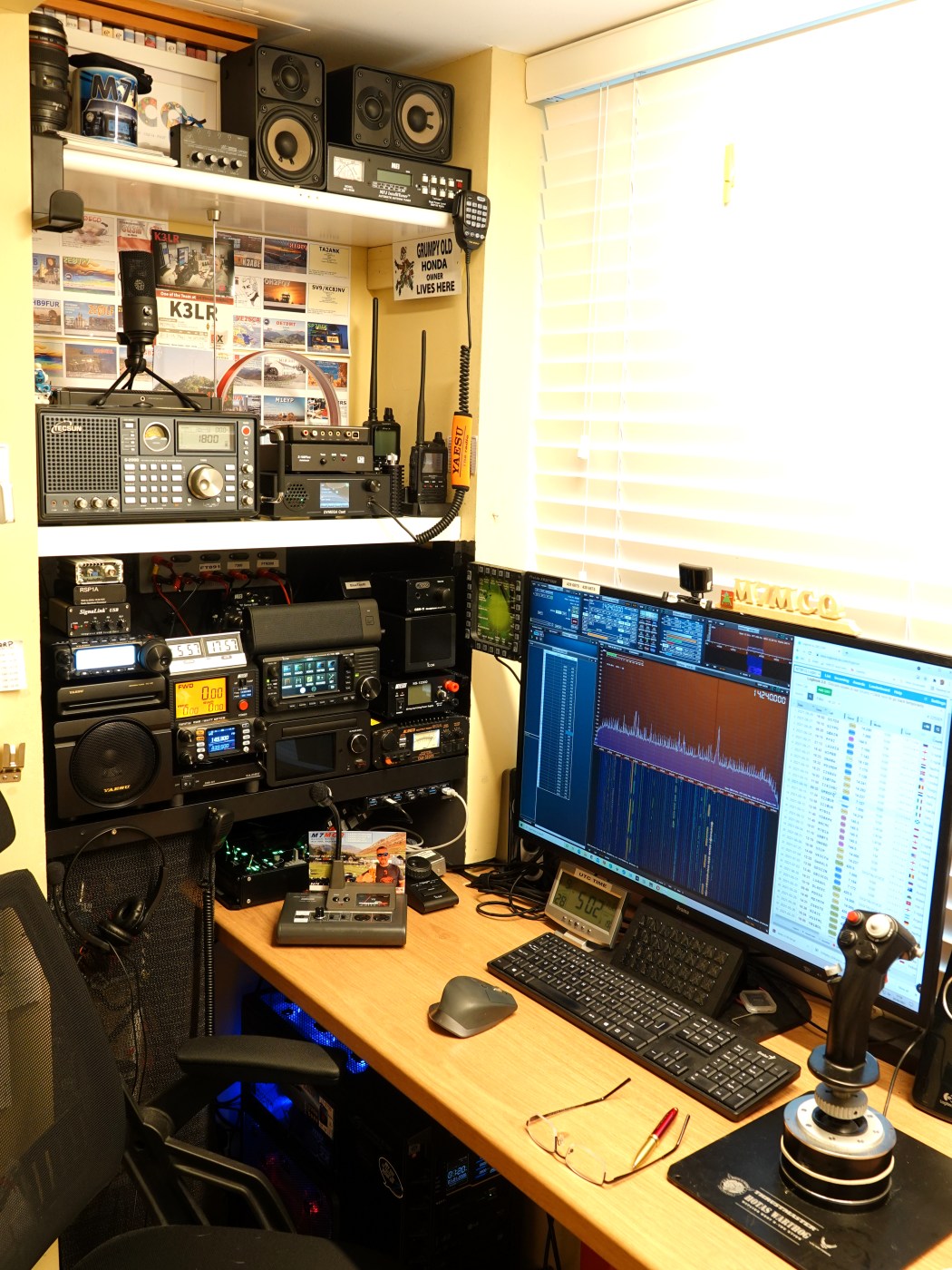
When my shack gets into a bit of a mess (which is often), I start to lose interest in spending time in there. This was happening recently because I'd removed the big MB1 base station and it left everything looking untidy. The answer was to devote some time to getting my house in order.
The new FT-891 needed to be permanently setup and it was important to do a proper installation complete with the SignaLink USB to give me FT8 capability and the RSP1A to give me a Panadapter and Waterfall.
The SignaLink was straightforward but fitting an RSP1A meant introducing another piece of hardware to isolate the RSP1A from the FT-891's transmissions. I achieved this isolation by placing a clever little device called an MFJ 1708B-SDR in the loop.
The unit works in two ways - one is by sensing RF and the other is by detecting a control signal from the FT891's PTT circuitry. The latter is the preferred method and it is achieved by purchasing a CAT cable which has an RCA Phono lead that is connected directly to the MFJ-1708B. Such a lead is available from Techtronics here in the UK.
The “B” series offers better isolation, achieved by additional relay isolation, and is specified up to 450MHz. An internal hybrid splitter reduces the antenna loading effect and provides isolation between the rig’s input and the SDR input. A TX LED on the front panel provides visual confirmation of correct operation when the transmitter is keyed. The MFJ-1708B-SDR features 3 SO-239 connectors, the MFJ-1708B-SDR-S substitutes an SMA female connector for the SDR connection.
It was quite a bit of messing around reorganising the shack because there's no way to access the back of the radio equipment (it's all mounted on shelves in a tiny alcove), but it's all sorted now and it's good to have the flexibility of SDR UNO software.
I'd forgotten how good this software is. It integrates perfectly with the 891 and it obviously permits one to listen through the radio or through the computer speakers. A friend recommended installing OmniRig but I'd already got it running in the background from a previous installation - I just had to switch ini file to suit the 891.
I also took the opportunity of bringing the DVMEGA CAST into the shack. I now have LW, MW, HF, VHF, UHF, C4FM, DSTAR and DMR (plus everything the RSP1A receiver provides (which includes Airband and Marine, etc)).
This is a quick review of a new radio which I bought (Sep 2021). It's a really nice 160-6M mobile with a built-in 3kHz Roofing Filter and a nice set of (32bit) DSP tools to dig out the weak signals and make them intelligible. It's very compact and weighs under 2 kilos despite housing a 100W amplifier.
NOW PLEASE BEAR IN MIND that this is no technical review - it's just a lowly M7 Operator talking about a radio. I don't have a degree in electronics and my oscilliscope is currently out of order 😂. Too many people get their knickers in a twist if you say anything negative about their beloved radio. And before you go spending money on a new radio, always consider investing in a better antenna first.
When this radio was due to be launched, many people though that it was going to be a replacement for the FT-857 Shack-In-A-Box - maybe even an SDR - but the truth was, Yaesu wanted to keep making the 857 because there was still plenty of demand for it. The '91 was aimed at a different buyer altogether - someone who wanted a more specialist HF mobile rig - a more up-to-date Triple Superhet with modern DSP.
Some hams have enough spare money to buy a 100W radio to keep in the shack and another one to keep in their Truck or Field Box. Others can't afford multiple radios and need a single radio to meet all their HF needs and this could be it. The FT-891 is a superb radio for the budget-conscious operator - it probably can't be bettered in terms of performance at this price level. Price-wise, the closest thing to the 891 is the FT-450 which is much older technology and lacks the sophistication of the 891.
The radio design features a detachable head-unit, allowing you to hide the base unit somewhere convenient and have the head-unit in a convenient location (eg on your vehicle's dashboard or centre-console). Needless to say, you'll need a "Separation Kit" to do that, which costs extra.
I've always fancied an 891 but other things (radios) kept getting in the way. Eventually, I got one, along with some accessories.
Separation Kit YSK-891
As soon as the 891 arrived, I started to look for a matching FC-50 ATU. Searches revealed limited options; there's not many of these around right now, but eventually I found one in stock.
The FT-891 is a fabulous radio, but it’s even better with its matching ATU!
Once I got the gear into the shack, I set about doing the hateful job of updating the firmware. There was an update for the main unit and another for the DSP, but the LCD didn't require anything. It's important to install the proper drivers from the YAESU website before plugging a USB cable between the radio and computer. Read the FirmWare Installation Guide very carefully before proceeding.
With the FT-891 running the very latest firmware, I plugged it in and performed a quick radio test on 40M & 20M with a Special Event Station 3Z20UR and received good reports both times using low power into an EFHW. For this first test, I actually hooked the radio up to my MFJ993B tuner because it was already setup on the shelf.
Having confirmed that the radio was performing as it should, I loaded HAM RADIO DELUXE V670269 and configured it for the 891. It performed flawlessly and so I spent a few minutes creating a new layout.
Spending more time playing around with the rig, I discovered that I wasn't totally happy with the audio from its speaker, so I plugged in an external speaker and there was very little improvement. I was starting to think that the radio sounded a bit tiring!
YAESU FT-891
And then I remembered to do what I'm always telling others to do - TURN DOWN THE RF GAIN!! Once I'd remembered my own advice, the radio's audio changed dramatically from being loud, noisy and annoying, to being pleasant to listen to - matching its reputation. The (mono) speaker socket at the back of the radio is further supplemented by a socket on the side of the front panel. This extra socket can be used with a speaker or a pair of stereo headphones (not a headset though).
The FT-891 is a very highly specified radio with internals similar to the FT-DX3000 and it's amazing how they crammed so much into such a small package. Needless to say, there has to be compromises with such a small rig and this does, of course, mean that there's not many physical buttons available. Instead, you have to go into the menus - and there are lots of them! Thankfully, the big screen (relative to the older FT-8nn radios) makes the menus easy to read.
Having previously owned an FT-818 and an FT-897, I'm used to the Yaesu menu system and I don't struggle with it at all. Most of the time I set everything up and it stays the same anyway! There are 3 customisable buttons on the front of the radio and that's enough most of the time. All the buttons on the 891 are illuminated by the way👍.
It puzzled me to find that there is an unused button on the radio which could have been assigned to a frequently used task. Perhaps they’ll do something with a future update.
FT-891 & FC-50 Rear View
Just a minute ago I was listening to someone on 14.285MHz and someone else started up a QSO on 14.286MHz. Using the tools built into the FT-891, I was easily able to remove the interfering signal. Moments later I was listening to a guy on 40M with a pile-up and he was doing his very best to pick out the callsign of a distant station. I too was struggling to hear him, but with a bit of the 891's DNR and a -400Hz shift, the callsign came easily. None of this is new of course when you're sat in your shack with access to full-size base stations, but it's good to see such a wide range of tools in something at this size and this price!
Its performance 'in the flesh' does not reflect its performance 'on paper'. Time and time again I've heard people loudly sing the praises of this radio despite some unfavourable measurements taken in review labs. It just goes to show that things can add up to more than the sum of all their parts.
AUDIO : The FT-891 has plenty of options to adjust the audio qualities of both RX and TX. Using the MONITOR function, a pair of headphones and a dummy load, it's easy to experiment with the TX settings to get the best sounding transmissions. Having said that, the default settings and standard mic sound really good! I also have an ADONIS desk-mic which I tried with the radio and it sounds fabulous. The beauty of the Adonis is that it has a speech-compressor built-in with a rotary dial to make adjustments on the fly. Plus you can switch the mic between two radios. I have mine connected to the FT-891 and my FTM300.
On 40M, Maurits from Norway (LA3XIA) was kind enough to give me a radio-report and focused strongly on my audio using this mic. He was incredibly detailed and equally complimentary. As a fan of ESSB, he told me that he didn't think there was anything that I could do to improve it - it was that good! He described it as "Superb"! I also worked Matt from Florida (W1MBB) on 17M (my very first phone contact on that band). Matt was also complimentary and said my signal was very punchy but still easy to listen to. These reports were the best I've ever had - using any radio/mic combination!
DATA : Although the 891 has a USB port, it is only for CAT control and cannot be used for DATA modes such as FT8 because there's no built-in sound card, so you'd need to add a SignaLink or CT39Apatch lead. That's fine by me at this price and I'll update this page as soon as I've finished a comprehensive FT8 session with WSJT-X. In the meantime, here’s the settings you need to alter in the radio for DATA modes….
Yaesu FT-891 Digital Operations Settings Menu
5-6 Cat Rate: 38400
5-7 CAT TOT: 1000 msec
5-8 CAT RTS: Disable
8-1 Data Mode: PSK
8-9 Data In Select: Rear
8-10 Data PTT Select: DAKY
8-11 Data Out Level: 50
8-12 Data BFO: USB
16-03 HF Power: 10 (I’m qrp but you could go up to 30W)
*Make a note of the original settings.
Some people have compared the FT-891 with the IC-7300 and personally, I think that's a bit of a silly comparison to make - they are like chalk and cheese. I've had both and I can say from direct experience that they are both superb receivers - I'm sure though that many 7300 die-hards would fail to identify their radio in a blind-test using a shared external speaker.
The 7300 is a base station and the 891 is a mobile. One's a triple superhet and the other's an SDR. One's got a large colour TFT touch-screen with panadapter and waterfall and the other has a monochrome LCD with a basic scope. One is twice as big and twice as heavy than the other. One costs almost twice as much as the other.
There's no bigger Icom fan than me, but I'd be the first to admit that I've had more success hearing weak or noisy signals with the 891 receiver and tools than with the 7300. Having said that, the 7300 looks drop dead gorgeous and has all that Icom intuitiveness and functionality.
You can't ask for a small radio for mobile work and then ask for a hundred buttons, knobs and dials. And if your "old eyes" struggle with the menu in a restaurant, they're hardly likely to do well with a screen that's 30mm high! Let's get sensible! 😀
I was pleased to see that you could add Alpha-Tags to the radio's memories 👍 You can also buy RT SYSTEM's programming software which not only aids the input of memories but also let's you save them to PC in case the worst should happen.
I should point out that the "RT-42" USB CABLE is a load of nonsense!! DO NOT purchase it because you'll just be paying three-times more than you'd pay for a regular USB-B lead.
-*-
The YAESU FC-50 ATU was designed specifically for the FT-891, so it looks very good when connected to it. As usual, these OEM tuners are pretty rubbish when compared to third party offerings and will be good for 'near resonant' antennas but next to useless with something like a G5RV. The FC-50 comes with fixing plates and every cable required to connect the two devices together. All that's required in order to get up and running is a quick change to a menu-setting.
As indicated previously, the 891 had been connected up to my MFJ993B and it works fine (as you'd expect from this very expensive unit). The FC-50 gives a solid performance on 40/20/15/12/10/6. The antenna used in this test was a multi and EFHW from wireantennas.co.uk.
On antennas which are closer to resonance, it works incredibly quickly and effortlessly and isa very worthwhile addition in the shack. I've just ordered a Double-Bazooka antenna solely for 17M because I don't want to be without that band - it's something that I've just 'discovered' and wish to explore more.
Double Bazooka for 17M
SUMMARY :
This really is a cracking radio and I don't think it can possibly be touched £ for £. That's the long and short of it. Should you buy one?? Well you should definitely consider it if you want a mobile which gives fabulous HF performance with no bells, whistles, smoke or mirrors. It's got some superb noise-reduction tools and is easy to operate once you get the knack of Yaesu's Menu System - and let's face it - people have been coping perfectly well with the 817, 818, 857 and 897 for many, many years! This is a radio that you can truly be happy with for many years - sat at home in your shack as a base station or outdoors on a Field Day or even POTA/SOTA!
What you shouldn't do is compare it to other radios that have bugger-all to do with it. Just ask yourself what else is available on the market for £680.
Thanks for visiting the blog - feel free to leave a comment below.
Take care, 73, Tom, M7MCQ.
SPECIFICATIONS
FT-891
The FT-891 offers up to 100 watts of HF/6m output power with efficient dual internal fans, coupled with Yaesu's legendary receiver design,triple conversation with a 1st IF frequency of 69.450MHz for really outstanding performance.
3KHz roofing filter equipped as standard
Detachable front panel for convenient mounting and operation
Large dot matrix LCD display with quick spectrum scope
Specifically designed external antenna tuner FC-50 (optional)
Ease of operation
Large diameter main tuning dial with torque adjustment
Pop-up menu for quick and easy operation
Multi-Function knob
Large transmit/receive indicator
3 x programmable front panel function keys
Up to 100 watts output power
The FT-891 provides a stable 100 W (25 W AM) high power output. High reliability is assured by the transmitter careful circuit design with efficient thermostatically-controlled dual internal fans and the diecast chassis.
FT-891 Real IF DSP provides effective and optimized QRM rejection The 32 but high speed floating point DSP (max 3000 MIPS) provides effective cancellation/reduction (DNR) of the random noise that is frequently frustrating in the HF frequencies. Also the AUTO NOTHC (DNF) automatically eliminates the dominant beat tone. The CONTOUR and the APF are very effective receiver noise reduction tools in the HF bands operations. The YAESU original DSP QRM and noise reduction functions are provided.
Just a quickie to help out anyone who has suffered the same issue as me. I switched the FT-891 on tonight and found a problem - the FT-891 was stuck at the logo screen. It wouldn't progress beyond the startup screen and none of the buttons worked.
I tried the Vulcan Nerve Pinch ( F, CLAR then PWR) but it made no difference.
The FT-891 stuck at the start-up screen is a USB issue! Simply disconnect the USB lead from the back of the radio and try again. 73, Tom, M7MCQ.
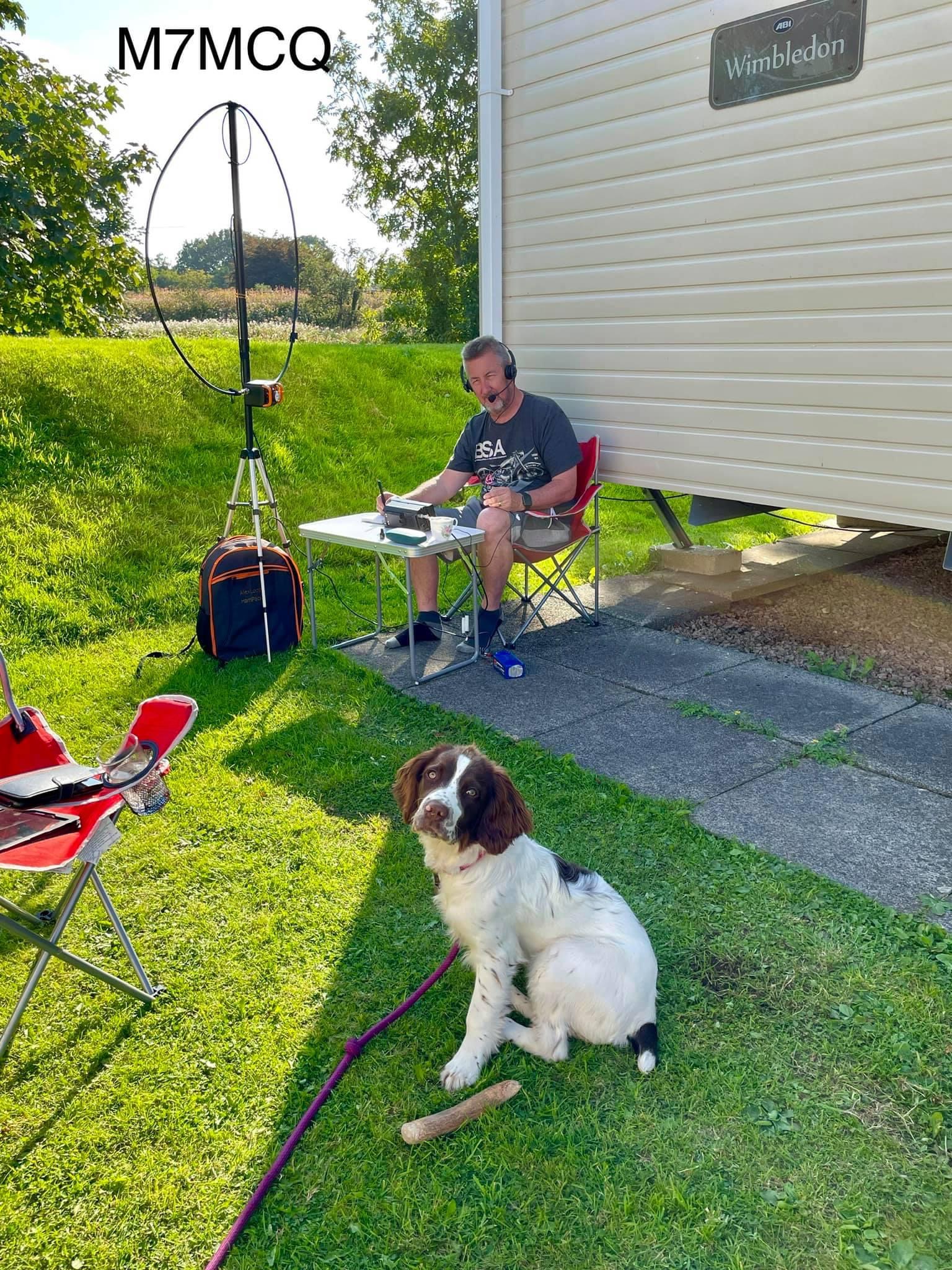
The ‘plan’ was to take a couple of weeks off work and have me a good old radio vacation, but our new puppy kinda ruined that idea! All my empty hours were filled with dog-walking instead of CQ’ing!
BETTY THE RADIO DOG
It seemed like every time I reached for my radio, young Betty (the English Springer Spaniel) would jump all over me to get me to take her for another long walk. If I ignored her pleas, she’d just just jump up on my knee to join in 😂
So I got very little done in the end. The caravan site we stayed at did not permit the erection of any antennas, so I couldn’t use my trusty and reliable SotaBeams Dipole. Instead, I used my AlexLoop HamPack, but the location wasn’t really good.
When I got home I setup on the patio and tried my Elecraft AX1 Telescopic but the bands were full of giant-power stations running an “All Asia” competition and no one was the slightest bit interested in an M7 from England 🙄
So overall, my great radio-holiday turned out to be a holiday away from radio LOL
Yes, it's that old chestnut -life's too short for qrp. I've heard the expression a million times. I'm sure some people think QRP operators must be on a shoe-string budget and have no choice but to buy a low-power radio, but that's absolute tosh.
Personally, I've owned some of the best base-stations available on the market and always ended up selling them on. Sure, it's nice to have a big transceiver in the shack with hundreds of buttons, dials and knobs and a huge screen, but it's not really necessary is it?
And although my licence restricts me to 25W, who's to know if I use a 1kW Linear to reach those DX stations? Me!!
I just don't feel the need for more power - I love QRP!! I could pass my Intermediate exam in a heartbeat, which would give me extra power, but I just have no interest in it. I find it much more thrilling to obtain a DX contact using 4W than 400W. In fact, it always makes me chuckle when operators tell me they're "only running 100W" and then I go back to them and declare my 10W or less 😂
I suppose it's a bit like biking. I've had small capacity bikes and big bikes (up to 1700cc), but my absolute favourite is 400cc. The bigger, more powerful bikes can reach 0-60mph in less than 3 seconds with absolute ease - it's just twist and go!
But to ride the roads quickly on a small bike is far more challenging and rewarding. You have to be skilled and focused enough to wring out every last bit of available power from a 400cc bike and make sure that you are maximising the power and torque bands by being in the right gear at the right time. It's all much more involving! I've toured Scotland with friends on powerful sports bikes and left them behind me on my little 400 Honda. Great fun!
I have to admit though, most of my radio time is not spent in the home shack - it's spent in the great outdoors, so my perspective is probably different to others.
People regularly mock the idea of working QRP. I see it on various internet platforms, on-air, at radio clubs and even (quite surprisingly) in magazine adverts! There are even Badges, Cups and T-shirts available to help reinforce the idea that QRP is a bit of a waste of time. So what's the problem?
Well let's not forget that in most cases it's just a bit of humour! But like any joke which is repeatedly aimed at a particular group, it can become a little tiring - especially when you keep hearing hams talking about QRP on the radio as though there's something a bit odd with low-power operators.
When I mention that I made a contact with someone thousands of miles away, I often get asked how much power I used and when I tell them I used 10W (or less) they smirk and imply that I'm lying.
Well, apart from the fact that I'm only licensed to use 25W, I actually prefer to use less when possible! I've made SSB voice contacts with people 7,000km away using just 2.5W and got a 55 report from them (eg. KE5EE).
It gives me great pleasure listening to QRO operators from my region struggling to get a contact logged with someone and then I manage to do it with my little IC-705. It's even more amusing when I know that they're using a monster antenna and I'm using a portable dipole or an end-fed wire.
Yes we all know that I could pump up the power and in reality no one would know any better, but I would know and that's the whole point - I'm playing radio for me not for others!
Even when I go on a Field Day with a club, I wouldn't dream of leaving my QRP radio at home. I'd much prefer to make ten contacts with 1W than making fifty contacts with 100W on the Club Radio. I love the challenge of QRP.
If people want to use 100W, 400W or 1500W, then that's up to them. I don't think any less of those operators - they've paid their money and chosen their preferred operating method just like I have. For me, QRO is like fishing in a bucket - it gets boring real soon. I know only too well that sometimes 10W just won't get you where you want to be and in my mind, I just think "I need to get to a higher location or a better take-off point". Or I need to improve my antenna.
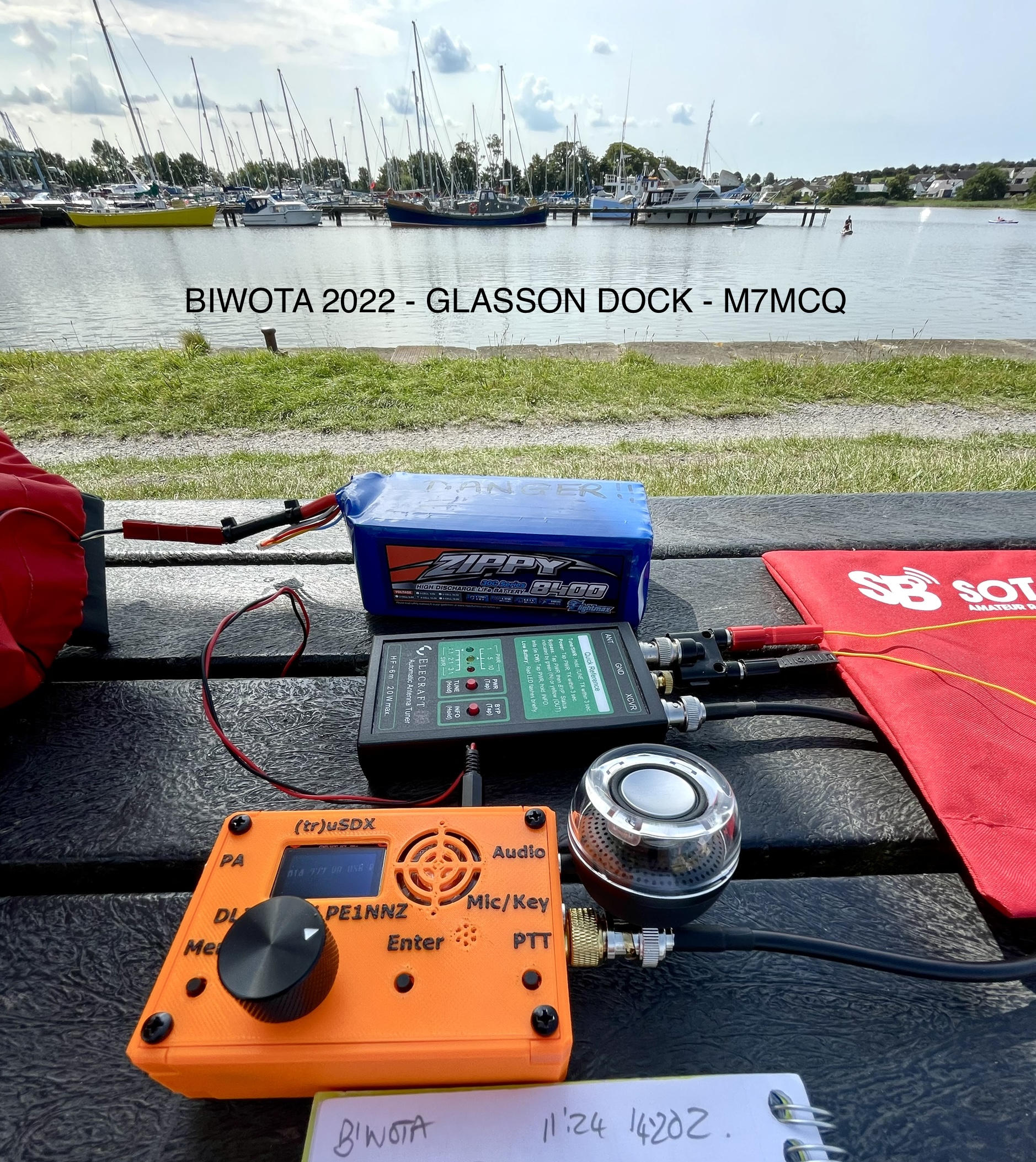
One of my favourite places to go is Bodie Hill at the top of Glasson Dock. Easy to get to and superb take off point to the West. My tiny (tr)uSDX 4W QRP rig is just a joy to use up there. People can hardly believe that I'm talking to them with a little plastic kit-radio with built-in microphone.
The harder I have to fight for a contact, the happier I am when I get it. Getting the station set up optimally and in the right location is my "power". And it all ties in with my enjoyment of going outdoors. Thankfully, my wife is also happy to go out with me for the day. We prepare a picnic, choose somewhere to go and while I play radio she can enjoy a good book, walk the dog or just chill out for a few hours.
When I'm at home, I spend very little time in the shack to be honest. Most of my time is spent with my IC-705 in the garden or in at my holiday home connected to a magnetic loop. If it was at all possible, I would sell my high-end radio and invest in an amazing antenna array, but that's never gonna happen due to local restrictions.
So what happens when I'm stuck at home and conditions are poor and my 10W limitation is getting me absolutely nowhere?? Well that's when I switch to my DVMEGA CAST which allows me to have some great chinwags with anyone in the world on FUSION, DSTAR and DMR. Or I jump onto Wires-X with my FTM-500 and PC.
Cynics say "So why have you got a 100W Base Station"?
Yes I have an Icom IC-7610. It's a magnificent radio!! That's why I bought it. If the IC-7610 was a QRP radio, I would still have purchased it, but of course it's 100W so there's nothing I can do about that.
If Icom had brought out an IC-7610W and an IC-76100W for roughly the same price, which one would I have bought then? Well I would obviously have still chosen the 100W radio to guarantee the highest resale price.
Just last night I was on my IC-7610 when I heard Ana from the Azores (CU2YK) and I moved from 5W to 10W but no matter how much I tried, I just couldn’t get through to her. I could very easily have pumped up the power, but it’s just not me. I’ll get her another time when I’m higher up (and probably on less power).
.After two years of being a licensed operator (Update : 4 years now), I absolutely know that I will never need 100W, 400W or 1000W and will therefore never take my Advanced test (not that I'd have a hope in hell of passing it). I might take the Intermediate just so that I can use more power in my truck on 2M & 70cm FM. That is where I will admit to feeling limited. But then again, 2M FM occupies an extremely small part of my operating time.
VIDEO OF MY TRANSATLANTIC QSO - 9W using Elad FDM
So please, let's stop the "Life's too short for QRP nonsense" 😂.
UPDATE :
Here's a typical comment too, on the subject of whether a QRP Rig is the right thing for a newcomer to use. This was a chat on Facebook in Nov 2023 where someone told me that QRP Rigs were merely toys for experienced hams!
Thanks for visiting - please take a minute to leave a comment below
Boy, what a frustrating weekend I've had. No matter what I tried, I just could not get any audio to come from my BlueDV App using my Windows10 Surface Pro7 tablet. It was all the more frustrating because it had worked fine a few weeks ago!
I had tried ALL SORTS of things to remedy the problem and had sought help from the BlueDV User Group on Facebook, but none of the suggestions seemed to help (because I'd tried them all myself).
Thinking that it was because my DVSTICK30 was faulty, I tried it in another PC and was presented with an altogether different problem - the BlueDV software reported that it "can not find com port". So that led me to waste a load of time resolving that issue. This particular problem turned out to be because I was using a Beta version of BDV.
So, knowing that there was nothing wrong with the hardware itself, I switched back to the Surface Pro7 tablet. I performed a Windows Update. I updated the Realtek drivers. Updated the FTDI drivers. I updated everything!!!
And still no audio. When I opened the Windows Volume Mixer, I could see that the BDV App was showing, but there was still no audio from the app even though I could clearly see that someone was transmitting.
Anyway, to cut a L-O-N-Gstory short, the issue was all down to the fact that I had selected the wrong Model AMBE in the setting page. I had clicked on AMBE3003 instead of AMBE3000 😩
So I'm posting this page to help any other dumbos like me who accidentally click on the wrong option in a drop-down menu. It might save someone a weekend of hair-pulling 😂 At least it's sorted out now and I can enjoy my digital chats again.
In case you don't know what a DVSTICK30 is (and BlueDV App), it's a means of connecting to DMR, DSTAR or C4FM digitally without the need for a radio or antenna. You simply plug the DVSTICK30 dongle into a Windows computer, laptop or tablet and run the (free) BlueDV software.
Using your PC's built-in mic/spkr you can start talking to operators around the globe. For those operators who have no repeaters within reach of their QTH (or for those who are not permitted antennas), the DVSTICK30 is a fabulous solution.
Of course, with no RF being involved, you'll come across the usual crowd who love to belittle internet-based radio users, but I just ignore them! At the end of the day, these devices permit Licensed Amateurs to communicate with one another, when they may not otherwise be able to. How can that be bad?
I have quite a few RF radios and I also have the DVSTICK30, a DVMEGACAST, a DVAP DONGLE and an OpenSpot2. With limited antenna options at home, it's really great to be able to comfortably have chinwags with operators from every corner of the globe.
Thanks for visiting - please take a minute to leave a comment below
Some time ago I discovered that I had a DeadZone on the 2M band. I could hear people perfectly well across the band but if they moved to 145.400 they disappeared.
I spent a lot of time checking out my shack and sought advice from many senior Hams with advanced licenses. I carried out numerous tests on different radios, different feed lines and different antennas. No one could identify the cause of the deadzone. And so it remained an unsolved mystery!
Well that was until I got my Expert Electronics MB1. Purely by chance, I caught a button on the front of the radio called 'WF'(wide filter)and straight away a HUGE signal appeared, centred on 145.400MHz 😲
Although it was just horrible noise, I thought I could detect the shape of voices, maybe even repetitive beats too. So I switched from Narrow FM to Wide FM and boom, there was HEART FM 105.4 broadcast radio station.
So all that time and messing around trying to solve the mystery of a deadzone was identified thanks to the WF filter option of the MB1. I've no idea what use the WF is for yet, but I'm just glad I caught it by accident.
Living right next to the Winter Hill Transmitter pushing out 5kW on FM probably means I need to invest in a 2m PassBand filter 😂
Thanks for visiting - please take a minute to leave a comment below
After receiving a bit of a windfall, I was all but ready to buy a 1970's Honda classic bike, but then I realised that I already have a great bike in the garage and adding another would simply double my ongoing motoring costs and I don't really have that much riding-time anyway.
Of course I could save the money for a rainy day, but that didn't sound like much fun and having seen quite a few people around my age pass away over the last couple of years, I decided to make hay while the sun shines. Reckless? Maybe.
So I looked at investing in a radio that would normally be welloutside my financial reach - the Expert ElectronicsMB1 PRIME 2021.
I bit the bullet and got one - It's the very latest 2021 spec with the built-in ATU, manufactured in March this year.
The MB1 is a 160-2M transceiver and a PC in a single package. It has a classic design, developed over several decades, with the most advanced DUC/DDC SDR technologies available today.
The computer within the radio chassis is a fully loaded Windows 10 PC with 16Gb DDR4 RAM, a superfast Samsung EVO970 SSD and an Intel i7-9700 CPU (same processor as my gaming pc).
The radio uses EESDR V2 which is a fabulous and incredibly configurable piece of software. Apparently, V3 is in development and early reports show that it makes far better use of the CPU which results in very significant speed improvements for those who only have an i5 cpu (as well as a host of great new features). The developers are unbelievably keen on striving for constant improvement and it's great to see that they listen to their customers and involve them heavily in deciding what's next.
Expert SDR V2 Single VFO Screen
Expert SDR V2 Quad VFO Screen
The latest 2021 MB1 PRIME is designed to be used as a PC every bit as much as being a radio, so having much faster components means that you can operate the radio while running demanding software in the background at the same time. Being relatively new to Ham Radio, I'm obviously keen to dabble in all aspects of it, which includes a lot of Digital work such as FT8, etc. Being able to run WSJT-X and Logging Programs directly from the radio itself will be a big plus to me.
This is not a radio for those people who don't like technical challenges. If you already struggle with your old superhet, then forget this thing altogether! Using a high-end SDR like this requires a user who is willing to read manuals and enjoys configuring software. Basically someone who loves tinkering and experimenting.
Having said that, the MB1 is probably the best SDR radio in the world when it comes to integration with third-party software on a computer - everything is so simple because of the TCI support. I remember having an ELAD FDM DUO which was a fabulous SDR radio and the SW2 software was really, really good, but my God, that radio was annoyingly fiddly to connect up to a PC - it required THREE usb connections which is just plain ridiculous!!
On the back of the MB1 are two display ports allowing you to run multiple monitors at FullHD and even 4K. This is great for when you have all four VFO's displayed, each with their own scope and waterfall, on an external monitor. Or you might just want to operate the radio in the traditional way, but have a couple of monitors showing QRZ, WSJT-X, PSK Reporter, SwissLog, Google, etc, etc.
The screen built into the radio itself is a 7" high-res unit which is pin-sharp and it is, of course, a touch-screen. And virtually everything on-screen can be clicked, altered, moved and stretched by hand or with a wireless mouse! It's all incredibly intuitive and it's the first non-Icom system that I've really enjoyed. BUT BEWARE - you'll have to have good eyesight to use this screen - you could almost call it too high-res.
I've heard Flex owners say similar things about the 6400M/6600M screens. It helps massively if you're able to locate the radio on a shelf at eye-level. Needless to say, most owners will take advantage of the external monitor options.
The 2021 MB1 PRIME transceiver covers HF, 6M and 2M (all modes) with 100W available on HF, 80W on 6M and 50W on 2M. Apparently, there's a mod to get 4M Tx/Rx. Only UHF is missing. That pretty much makes it a high-end Shack-In-A-Box!
When the radio first arrived, I was a little surprised at how compact it was and soon discovered it could benefit from being about 1 inch wider just to provide better spacing between the four concentric rotary encoders in the top right corner. Build quality is superb!! The whole thing just oozes quality and all the buttons and rotaries feel great. The only concern I might have for the future is how well the screen printing on the buttons can stand up to thousands of key-presses 😕
Initial setup was pretty straightforward but you need to be aware that any radio which depends on a computer needs to be protected from unexpected changes. If you update a Windows Driver for example, it might have an impact on the radio software and cause a problem. This is nothing unique to the MB1 of course - it's the same for any computer-driven SDR like a Flex, Elad or Apache, etc. As soon as a problem appears, the SDR manufacturers always release a patch to sort out the issue. It's really quite rare anyway.
I strongly suggest that you create a Restore-Point EVERY time that you are about to add new software to your PC.
Once the radio was running, I had a quick play around (without reading the two spiral bound manuals) and soon ran into trouble. This is a rig that demands you RTFM, so don't be like me!
Connecting an external monitor to the HDMI connector permitted a much more comfortable view of the software. And it's very attractive software too! There's a version designed specifically for the MB1 7" screen which limits the amount of clutter and gives you a gorgeous swinging-needle S-Meter.
MB1 GUI for 7" screen
With the click of a button, you can use the more comprehensive DESKTOP layout shown below, which provides a lot more onscreen-control but requires an external monitor. Trying to use this GUI on a 7" screen will make your eyes bleed 👀
DESKTOP GUI for external monitors
If you're going to use an external monitor (or multiple monitors) then you need to go into the Windows10 Display settings and change them so that the screens are "EXTENDED" instead of the default "MIRROR" setting.
The colours of the scope and waterfall can be altered to suit the individual operator - there's virtually no limit to the combinations or colours, shades, gradients, etc.
The MB1 has 6 x USB sockets, making it very easy to setup a wireless keyboard and mouse and any other accessories that you may wish to use. And unlike most other radios, your mouse will work ALL OVER THE SCREEN, allowing you to quickly change settings with the click of a mouse-button.
My MB1 is currently (but not permanently) setup in the corner of the lounge and it is connected to a half-size G5RV which is very poorly sited. The N-Type VHF sockets are connected to a high quality Discone which allows TX on 2M and to an AOR SA7000 receive-only antenna. You can also connect receive-only antennas to the RX-IN ports.
A great feature for those operators with multiple antennas is the ability to choose from a software matrix which antenna to listen on and which to transmit on. These choices can be programmed specifically to different bands. So you may listen to one band on say the SA7000 antenna and listen to another band on your Magnetic Loop, and then transmit to a different antenna altogether.
I'm going to connect the radio to my wonderful EFHW which is very well located and performs amazingly well with my 7300. If only I could get more metal in the air at my home QTH 😢
Customised Screen
When I first played with 2M on this radio, I was very disappointed and stupidly complained on the EE Forum. Needless to say, there was nothing wrong other than the settings were incorrect. Being an ex-demo, someone must have been messing around with all the different knobs, buttons, sliders and dials, resulting in a dreadful VHF response. It's all fine now. Great even!
20M and 40M work pretty well on the G5RV and I managed to make quite a few contacts within minutes of powering up the MB1 using low power. With a decent signal, the RX audio from this rig is ASTONISHING! It sounds awesome and I received some very complimentary audio reports. I can't wait to learn more about the radio and set it up properly.
The built-in recorder is really easy to use and you can re-transmit your recording over the air with the press of a button. Nice! Below is a short video of a chat I had on 40M SSB with a Welsh operator.
Another nice feature is the built-in ATU which has a pretty good matching range, but nowhere near as good as a decent tuner like the MFJ-993B, so 160/80M on the G5RV is a no-no, but most other bands can be tuned.
Well that's as much as I can say about the MB1 at this point. When I learn more about it, I'll write more about it, but in the meantime, take a look at some of the videos available on YouTube...
Internal power-meter for HF and VHF bands and SWR-meter for HF band
Record and play on air fragments (IQ files) with a bandwidth of up to 312 kHz
Internal ATU (Automatic Tuner Unit)
The embedded power supply unit
MB1 PC capabilities
Installation of digital modes software
Installation of HAM and Contest logs
Two CW Skimmers may be used on different bands
The transceiver can connect to the LAN and the Internet
Use of Internet applications (e.g. e-mail, Skype, ICQ, TV, etc.)
Play video and audio files
Watch TV via USB-receivers
An opportunity to connect two external displays, keyboard, mouse
An opportunity to connect external speakers to the PHONES jack on the front panel
MB1 Applications
Full-function radio amateur transceiver
Mobile contest-station
Remote receipt point for the contests and other applications
Spectrum analyser with the bandwidth up to 80MHz
Work with the external programs of digital connection types, CW Skimmer, etc.
MB1 Block Diagram
ExpertSDR2 Software
A version of ExpertSDR2 software with adapted GUI for 7″ display was specially developed for the MB1 transceiver. At the present time software works in RX/TX mode and supports two independent receiving channels with the bandwidth up to 312 kHz. A DSP library developed by company Expert Electronics allowed improvement of receiving quality and higher the stability of the software.
MB1 PRIME Specifications
RF ADC, bit @ MHz
16 @ 160
ADC type
LTC2209
RX Frequency range, MHz
0.1…65; 95…155
Independent software receivers
2 + 2 SubRX
Sample rate, kHz @ bit
39; 78; 156; 312 @ 24
Bandscope, MHz
80
RX HF filters, MHz
LPF: 65 or 9 x BPF
RX VHF filters, MHz
WideRX: 95-155 or SAW filter for 2M: 144-148
BDR on HF, dB
130
BDR on VHF, dB
114
Sensitivity, uV
0.2
DR IMD3, not less dB
98
RMDR, dB
110
ATT/Preamp, dB
-20; -10; 0; +10
VHF LNA, dB
+22
RF DAC, bit @ MHz
14 @ 640
TX Frequency range, M
All amateur bands 160-6; 2
Output power on HF, W
100
Output power on 6M, W
80
Output power on VHF, W
50
TX IMD3, dB
25-37 on HF/VHF
Local oscillator TCXO, MHz +/- ppm
20 +/- 0.5
External 10 MHz oscillator input
+
Built-in audio codec, bit
24
RF input/output
4HF (SO 239) 2VHF (N-type) 1XVTR, ADC IN, DAC OUT (SMA)
Built-in PC (Prime 2021 version)
Windows 10 OS Motherboard – GA-IMB310TN CPU: i7-9700T RAM: 16 GB DDR4 SSD: Samsung 970 EVO 500 GB IPS 7″ 1280×800 touchscreen display
AC voltage range, V, Hz
~100…240; 50…60
Power consumption RX/TX, W
320
Operating temperature, °C/°F
0…+50/ +32…+122
Dimensions L x W x H, cm/inches
32.5 x 28.5 x 15.0/ 12.6 x 9.84 x 5.51
Weight, kg/lbs
9.3/ 22
In the Box
PTT-microphone MD15
Power Supply Cable to connect the transceiver to an AC mains network







uSDX-3Dview-M7MCQ.jpg)


uSDX-picnic1-M7MCQ.jpg)