Wednesday, 11 October 2023

XIEGU XPA-125B AMP/ATU

BARGAIN AMP & TUNER

I recently came across the opportunity to buy a £540 AMP/ATU combo (with extras) for a very very low price and I initially told myself that I had no use for such a thing, but then the devil on my shoulder told me I'd be an absolute fool to walk away from such a bargain and pointed out that after I'd experimented with it for a while I'd be able to sell it and make some profit!

So I thought 'what the hell'....

The XPA-125B hit the UK shelves about 3 years ago and has enjoyed good sales. Obviously, it was immediately popular with Xiegu X6100 radio owners, but has since found popularity with other radios users like the FT-817/818 and IC-705.  I have both these models so I'm keen to experiment with them along with my (tr)uSDX and Prepcomm MMX.

In this post I will initially only be looking at the XPA125B as an amplifier for use with NON-XIEGU radios! Later, I will add a section on the X6100.

The amp is supposedly capable of producing 100W from a 1-5W input and in some cases it has reportedly produced 125W. There's a 30A blade fuse in the back of the case so I replaced it straight away with a 20A fuse just to be on the safe side.  I'm well aware that an amp in the wrong hands can be a dangerous thing, so I'll be exercising great caution when connecting radios to it.

When the amp arrived, it was good to see that it was in MINT+++ condition and just as the seller had claimed, it clearly hadn't seen any use other than a couple of holiday outings away from home...


It also came with a pretty handy accessory in the form of the XIEGU CE-19 which apparently makes data-modes an absolute breeze along with a bunch of leads.

 
I was surprised to discover that the amp doesn’t have a fan inside - not that I'm complaining - quieter the better, but if I was licensed to use 100W then I might be more concerned about the potential high temperatures. Having said that, running 100W Watts into a dummy load on SSB didn't increase the operating temperature significantly. 

Simulating operation on an FM repeater was only slightly different, with temperatures in the mid-50’s after a 3 minute transmission. I suspect that data-modes might result in higher temps. It's my understanding that the amp would protect itself by switching off once it approaches 100 degrees๐Ÿ’ฅ

3 minute tx on FM - 52 degrees

'Off-The-Shelf' Interface leads are available for the FT-818 and IC-705, but they only provide a means of triggering the PA and not controlling band-switching, so it's very important to remember to change bands on the amp prior to transmitting (or you are likely to see some magic smoke emanating from the case).

You can buy a CN-20 FT-818 interface from Sinotel for just under £30 which still doesn't provide automatic band-switching but it does provide ALC control, which prevents your radio from over-driving the amp.


Because my IC-705 would cost £1400 to replace if I blew it up, I decided to start tests with my FT-818 with very low output levels from the 818.  

Using SSB into a dummy load, the FT-818's lowest TX power peaked around 90W output from the amp and the radio's highest output peaked around 107W, so there's absolutely no point in using anything more than half a watt to drive the amp.

I’d prefer it if the amp’s power-levels dropped in relation to the input, but they barely change, so basically, there’s little power adjustment with an 818 connected (like there is on Elecraft amps (at 3 times the price)).

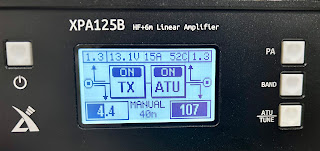
The XPA125B has a bright LCD display which provides all the information you require, but personally, I think it could have been better laid out - I've seen people on YouTube getting confused over what the various readings mean and I don't think the graphics serve much purpose. I think the "RX" should perhaps be changed to "PA". Of course once you understand the readouts, it's no big deal.

The top left and top right boxes show the SWR readings. With the ATU switched OFF, the left reading is the SWR at the radio and the right reading is the SWR at the antenna. Once you have performed a tune, you will see the readings drop according to how well the ATU could produce a match.

The bottom left and right readings show the amount of power from the radio (keep below 5W), while the bottom right reading shows the amount of power being sent to the antenna.

The reading in the bottom center is the currently selected Band and unless you are connected to a suitable Xiegu radio, you need to switch this manually each time you change bands. This of course is only important if the PA is ON and you  are transmitting. If you are simply using the ATU to find a match, the PA will be switched off.

Finally, the top center readouts are for input voltage, current draw and PA temperature.

Here's a clearer diagram...


The built-in ATU works very well but not quite as good as an Elecraft. Its tuning range goes up to 500ohm so that's in the “Tune a wet noodle” range ๐Ÿ˜‚ The only downside is that when it finds a match at say 1.3 it is reluctant to try again for a better match - it just won't retune - it's happy, so it thinks you should be too ๐Ÿ˜† 

Using one of my EFHW antennas, I got great matches from 80-6M and an acceptable match on the Top Band. The ATU doesn't seem to have any memories which is a little odd considering that most other ATU's have hundreds. It's no big deal to me though because I tend not to rely on memories and prefer fresh tunes - it only takes a few seconds anyway.

Note the tuning process...

1) Switch off the PA

2) Increase the radio's output to around 5W (it won't tune up from very low power)

3) Key up in a constant carrier mode

4) Hold the amp's TUNE button for a couple of seconds

When you have your match, you can drop the radio's power back down and switch on the PA. So from this, you will see that there's virtually no automation with non-Xiegu radios ๐Ÿ˜ฎ

You can see in the image below that I used a Samlex 30A mains PSU to power the XPA125B. Using my usual  8.4Ah Zippy FlightMax LifePO battery to power the amp wouldn't really be feasible considering that the amp could potentially draw 15-20A. That's why I'd prefer to have an option to reduce the amp's output. 

I suppose the only way to go if you want to use the XPA125B out in the field would be to purchase a 20Ah LifePO4 battery, which would probably last a few hours on SSB - enough for most people. 

It's all hypothetic for me anyway, since I neither need nor want to use 100W, so I'll be selling this lovely bit of equipment to someone who can benefit from it.

Overall though, I think the Xiegu is a cracking bit of kit and it's flexible enough to work with a great many radios as long as you're willing to manually change bands. After a full day of testing and playing around, the amp performed flawlessly and never went near the limit of its operating temperature - even the outer casing had no hot-spots.

I found a neat little carry-bag online (£8) and while it won't offer protection from hard knocks, it will certainly protect it from the usual scratches that these things collect during outings. It also has an inner pocket for leads.


ICOM IC-705 - XPA125B...


Okay, so next was the turn of the IC-705. The connection to the amp was a bit messier due to the fact that I was using the RBI-1 buffer, but at least I felt protected from any potential damage to my prized possession.

A press of the 705's TUNE button initiated a tune, but first of all  I still had to manually change band on the amp, switch off the PA, adjust the power on the radio to 4/5W, select RTTY mode, key up for the tune and then return the radio settings to what they had previously been (and switch the PA back on). 

When it comes to using the XPA125B with a Xiegu X6100, you'd be forgiven for expecting 100% integration, but sadly, it's barely better than when using a non-Xiegu radio! The only real benefit I can see is that you get automatic band detection.

When other manufacturers make a radio and an amp (say Elecraft), you'd be pressing the TUNE button on the radio and it would automatically change to a constant carrier, adjust the power, tune up and then return the radio to its former state. Not so with the Xiegu ๐Ÿ˜•  All it does, is initiate a tune without making any changes at all. Maybe that will get better in time with firmware (again).


This mini-review probably sounds a bit negative and yes, there are some disappointing elements relating to the current lack of integration with Xiegu radios, but other than that, the XPA125B works really well and there's not many alternatives out there at this price. The price of the "interface leads" is also a bit disappointing considering that they're nothing special - you could make your own!

Bear in mind that you could buy a 100W HF radio (eg FT-891) for the same price as an XPA125B, but that won't give you the flexibility of being able to use virtually any other radio at 100W. Personally, I have 4 or 5 QRP radios and if I had a full or intermediate license, the XPA125B would be a very good addition to the shack. But I haven't and I don't feel the need for one anyway.

I've lost count of how many times I've been in a QSO and dropped from 10W to 5W only to be told that it barely made any difference to my signal strength or readability.

Xiegu XPA125B for sale ๐Ÿ˜€

Thanks for reading.

73, Tom, M7MCQ.

XIEGU XPA125B Specifications:

  • Frequency Range: 0.5-54 MHzMaximum
  • Output Power: 1.8-30 MHz >120 Watts / 50 MHz >90W
  • Maximum Ambient Operation Temp: 130F Fahrenheit, 55c Celsius
  • Gain: 13 dB (+/-2dB)
  • Spurious Suppression: >50 dB
  • Supply Voltage: 12-15 Volts DC
  • Transmit Current Draw: @ max output 30 Amps
  • Receive Current Draw: @ max 700 mA
  • ATU Frequency Range: 1.8-30 MHz & 50-54 MHz
  • ATU Tuning Range: 14-500 Ohms
  • Dimensions: 10.3 x 6.3 x 2.8 inches (Excluding knobs, feets, handle etc)
  • Weight: 2.65 Kg

Thursday, 28 September 2023

LEADSOUND EXTERNAL SPEAKER

A TINY PORTABLE SPEAKER

It's a fact that most QRP radios have pretty poor built-in speakers and while you may 'put up' with them, it would be nice if there was a better option. Well the obvious answer is to carry around an external speaker but the truth is, they're usually bigger and clumsier than you'd like. Enter the LeadSound Portable Speaker...


It's a very compact device around the size of a golfball and has a 3.5mm stereo jackplug which you pop into your radio's headphone/spkr socket and away you go!

It has an amazing sound for something so small and the internal rechargeable battery will last about 8 hours - I've never managed to flatten it even on an all-day Field Day! It recharges with the supplied USB lead. It comes with a protective pouch and is easily stored in your radio bag.

I first got one of these for my (tr)uSDX because the internal speaker is just so shockingly bad and I prefer not to wear earphones if I can help it. I was amazed at the difference and so I bought another one to keep at the caravan.


If the speaker won't plug into your radio's headphone socket because there's something in the way, simply use an adapter lead as shown below.


I strongly recommend these little beauties and use them all the time. You can also use them with any other audio device.


Available from Amazon and probably lots of other places.

73, Tom, M7MCQ.


Thursday, 21 September 2023

CWMORSE DOUBLE PADDLE KEY

THE JOURNEY BEGINS

I've always fancied learning morse code but felt too darned busy to learn a new language, so instead, I bought a CW Decoder/Encoder from Preppcomm. That works pretty well and I kind of stumble along with it, but feel that other operators can detect the 'machine code' and prefer not to engage with it.

Then last week I went to a presentation at our local Radio Club where Lynda G6QA encouraged people to take up morse and demonstrated how one might learn the code. I was too shy to participate in the 'have a go' sessions, but I was suitably inspired to make an effort once I was back home.

The first step was to buy a key and having once tried an iambic paddle on a KX2, I thought that might be the best one to learn on (some might say it makes more sense to start with a single straight-key, but I just had a liking for the paddles).

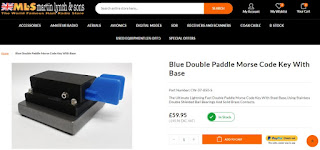
Looking around I spotted some cheap keys from an American company called CWMORSE and they were available here in the UK at Martin Lynch & Sons, so on September 11th I ordered a DOUBLE PADDLE from them....


When it arrived, I could immediately tell that there was something amiss. For a start, it just didn't feel like a double paddle key, because when you pressed one of the paddles, the other moved with it ๐Ÿ˜ฎ  I removed the top casing and saw that it was indeed a single paddle fitted with two wings.


This was very disappointing and so I wrote to ML&S and explained that I'd ordered a 'double paddle key' from their website and instead received this single key!  The box had a label on it which covered up another label clearly showing that it was actually a single key...

There was a great deal of misunderstanding went on between me and ML&S before the correct key was dispatched and it ended up with me having to go into town to take the wrong key to the Post Office and then being told by ML&S that I’d have to pay more for the correct key because it was £63.95!  All very frustrating and no hint of apology for the incorrect descriptions on their website and the inconvenience. Worse still, the new key arrived with a price sticker on it of £59.95 ๐Ÿ˜ฎ๐Ÿ˜ก๐Ÿ˜ฎ  So all in all, with the initial postage and the return postage, I have paid a total of £85.90 ๐Ÿ˜ก๐Ÿคฌ๐Ÿ˜ก You couldn't make this stuff up, lol.

Anyway, all that aside, the key is here and seems to be working fine. Initially it needs some adjustment to center the keys and make sure that there's equal amounts of travel in each key. I like the keys to have very little movement, but it's obviously a personal preference. Making adjustments is a very simple and self-explanatory procedure.


The key is 3D-Printed and the quality of materials and construction seems quite good. The internals are very simple, which gives you the comfort of knowing that if something goes wrong after years of use, you'll probably be able to fix it yourself with hexhead bolts and springs, etc. It comes with a heavy steel base so that it doesn't move around on the table, but you can always remove the base if you're taking the key on a SOTA outing and want to lose the weight.

The unit is fitted with a 3.5mm stereo jack socket but no cable is included. You will have to buy or make up a lead yourself, possibly configuring the wiring of the stereo plug to determine which paddle is a dah and which is a dit.

Initial inspection of the key reveals a very slight sloppiness in the vertical plane of one of the paddles which I don't particularly like, but I don’t think it will have any affect the performance anyway. I'm obviously an out and out beginner, but common sense tells me that any off-plane movement is not a good thing  (but you have to bear in mind the low price of these keys (starting at £39 without a base (if you’re lucky enough to get what you order)).

I had already learned to key CQ TEST M7MCQ with ease when I had a KX2 so I started with that - it went well. I feel that I can confidently go forward in the (long) journey toward learning Morse.

So there you have it - a cheap and cheerful double paddle key which is super lightweight for SOTA/POTA use, but perfectly planted on the shack desk when used with the heavy base.

The key worked well with my IC-7610, IC-705, FT-818 and (tr)uSDX - no bother at all. A good purchase I'd say. Now the learning begins! ๐Ÿ˜‚ If I feel things are going well, I will look to buying a better key for permanent home use and will throw this cheaper one in my ruckshack for outdoor ops.


OOOPS!!! Something went wrong!

An hour later I started to notice that my practise work was not consistent even on the short string of letters that I am very familiar with. I lifted the cover off the paddle and saw that one of the upright posts was loose - it had no doubt failed during the actual 3D-Printing process.

As a result, the post was only held on at one side and could fail at anytime. I took a video of the problem and emailed it to make it easy for ML&S to understand what was wrong and then posted the item back to the shop for replacement ๐Ÿ˜ญ๐Ÿ˜ญ๐Ÿ˜ญ

ML&S rang me when they received the email and asked what was wrong with the key - they hadn't even watched the video ๐Ÿ˜ฉ so that was a waste of time. They then said that they "didn't really want to be sending these back and forth" which made me feel like it was them who were being inconvenienced!

In the end they said they'd ship another key and credit my account with the £20 which I'd had to pay for returning two keys to them. 

Click HERE if video doesn't load


>>>FINGERS CROSSED<<<
for a happy and positive ending!!


Well, 16 DAYS ๐Ÿ˜ฎ after first ordering and the replacement key arrives. It is the correct one and it seems to be fit for purpose at last. Am I happy?? Not really. I am pretty much sick to death of fighting with online retailers  just to get what I ordered from their website

It seems that some retailers aren't really familiar with their products but still put them on sale on their website and basically let the customer discover the problems and website inaccuracies.

I know $hit happens occasionally and things can go wrong - it sometimes happens in my business too - and when $hit does happen, that's the time for your customer-service processes to really shine. The way we handle errors usually ends up with the customer thinking more of us than before the error occurred!

Oh, and did I get my £20 credit? Of course not. And did they offer an explanation for me being charged £63.95 for a key which had a £59.95 price sticker on it? Of course not.

Anyway, it is what it is and I'm sick of banging on about it. Vote with your feet!

___________


Ian (G0CTO) also posted these words on Social Media, which is very appropriate to my new quest...

In a world dominated by instant messaging, video calls, and high-tech communication methods, there exists a hidden treasure among radio enthusiasts. It's a language that transcends time and technology, weaving a symphony of dots and dashes through the airwaves, captivating the hearts and minds of amateur radio operators. It's the thrilling art of listening to Morse Code as a conversation, an experience that transcends mere communication and becomes a passionate pursuit of connection and skill.
Amateur radio has been a bastion of communication for hobbyists and enthusiasts for over a century. While it encompasses a vast range of modes and frequencies, Morse Code, or CW (Continuous Wave), remains a timeless and enthralling aspect of this diverse community.
Imagine tuning your radio to a quiet frequency, and suddenly, there are a series of distinct tones, some long and some short, and to those that cannot read it, that is what it will sound like.

To the uninitiated, it might seem like random beeping, but to those in the know, it's a series of different conversations. It's like being in a large hall with people involved in conversations. You can understand those but not those in Morse Code. That changes when you can read the Code.
Listening to Morse Code as a conversation is akin to eavesdropping on a secret code between two friends. Each "dit" (.) and "dah" (-) carries significance, forming letters, words, and sentences. It's like deciphering a cryptic puzzle, one that engages both your ears and your intellect. The anticipation builds as you try to piece together the message being transmitted, and when you decode a word or phrase, a sense of accomplishment washes over you.

What makes Morse Code conversations so exhilarating is the sheer efficiency and range of this communication mode. With minimal equipment and power, radio operators can connect over vast distances, often when all other modes fail due to interference or poor conditions. It's a testament to human ingenuity, enabling communication in the most challenging of circumstances. Yes, it IS ancient technology but one that will be with the amateur community for as long as we have those that learn the Code.

But it's not just the utility of Morse Code that makes it exciting; it's the culture surrounding it. CW operators are part of a global fraternity that appreciates the beauty of this art form. They exchange stories, knowledge, and camaraderie through the rhythmic pulses of dots and dashes. It's a tradition that has persisted through generations, handed down like an heirloom.

There's a certain romance in listening to Morse Code, too. It's a language that connects you not just to the person transmitting the message but also to the rich history of radio communication. It conjures images of intrepid explorers, wartime heroes, and adventurers who relied on these signals to bridge the gap between worlds. Take Bletchley Park for example. The operators there during the war, mostly women, shortened the war with their efforts. There are still a couple that are licensed amateurs actually.

In a world that often seems inundated with noise, Morse Code stands as a beacon of simplicity, an oasis of calm. It reminds us that communication can be both an art and a science, a pursuit that challenges our intellect and enriches our souls. It reminds us that in the digital age, there's still room for the beauty of analog communication.

So, the next time you hear those rhythmic dots and dashes emanating from your radio, take a moment to savor the magic. Revel in the excitement of deciphering messages hidden in plain sight. Embrace the timelessness of Morse Code, and you'll discover a world where conversation becomes an art form, and each transmission is a symphony in dots and dashes.


Ian, a friend from the local radio club, G0CTO, said : Ha ha I had a similar issue with MLS, - ordered an iambic Kent paddle - they sent a single lever rang them and the clown at the other end tried to get me to keep it. I made them collect it and send the correct key. Keys are personal things but engineering is everything - the two paddles I have now are a Chevron AGA and a Begali Sculpture. The one I use most is the Begali as it’s more compact. The two keys are very different as one uses magnets in attraction and is very snappy the other uses them in repulsion and behaves more like a spring. Both keys can be adjusted very finely to such an extent that temperature can cause keying with metal expansion.

An anonymous message…..

“…….. you’re not too old to learn CW. I started at about 58 and I’m now 60. Earlier this year I completed the CWops advanced 25wpm course. One of the chaps on the intermediate course was 85. The whole process has been an enjoyable and fascinating challenge opening up all sorts of opportunities for gear accumulation. I’m now 100% CW and achieved my CW DXCC in about 12 months. Three good resources are LICW, CWops and Morse Code Ninja (great youtube and podcasts).”


Saturday, 2 September 2023

SWL - AIRBAND

AIRBAND LISTENING


My ShortWave Listening hobby began as a young child and it stayed with me for decades (apart from the usual periodic lapses when life serves you lemons). When I started to go to Airshows and Airports in my 20's, it was only natural that I became interested in the on-air chatter between pilots and ground stations. Of course back then, the AM airband receivers (that I could afford) were extremely basic and not particularly sensitive, but they were good enough to maintain an interest.  As I got into my 30's, things had got significantly better and I could afford equipment from Yupitera, Alinco and AOR. Their scanning receivers had huge frequency ranges, multiple modes, memories and blisteringly fast scanning speeds!!

Rather than just scan the airband for local traffic, I soon became curious about how it all worked and searched outside the AM sector for signals of a more DX nature. I was never going to become obsessed with it, because I had other hobbies too, but I did at least want to go further than the average spotter at the runway apron.

So, here's my understanding of it. I'm no expert - far from it - but learning just a little more about how it all works, can greatly enhance your enjoyment.

The world's airspace is split up into regions called Flight Information Regions (FIR). Some countries may only have one FIR due to their small size, while others need multiple FIRs because their country is physically huge.

As aircraft pass through our airspace, you may hear them on the approach seeking permission to enter, for example, the LONDON FIR and then soon after being told to contact the SHANWICK FIR to continue their journey over the Atlantic to their final destination.

Apart from horizontal splits across land, vertical splits also exist. You can (and usually do) have an upper and lower FIR (the lower one being referred to simply as FIR and the upper one being called UIR). Upper Airspace is normally regarded as being the space above 24,500ft (FL245).

Here in the UK we have 3 FIRs with the callsigns LONDON, SCOTTISH and SHANWICK OCEANIC. The London FIR covers England and Wales. The Scottish FIR covers Scotland and Northern Ireland. The Shanwick FIR covers the North East Atlantic.

FIRs

Because of the size and the amount of traffic, LONDON FIR uses additional resources at Manchester Airport to aid control of the vast number of flights passing through England and Wales.

Around 6,000 aircraft fly through our airspace every day and all that traffic is controlled by the Civil Aviation Authority and split into sectors classified as A, C, D, E or G and our airspace (broadly speaking) is either controlled or uncontrolled. 

Uncontrolled airspace (Classified as G) has no restrictions on which aircraft can enter it or the routes aircraft can take. Class G is basically any airspace which doesn't have one of the other classifications. And it's not just a horizontal space from A to B, it's also a vertical space from ground to a certain height (usually expressed in feet). Class G's ceiling-height will be Class E's floor-height. Pilots flying in Class G airspace are responsible for their own navigation, separation from other aircraft, obstructions, etc, but a pilot can ask for help.

All other airspace is Controlled - rigidly controlled! Different classifications exist in order to provide safe movement across the skies of the UK. Here's what the different classes mean in real terms...

CLASS-A requires a pilot(s) to be certified to fly on Instruments Only (IFR) and not rely on what he sees outside the window. This is the most strictly regulated airspace of all and pilots must observe and follow every instruction given by the local air-traffic-controller (ATC). Aircraft which operate in Class-A airspace are kept well away from other traffic and are usually comprised of large commercial airliners.

CLASS-C is an airspace (in the UK at least) which is at a flight-level between 19,500ft (known as FL195) and 66,000ft (FL660). In Class-C airspace, pilots can operate IFR (Instrument Flight Rules) or VFR (Visual Flight Rules), but they must request permission to enter the airspace and must comply with ATC instructions.

CLASS-D is like Class-C in that pilots can work to IFR or VFR but Class-D is typically assigned to the areas around airports and aerodromes and have a speed limit of 250kts when the aircraft is below 10,000ft. Again, pilots must obtain permission to enter Class-D airspace and must comply with ATC.

CLASS-E permits either IFR or VFR. IFR traffic need to request permission to enter this airspace and comply with all ATC instructions, where VFR traffic does not.


Air Traffic Controllers can only control a limited amount of aircraft at any one time, so the country is split into sectors and the number of sectors can vary according to the time of day and even the time of year - the more traffic, the more sectors. When it's less busy (such as night time), some sectors will be grouped together with fewer controllers managing a larger area. A bit like a superstore opening more tills on a Saturday morning, but closing many of them down on a Sunday afternoon ๐Ÿ˜…

 
Responsibility for Transatlantic traffic is shared between the UK, Portugal, USA, Canada and Iceland. Aircraft stick to predetermined routes which are published every 12 hours and these routes are generated according to weather conditions and in particular, tailwinds which can help traffic make enormous savings in fuel. Approximately 80% of all Transatlantic traffic goes through Shanwick Oceanic - it's the gateway to Europe!


It's worth noting that while radar is useful for determining the position, heading and speed of aircraft, it only has a range of around 250 miles due to the curvature of the earth, so aircraft "squawk" their unique ID and positional data electronically (by satellite or radio) every so often in a data-burst and this information is gathered by ATC's across the world to form a picture of what's going on.

 
It's possible for you to play an active part in monitoring air traffic in your area by using a simple bit of hardware and software with a tiny antenna mounted (ideally) outdoors above your roofline. It's called Automatic Dependent Surveillance-Broadcast (ADS-B). We'll talk about this later.


IS IT LEGAL TO LISTEN IN?

You need to be aware that it is ILLEGAL to monitor the Airband in the UK!  You're okay to purchase an Airband receiver or even purchase a Transceiver like I did, but you are not allowed to listen to it.  Crazy, I know, but that's how it is.

Needless to say, you are extremely unlikely to be prosecuted for listening in, but just be aware that the authorities do have the right to confiscate your radio, but you only have to walk around the airport perimeters and viewing parks to see scores of people watching aircraft traffic while listening to pilot/control chatter on their radios with no objections from airport staff or authorities. 


SO WHAT CAN YOU LISTEN TO?

Most people simply tune into their own local airport Approach & Tower frequencies and listen to the two-way comms relating to take-offs and landings. That in itself can be quite interesting, especially as a background fill-in while you're doing something else. You'll occasionally get a bit of excitement in the way of a Go-Around or reports of someone kicking off on a plane ๐Ÿ˜‚

If you are reasonably close to an airport, you should also be able to pick up GroundCrew transmissions. These can be quite mundane but occasionally turn up some interesting situations. If you are too far from an airport, you will only hear the aircraft above you (up to around 200 miles away on VHF).

You can also listen to ATIS transmissions where messages are repeated continuously, relaying information on local weather conditions and other important information. There are also VOLMETS which perform a similar function but with information relating to a much wider area. Bit boring but sometimes useful as a measure of conditions.

Hand gliders, Balloonists and Gliders use a specific frequency, so if you're visiting a local event, you can always listen in to what's going on.

If you program your radio to monitor the Distress Frequency (121.5MHz Civil, 243.0MHz Military), you will very occasionally hear a bit of drama which, thankfully, is usually nothing too bad.

Airport Fire Services have a fixed frequency, so if you see any movement of fire engines while at an airport, you can always tune in and see what's happening (might just be a drill).

Finally, you will very occasionally hear a bit of an argument between ATC and Pilots. They're very rare, so keep your recorder going!


WHICH MODES / FREQENCIES?

The vast majority of civil-aviation chatter occurs on VHF frequencies using AM. Occasionally you may find some Military action on VHF too - usually at an airshow.

Military flights usually use UHF frequencies between 225MHz and 400MHz. Obviously, you will find it much easier to monitor Military Flight activity if you live close to a Military AirBase or on a route to one.

 For long-distance transmissions, pilots may use HF and there's a number of common frequencies between 2MHz and 23MHz where you'll find activity. Needless to say, it's nowhere near as busy as your local VHF chatter.

With regard to specific frequencies, you can easily Google the airport frequencies local to you or visit a website such as the UK AIRPORT & AIRFIELD site or the MILITARY AIRSHOWS UK site and obtain them from there.


Alternatively (or in addition) you can buy an Airport Frequency Reference Book. These books don't age as quickly as you might expect and they always contain additional information. Just bear in mind that books contain very comprehensive lists of frequencies, but most of them will relate to activity way outside your area and therefore of little interest (unless you travel around a lot).

Note that spacing is usually 25kHz but 8.33kHz will be used increasingly See THIS document about 8.33.


WHICH EQUIPMENT TO USE?

If you're not convinced that Airband Listening is for you, then you'd be ill-advised to spend too much on radio equipment at this stage. You're probably better off buying the cheapest scanner available so that you can sell it if things don't work out for you. You'll probably not lose any money - especially if you buy something used on eBay.  Just bear in mind that the really cheap stuff only works well if you're at an airport spectator park or live closeby,  so don't expect too much.

If you are already convinced that the AirBand is for you, then it all depends on your budget and whether or not you want your new radio to receive other stuff in addition to AirBand signals. There's a lot of cheap scanners out there which will cover a very wide frequency range, but they should be considered as Jack Of All Trades and Master of None.

Personally, I would recommend the YAESU FTA-550 Airband Transceiver over a scanner like the UNIDEN UBC-125XLT. The Yaseu is dedicated to the AirBand and is superbly well built. Needless to say, you need to disable the TRANSMIT function by changing a menu option.


If you think most of your listening will be done solely from home, you might want to consider an excellent (and cheap) RSP1A from SDRPLAY. These cover an extremely wide range of frequencies and provide you with a plethora of amazing functions and features BUT you need to connect it to a PC to work. 


One of my favourite handhelds for AirBand and other bands is my 20yr old ALINCO DJ-X2000. It cost a fortune back in the day and was probably the most advanced scanner in the world upon launch. It still works very well to this day, although the HF tuning is out a couple of kc. I just love this radio and will never sell it.

My 30yr old AOR AR-3000A is another great bit of kit to monitor with. It covers everything from the lowest to the highest and is super sensitive. There's plenty around on eBay still (although some people are a bit deluded when it comes to pricing them).

Being a licensed ham, I do, of course, have other radios which are capable of monitoring the AirBand and I use them regularly. My Kenwood TH-D74 is one such radio and it performs magnificently but it's a very expensive bit of kit and I wouldn't take it to an Airport Spectator Park because I'd be terrified of losing it or dropping it, lol. Not only can it monitor AirBand, but it also covers HF and has SSB.

My YAESU FT-3D covers the AirBand and is quite sensitive at those frequencies but it has no SSB capability. 

Most VHF/UHF ham radios include access to the AirBand and some do it better than others, so if you already have such a rig, there's no point in spending more. And don't forget that your Shack-In-A-Box will almost certainly have Airband receive capability as well as HF SSB. Things like the IC-7100, FT-991A, FT-818, etc.

Another favourite radio of mine is the TECSUN PL-680 which has a very useful form factor. It covers the AirBand and also HF with SSB. It has lots of memories in which you can store frequencies. Super portable and very flexible around the home for general domestic use too. Its bigger brother the S-2000 performs pretty well but is quite cumbersome. Both Tecsuns have external antenna options.

Sometime in the hopefully not too distant future, AOR will get round to releasing their flagship AirBand receiver - the AR-7400. It will no doubt be quite expensive, but will hopefully set the gold standard for AirBand Scanning Receivers.

There are a LOT of other options out there and I would suggest you spend some time looking at the radios available online. Martin Lynch are a very good source for both new and used equipment and might be a good starting point, but there are other stores you available in the UK, including Moonraker. You can pay anything from a few pounds to a few thousand pounds.I'd recommend that you see if you can borrow a radio from a friend or club before spending big bucks on something.


ADS-B : MONITORING LIVE TRAFFIC

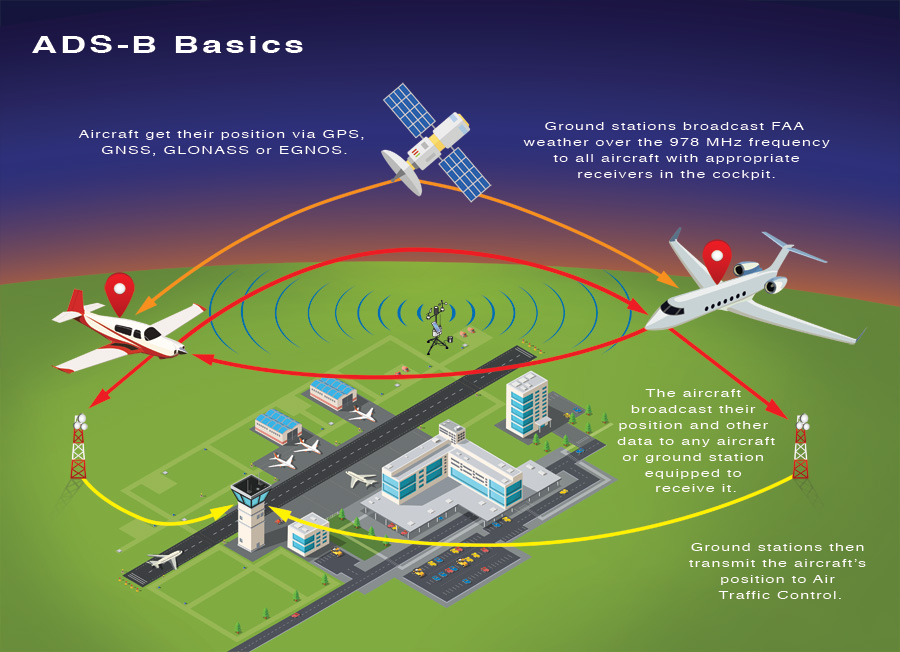
If you have a mind to, you can setup a low-cost station which will gather all the information which aircraft broadcast using a system called Automatic Dependent Surveillance Broadcast (ADS-B). This information includes all the data relating to the aircraft's ID, its position, heading and speed.

As you can see from the diagram below, the aircraft obtains its positional data from the GNSS satellites and then transmits it to Ground Stations and other aircraft around it.


Anybody can gather this data and by doing so, you can actually be part of the system by uploading your gathered data 'on the fly' to interested parties. In order to build your own Ground Station, you'll need the following...

  • A computer (Raspberry Pi with SDCARD)
  • A connection to the internet
  • A FlightAware USB stick
  • A Tiny 1090MHz antenna
  • A FlightAware Account


You can see from the photo above that I chose a Raspberry Pi Zero 2W which are very cheap, very small and perfectly capable of running the software. I bought one with the optional aluminium case which doubles up as a heatsink. 

There are a number of ADS-B RECEIVER dongles on the market, but the very best is the FlightAware Pro Plus because it has a built-in preamp and built-in filter. It's therefore far more reliable at decoding than others and will give you superior results, for just a small premium.

As a contributor to the ADS-B data system (ie, you're uploading all the aircraft data gathered from your Ground Station), you can obtain a FREE Enterprise account which would normally cost you around £90 per month, giving you full access to the system.

 SAMPLES


Traffic over Europe with Weather

Click on the image below to read the full installation guide. It's all very straightforward and you'll be up and running in no time at all...


If you have anything to add to this post, please make a comment in the COMMENTS SECTION below and don't forget to add your name (and callsign if you have one).

Thanks for visiting the blog.

Tom, M7MCQ.