753 CONTACTS, 58 COUNTRIES I was just looking at my log to see how much I've done so far with 10W and I must say, I am quite pleased with it considering that I've got so many other hobbies too 😂 And it's not about the quantity of the contacts though - it's more about the great chats that I've had with people from all over the world. Different countries, cultures, points of view. It's about the different modes of operation, the different operating locations, the learning, the struggling, the help and encouragement I've been given and the help I've sometimes been been able to give others. My thanks to everyone who's helped me to enjoy my first year or so in Amateur Radio 👍
AOR AR-3000A Back in the day, my wife wasn't very happy with me when I spent an absolute fortune on a receiver. It was almost £1000 and that's when £1000 was a mighty chunk of household income (over £2,000 in today's money). She fell out with me for a week or so, lol. But I didn't care. I'd been working my socks off in order to save enough money and was doing loads of overtime. I already had a good handheld scanner, but I wanted this beautiful Base Station called the AOR AR-3000A.
PHOTOS ARE PROPERTY OF TOM MCQUIGGAN
When I bought it, I set the receiver up in the kitchen area at the back of the house and attached it to an AOR Discone for coverage above 30MHz and I used a long wire for HF listening. The AR-3000A was a very wideband receiver which covered 100KHz to over 2GHz with no gaps whatsoever. It had all the modes I wanted : LSB, USB, CW, NFM, WFM and AM. The front panel is tilted upwards at an angle to aid viewing whilst operating from a desktop position. This gave the unit its unique appearance that set it apart from the crowd. All the controls fall easily to hand, with the squelch and volume being on rotaries to the left side and the main VFO tuning knob was over on the bottom corner - perfect for a right-handed person.
PHOTOS ARE PROPERTY OF TOM MCQUIGGAN
Each button has two functions, controlled by a "2nd F" button (like a shift-key) and although the legends above the keys aren't exactly easy to read, you very quickly get to know what each button does with barely a glance. The frequency can be input using the Dial or by simply inputting it directly using the ten number buttons and the enter-key. Alternatively, you can flick through the 400 available memories which are stored in 4 banks of 100. The same goes for searching between any two frequencies. The LCD screen is on the small size but perfectly legible when you switch on the illumination. The scanning speed is blisteringly fast and I wonder why modern SDR radios can't match it? Performance wise, the AR-3000A is pretty amazing, incorporating 15 band Pass filters. Using the supplied telescopic antenna or a Discone, the signals are easily pulled in. On the Shortwave and Longwave frequencies, sensitivity is also very good, but if you attach an outdoor antenna or wire, things improve even more!!
PHOTOS ARE PROPERTY OF TOM MCQUIGGAN
On the back of the radio you have a BNC connector for your antenna, a 12V proprietary connector, a 3.5mm external speaker socket, a DIN socket for recording audio and an RS-232 socket for computer control. The software that was available at the time of purchase was fairly good - I'll have to see if I can find a copy to see if it will run on modern 64bit machines. The audio quality of the AR-3000A is nice and rich, but depending on the surface you place the radio, it can sometimes sound a little muted due to the speaker being on the underside of the cabinet. Placing the unit on a hard surface always gives the best result.
The manual was specifically written for each country, discussing frequencies pertinent to that region of the world and I always felt that this was one of the better produced manuals to come out of Japan. It must surely have been due to the use of a decent translator. The content made it very easy to get to grips with the unit and plenty of examples were included. Shame today's manuals are as well written. As you can see from the photos, my AR-3000A is in fabulous condition and because it doesn't get much use these days, I had been thinking of selling it, but after plugging it in and having a play around, I've decided no, I'm not selling it. It's a bit of an icon and worth far more to me than the cash I'd get for it on eBay. I have a real fondness for this old girl. Having said that, I watched one sell for £380 yesterday and it wasn't as nice as mine, so I might reconsider! 😀
1.2 watts at 4 ohm load 10% distortion 0.7 Watts at 8 ohm load 10% distortion
Power Requirements:
13.8 volts DC, approx. 500mA
Display:
Liquid crystal
UPDATE :
I saw an AR3000A on sale on eBay complete with a CD full of software, frequencies, etc, so I messaged the seller and asked if I could buy a copy of the CD. To my amazement, he agreed to send me a copy completely free of charge!! What a nice guy! Typical though, of the great HAM spirit.
Many thanks Brian Stephenson (GM0IPV) for your generosity and help!
MISSING DUAL BAND NOTE: Since writing this post, I've sold my 991A because it seemed ridiculous that Yaesu's flagship Fusion radio couldn't connect directly to Wires-X and work as a node, even though a host of their more recent (and cheaper) radios can. It was further embarrassed by the FTM-300 which is DualBand with its twin receivers and can monitor ANY two bands including C4FM & C4FM!!
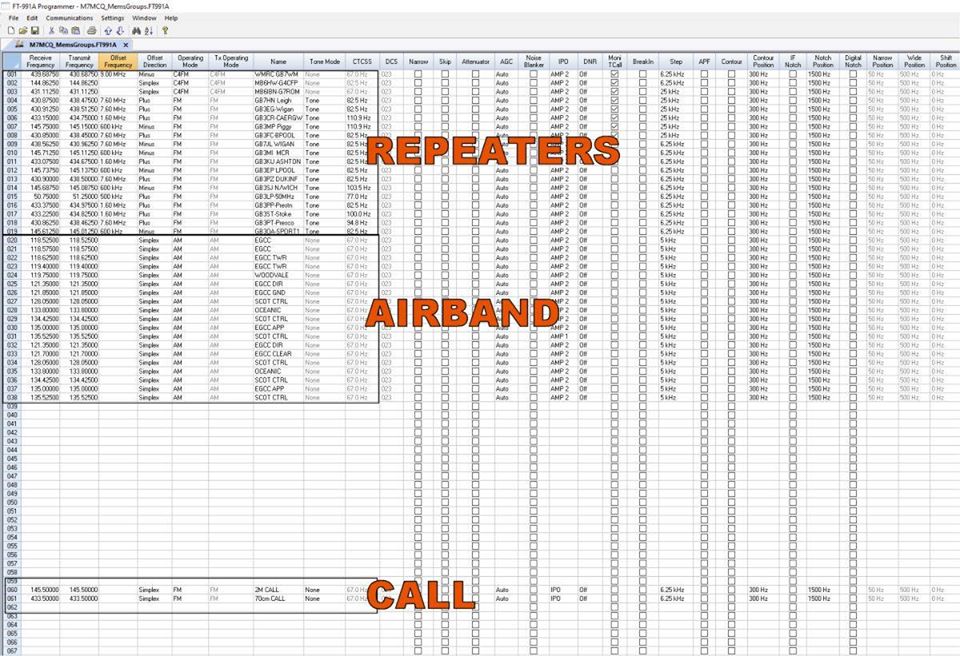
Since purchasing my lovely Yaesu FT-991A, I've really missed my Alinco DR-735E! The Alinco was a dual-band radio which allowed me to monitor both VHF and UHF at the same time. You could even cross-band with it! Sadly, the FT-991A is only single-receive so by default, I can only monitor one band at a time. So I decided to delve into the memories and discovered that the 991A has 100 memories and more importantly, it has groups! So I did a little programming using RT-Systems software and provided myself with a simple way of monitoring multiple frequencies. Here's the video for anyone interested...
Yaesu FT-991A Memories & Groups
The scan-speed is pretty damned slow in my opinion, but others may find it perfectly acceptable. If you're only scanning two or three frequencies then it's not much of an issue but when scanning a few dozen, you begin to notice.
To be honest, this is the first time I've even used scanning on a rig like this, but I'm glad I went to the trouble of sorting it out.
Right Tools For The Job! Isn't it ridiculous how we can go for ages without using the right tools? Ever since I started to use Anderson Pole Connectors, I've struggled to crimp the pins neatly and have had to solder every time to give extra strength to the connection. With the correct cimping tool, there is actually no need to solder! Well actually, I still do, but it's not a requirement. The proper crimping tool does a fabulous job of forming a tight, reliable clamp onto the wire. I bought my IWISS AP-153045 from SotaBeams here in the UK with a pack of Anderson Pole Connectors. I can now start to switch over from 4mm Banana Plugs on all my equipment to these. I can also make a nice little Banana-to-Anderson patch lead for those occasions when a PSU only has banana sockets.
IT'S JUST TOO MUCH! If there's one thing that I don't like paying for, it's Post & Packing. I know it can't be considered as an overhead of the business, but neither should it be considered as a means of making additional profit. At my own business, we have one charge of £9.50 for anything up to 5Kg in weight which, I know, is not exactly cheap, but (if you order before 2pm) it's guaranteed NEXT DAY delivery! So how do our (UK) HAM RADIO retailers fare in this respect? Not too well as far as I'm concerned (they're already in my bad books as you can see from this previous post). Okay, let's put it to the test. Lets go online and find an item from all the big online-resellers and see what the deal is. We'll order something that they all should reasonably have in stock - a small rubber-duck antenna.
ML&S P&P £9 MOONRAKER P&P £8
LAMCO P&P £7 WATERS & STANTON P&P £6 RADIOWORLD P&P £2.49 Well congratulations to RadioWorld for being the cheapest. The worst performer here was ML&S at almost £9 to stick a tiny item in a jiffy bag and pop it in the post. None of the resellers actually explain the level of delivery service you get for the advertised charge except RadioWorld - whos default P&P is openly declared 2nd-Class Royal Mail - so you can only assume from the information provided (or omitted) that the others are all 2nd-class too unless you pay extra for next-day express delivery. So basically, when you order online, you have no idea when your item is likely to arrive. You don't know when it's going to be picked and you don't know when it's going to be posted. Not even when you pay up to £17(!!!) for Next Day delivery can you guarantee your order will arrive the day after. Many online resellers don't even bother to inform that the item has been dispatched and provide no pre-delivery tracking details. And if you think I'm talking about service levels during the Covid-19 period, I'm not. Some resellers may say "Hold on - our product is cheaper than our competitors" and that may sometimes be true, but product prices are a separate issue. And rather annoyingly, some of these websites don't even display the shipping costs until you reach the shopping-cart! I should point out that I ordered a V2000 antenna last Thursday from ML&S and their standard fee for an antenna is £12 but at least it arrived the next day and I was grateful for that and thanked them. So there you have it - it's a funny old world and it's clear (to me at least) that our suppliers haven't got it right. I've spent a small fortune with some of these online resellers and I don't think they appreciate how important it is to customers that they are provided with clear information regarding P&P. I am going to start voting with my virtual feet from now on. Unless a website provides me with clear, simple, pre-cart guidance on how much the P&P is and the expected delivery date, I won't use them. The end.
UPDATE : June 2020
Recently ordered an "IN STOCK" MFJ-557 Morse Code Oscillator and after paying £12 for postage, I was sad to see it arrive some 12 DAYS later! It was also BROKEN due to the fact that this vulnerable item had been packed in a cheap, light weight jiffy bag. It was inevitable that it wouldn't survive the journey across country. I returned it immediately, not because it was broken, but because I'd had to wait 12 days with ZERO COMMUNICATION from the supplier. And I then had to go into town to post it back to them at a cost of £3.70 plus the cost of proper return-packaging. Sure, I got my money back with an apology, but I didn't get my return costs back nor the 12 days wasted time!! So here we are a few days after that and I decide to order some UltraFlex-7 coax. P&P is shown as £5.95 but when I put it in the cart, it almost doubles!
At first, I thought it might be because I'd added some PL-Plugs, but no. The reason is that I ordered more than 3 metres! Well hold on a minute, WHO is going to order anything less??? You buy this coax because you want to reduce losses on a long run! What a farce! Another example of misleading information.
I was a bit of a JackAss today! I spent ages 'plumbing in' my FT-991A and changing all the screen colours and settings and inputting a load of frequencies into memory by hand - and then decided to check the firmware! Needless to say it was out of date and so I spent another load of time downloading the update files and reading the guide. Once the firmware updates were done (there's FOUR of them), I had to do a full reset and lost all my previous work. Don't make the same mistake 😆 Anyway, I'm writing this so that any newcomers might learn from the mistakes that I made - hopefully it will make things go nice and easy for you. First job is to download the necessary software from Yaesu's website. At the time of writing, they can be foundHERE. Make sure you download the latest files including the VIRTUAL COM PORT!
Oh, and DO NOT connect a USB lead until the Virtual Com Port has been successfully installed!!! Okay, now that you have your software saved, you can install the Virtual Com Port. Once that's done, do yourself a favour and download FTRESTORE by VK2BYI. It's a cracking little program which lets you save your radio's memory and menu settings to a file on your PC, so after you've done a factory-reset (for whatever reason), you can quickly get your radio back to how you liked it. If your radio is absolutely brand new and there's nothing to backup, skip to the next part. To find out the current version of your firmware, hold down the [A=B] & [A/B] buttons while pressing the POWER button. It might be worth grabbing hold of your phone camera to take a snapshot of the screen because it quickly disappears...
If your 'MAIN' version number is lower than the one on Yaesu's website, then go ahead and perform an update. Bear in mind that there are actually four update processes involved and each one is totally independent to the other. If you don't update all four, your radio will likely stop functioning. You should update in the order shown in the screen above, starting with the Main. The updating process will take about 20 minutes. Carefully read through Yaesu's Firmware Upgrade Manual before starting the process and have it to hand throughout. Once you've completed all four updates, you'll be told to switch off the radio and then back on. Check your version number to confirm everything has changed to the new version.
PROGRAMMING As is often the case with Yaesu, the FT-991A doesn't come with any programming software, so you are expected to hand-ball everything into the radio via the front panel. This wouldn't be so bad if it wasn't for the ridiculous single repeater shift for each band! In the menus you can alter the setting for repeater-shifts and every time you choose + or - when programming a memory, it will apply the shift which you inputted (say -600 for 2M and +7600 for 70cm). That's fine most of the time, but what if some of the 70cm repeaters need a 1.6MHz shift and others need a 7.6MHz shift?? You're stuffed!! I tried to find a way around this and even looked at VK2BYI's software to see if I could edit the file but sadly it's not possible. Apparently, Yaesu don't document how to set a repeater offset for a specific memory channel - only the direction. I was originally going to try running it SPLIT but it got kinda messy so I looked for other options. Sorry to whinge, but it really does cheese me off when a manufacturer sells you (an often very expensive) radio with thousands of memories but no way of easily inputting them via computer software. It's just plain ridiculous! RT SYSTEMS software will allow you to program independent offsets so they have either got a friend at Yaesu or they've figured it out themselves. I'm not a fan of paying for 3rd party programming software and I always espouse the use of a manufacturers (free) software, but in this case, there just doesn't seem to be any! So for £21 ($25) I decided to bite the bullet and make the purchase. If you do the same, DO NOT buy the ridiculously overpriced "RT42" programming cable which is just a bog-standard USB-A to USB-B lead (as commonly used on printers). 😡 Anyway, I have to admit, the RT Systems software is both comprehensive and easy to use. Just know that it is not something that will work on all your radios - you have to buy a copy for each individual radio. Having said that, I'd wager money on this software working with an FT-DX1200 or FT-DX3000.
PROGRAM A MEMORY
If you only have a handful of frequencies that you wish to store in your radio's memories, then you can do it by hand and here's how...
Tune your desired frequency and mode.
Briefly press the [A>M] button.
Use the Multi-Dial to scroll to a memory slot.
Press & Hold the [A>M] button.
Just for the sake of this exercise, repeat this process and add another memory.
The two frequencies and modes you chose are now stored in the memory slots you chose. So how do you get to the memory channels to use them??
You need to take your radio out of VFO mode and put it into MEMORY mode by pressing the [V/M] button so that the screen says MEM##instead of VFO-A or MT
You can now move between your stored memories using the Multi-Dial BUT before you spin that little dial, you need to make sure the dial isn't still set to change power or meter or whatever you last had it set to.
To change the Multi-Dial to Memory-Channel-Change, hit the [F M-LIST] button and find the [MCH] button - then select it. Your Multi-Dial will now change Memory Channels.
Please note, that if you are in Memory Mode and accidentally catch the main VFO dial, the MEM## will disappear and be replaced by MT which means Memory Tune. To get back to the original memory, just hit the [V/M] button again.
If this is all too complicated in writing (my fault), then you'll be as well watching this video from Martin Lynch...
-----------------------
Now then, here's a good tip!
The four buttons at the bottom of your screen, can be altered for buttons which you prefer over the default ones. But not only can you change those four buttons, but you can change them according to which band you're on!
For me, the default buttons are pants 😂 but it's easy to change them with the [SWAP#] buttons in the F menu.
Here's how I altered mine to suit the mode I'm in...
JUST MY OPINION! One of the local radio clubs is about to set up a new Fusion Repeater when the lockdown is over, and being just 7 miles away from my QTH I was thinking that this may be my route into C4FM operation using RF instead of my usual access point - an OpenSpot and internet. There's no guarantee of course that I'll be able to reach the repeater, but the fact that I can access other UHF repeaters such as Blackpool, some 26 miles away, gives me hope. Currently I have an Alinco DR735 2M/70cm radio in the shack and as much as I love this wonderful radio, it does bug me that I can't work sideband. So I figured that now's the time to kill two birds with one stone - get a new radio which does both sideband and Fusion. So I ordered a used Yaesu FT-991A from a big online reseller after checking that the parcel would definitely go out that day and arrive the next morning, Thursday, before 12noon. Annoyingly(!)the next day I got a call to say that the radio would not arrive until Friday. I pointed out that I had specifically checked the delivery date before ordering and was told that I must have spoken to a member of staff who wasn't aware of the delivery schedule. And also, the V2000 antenna I'd ordered which was showing as "in stock" was actually out of stock! I don't mind one bit waiting for something that is scheduled for delivery in 3 days time, 3 weeks time or even 3 months time IF I am told that date. But when you've been told NEXT DAY delivery and have PAID for next day delivery (£20 in this case), then I do expect next day delivery. Why can online resellers not get this bit right???
Anyway, it's a shame that I have to pay for the HF portion of the 991A because I won't be using it in the shack (the 7610 is my HF rig), but that's by the by. I'll be using the radio's N connector for 2M/70cm and the SO239 for 6M.
When the Diamond V2000 arrives (found one in stock at ML&S) it will give me all three bands on one antenna which (assuming it works well) is a godsend. In the past I've had to either use my EFHW or erect a separate 6M temporary antenna in the garden.
DIAMOND MX-62 DUPLEXER
The FT-991A reminds me very much of the old FT-897D. I love those radios - they just had a great look about them - a military ruggedness almost. And of course they were a 'shack-in-a-box' with all bands and all modes and 100W HF, 50W VHF, 20W UHF. The 991A is the modern day equivalent, with 100W HF and 50W on both VHF and UHF. It also adds the increasingly popular C4FM Digital mode. Of course other modes include SSB, CW, AM, FM and RTTY. Instead of the tiny monochrome screen of the 897, the 991 comes with a beautiful TFT colour touch-screen. It's around 3.5" diagonally which is big enough for all but the most ham-fisted operators (pardon the pun). The main frequency is displayed clearly and boldly at the top of the screen, with a smaller indication of VFO-B frequency below.
Below that is the S-Meter which doubles up as a secondary meter which can be switched between Power, SWR, ALC, etc by the touch of a button. Speaking of buttons, the display always shows four buttons at the bottom and these can be altered to suit your individual requirements. In the middle sits a real-time Spectrum Scope and Waterfall which looks pretty cool. It looks fairly 'lo-res' compared to the superb IC-7610, but hey, there's a big difference in price LOL. The radio has a 32bit DSP system which reportedly works very well - hopefully making those weaker SOTA signals more intelligible (and therefore workable). There's an inbuilt ATU which will be handy for tuning the 6M part of the V2000 (it's annoyingly tuned around the 52-54MHz mark instead of 50-52MHz). The tuner has 100 memories.
Band selection and Mode selection is made by pressing the relevant button to the right of the screen and then choosing your option by pressing one of the virtual buttons onscreen. Very simple and effective. Band-stacking is also provided by adding your three favourite parts of the band and then cycling through them by repeated presses on the relevant frequency. I like this feature and always make sure that the first frequency in stacks is the QRP frequency of each band.
What I don't particularly like is the TX INDICATOR which is over to the right of the main screen. It's a red LED which to me, is not particularly bright. When I'm operating a radio, I tend to always have my eyes on the main screen and when you press the PTT nothing really alters there. It's just a personal preference, but I would always like a big change during transmit - like the screen going predominantly red or something like that. Ah well, that's just me.
One more nice feature (as far as I'm concerned) is the inclusion of the AirBand. I'm not an avid listener, but I often have it on in the background if I'm doing something in the shack other than amateur radio. So that's it for now. I'm quite pleased with my choice of radio for this part of the shack and I hope it lives up to my expectations. I'll update in a few weeks.
UPDATE :
The FT-991A has disappointed me somewhat (even though there's a lot about it that I like). The lack of DualBand is a pain in the ass - I can't monitor say 2M & 70cm 😒
I also can't believe the FT-991A's Wires-X limitations 😮
Yaesu's flagship C4FM radio, the FT-991A should be everything you need surely?? Well apparently not, because the FT-991A is not really equipped to be considered as Yaesu's 'flagship' C4FM radio despite its £1300 price tag!
If you want to connect your radio to a PC and use the Wires-X software (which I often do), then you'd better look elsewhere, because the firmware architecture of the FT-991A doesn't really permit this. It's just too old hat. There needs to be a 991B introduced.
The only way that I can use the Wires-X software on my PC is by connecting my Yaesu FT3D to the PC in PDN Access Point mode and then using the 991A to transmit and receive.
So in that configuration, my expensive handheld Fusion radio is tied up in the shack (literally, by cables connecting it to the computer). And it's not just one cable, it's the SCU-19 and a twin audio cable (collectively called the SCU-39 at the princely sum of £70)!!
CONCLUSION :
I think I'd be better off with an IC-7300 for HF and an FTM300 for C4FM, VHF/UHF.