

Friday, 24 January 2020
QUICK-RELEASE EARTH
Might seem daft, but I've fitted these ground connections to all my radios cos I'm sick of struggling with the Ground connection when trying to pull a radio out from it's position on a shelf, when all the other connections can be undone quickly :-)


NISSEI DG-503
SWR / POWER METER
 Pretty much all radios have an SWR Meter built into them these day, but they're invariably small and not too easy to read. They can also only read one thing at a time usually (although there are exceptions to this like on my IC-7100), so it's not a bad idea to have one meter permanently in line showing Pwr, Ref & SWR while your radio(s) can be set to show ALC or whatever other measurement you opt for.
Looking on the market there are lots of choices out there, but I didn't want to spend a fortune, so I opted for a mid-upper range and ordered the NISSEI DG-503 which covers HF, VHF & UHF. All up to a couple of hundred Watts. Leaving it inline will lose you about 0.3db which is more than acceptable to me.


Looking on the market there are lots of choices out there, but I didn't want to spend a fortune, so I opted for a mid-upper range and ordered the NISSEI DG-503 which covers HF, VHF & UHF. All up to a couple of hundred Watts. Leaving it inline will lose you about 0.3db which is more than acceptable to me.

This SWR / Wattmeter Nissei DG-503 has a digital backlit display and allows the measurement of SWR for HF frequencies from 1.6 to 60 MHz and VHF-UHF from 125 to 525Mhz, as well as the measurement of the power up to 200W.
The SWR / Power Meter DG-503 can be used directly, with calibration.
Its low insertion loss allows it to be permanently connected.
Accuracy: +/- 5%
Antenna Connector: 2 * 2 UHF Female (SO-239)
Power supply: 12v with power cable included.
The SWR / Power Meter DG-503 can be used directly, with calibration.
Its low insertion loss allows it to be permanently connected.
Accuracy: +/- 5%
Antenna Connector: 2 * 2 UHF Female (SO-239)
Power supply: 12v with power cable included.
Tuesday, 21 January 2020
INTERFACE CABLE FOR FT-817 & ELAD DUO-ART
HOW TO MAKE AN INTERFACE CABLE
 Well, since getting my ELAD DUO-ART I've done quite a bit of moaning about the fact that ELAD neither supply, offer to sell or provide a simple wiring diagram to allow you to interface your DUO-ART with your FT-817/818.
Seems absolutely crazy to me to advertise a feature which you can not help your customers to use. The DUO-ART manual shows an over-simplified diagram of how to connect an FT-817 to your amp, but there is no information on how that connection is made. When I asked Advanced Operators for help, I typically got the response "It's not rocket science" and "It looks pretty straightforward", but no one actually came out with anything useful.

I turned to the ELAD FORUMS and initially got the familiar responses which make you feel a bit dumb and spoke of 'holding the soldering iron the right way around'. I explained that I wasn't dumb - and I was perfectly capable of putting together a cable if someone could just tell me what connects to what.
After a couple of days, I was again receiving conflicting advice (albeit in a much more friendly manner). So I decided to read through the information, pick the bones out of it and just 'have a go'!
So for the benefit of other DUO-ART/FT-817/818 owners, here's what I did....
 First of all, you need to buy 3.5mm Stereo Jack-Plug with shielded cable. You may already have one knocking about somewhere - just make sure it's of decent quality and definitely shielded.
You also need to buy a a Yaesu CT-62 Lead. At one end it has an 8-PIN DIN for the 817's ACC Socket and at the other end it has a DB9 Connector for the DUO-ART. You NEED the DB9 Connector, but the lead is useless in this project because it only contains 4 wires, so open up the DB-9 connector, take a nice clear photo of the wiring for reference and then de-solder the connections and throw the rest of the cable in a storage drawer.
JUST A QUICK NOTE : Don't think that you can use any old DB-9 connector! The CT-62's DB-9 connector includes a PCB which provides some sort of "Line Level".
Order a shielded 8-PIN MINI DIN to Bare Wire Lead from the internet. The best place to buy one in the UK is TechnoFix...

Using a Multi-Meter, determine which colours go to which pins and make a note. Your cable may have the same colour combination as mine, in which case you can follow the diagram above. Otherwise, just make sure that the 4 connections on the DB9 match up with the appropriate pins in the mini-din.
After soldering the 4 relevant wires to the DB-9, you will have four surplus wires in the cable. Find out which one of them goes to Pin-8 of the mini-din - you are going to connect that wire to the TIP of the Jack-Plug and cut off the 3 surplus wires.
When connecting the Jack-Plug Tip wire to the Pin-8 wire, it's best to keep both wires small. Lay the cables next to each other as show in the drawing below, cable-tie them together and connect the two wires together with a soldered joint. Insulate and then rebuild the DB-9 connector. You may want to add another cable-tie slightly lower down the cables for additional strengthening.
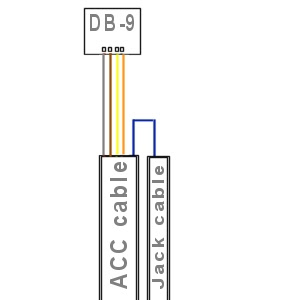
Your cable should now look like this.....


When it comes to testing, make sure that your FT-817/818 is set to its lowest power and set 5db attenuation on the DUO-ART. Try transmitting very briefly to make sure you've got the connections right and if all's okay, then you can increase the power levels.

I couldn't test the full power range of the amp because my licence only permits 10W, so I'll run more tests when my mate G0UXF pops over. So far though, it all seems to be running perfectly well. The ATU doesn't seem to do anything when I press TUNE so I'll see if there's a way to get that working with the FT-818 at a later date.
I'm just pleased that I managed to come up with a working solution when ELAD couldn't be bothered to. I'll probably use the FT-818 and DUO together once every blue moon, so I guess people will wonder why I was so determined to find an interface? Just because! The facility existed on the Amp and it drove me potty that no one seemed to know how to make a cable! If ELAD had just produced a simple guide like this one, everything would have been sooooo simple.
And even though he's a YorkshireMan, my thanks still go to Neil Smith G4DBN for his encouragement and assistance.

Seems absolutely crazy to me to advertise a feature which you can not help your customers to use. The DUO-ART manual shows an over-simplified diagram of how to connect an FT-817 to your amp, but there is no information on how that connection is made. When I asked Advanced Operators for help, I typically got the response "It's not rocket science" and "It looks pretty straightforward", but no one actually came out with anything useful.

I approached ELAD's Technical Support and despite me explaining that I am a Foundation Licence holder with ZERO KNOWLEDGE of electronics, I received techno-talk and unfathomable schematics. They could not provide a pre-made cable and could not just tell me in plain English which parts to buy and which wires go to which pins. In fact, they sent me conflicting information on a number of occasions. Here's some of the stuff they sent to me which really did not help...


I turned to the ELAD FORUMS and initially got the familiar responses which make you feel a bit dumb and spoke of 'holding the soldering iron the right way around'. I explained that I wasn't dumb - and I was perfectly capable of putting together a cable if someone could just tell me what connects to what.
After a couple of days, I was again receiving conflicting advice (albeit in a much more friendly manner). So I decided to read through the information, pick the bones out of it and just 'have a go'!
______________________________
So for the benefit of other DUO-ART/FT-817/818 owners, here's what I did....

You also need to buy a a Yaesu CT-62 Lead. At one end it has an 8-PIN DIN for the 817's ACC Socket and at the other end it has a DB9 Connector for the DUO-ART. You NEED the DB9 Connector, but the lead is useless in this project because it only contains 4 wires, so open up the DB-9 connector, take a nice clear photo of the wiring for reference and then de-solder the connections and throw the rest of the cable in a storage drawer.
JUST A QUICK NOTE : Don't think that you can use any old DB-9 connector! The CT-62's DB-9 connector includes a PCB which provides some sort of "Line Level".
Order a shielded 8-PIN MINI DIN to Bare Wire Lead from the internet. The best place to buy one in the UK is TechnoFix...

Using a Multi-Meter, determine which colours go to which pins and make a note. Your cable may have the same colour combination as mine, in which case you can follow the diagram above. Otherwise, just make sure that the 4 connections on the DB9 match up with the appropriate pins in the mini-din.
After soldering the 4 relevant wires to the DB-9, you will have four surplus wires in the cable. Find out which one of them goes to Pin-8 of the mini-din - you are going to connect that wire to the TIP of the Jack-Plug and cut off the 3 surplus wires.
When connecting the Jack-Plug Tip wire to the Pin-8 wire, it's best to keep both wires small. Lay the cables next to each other as show in the drawing below, cable-tie them together and connect the two wires together with a soldered joint. Insulate and then rebuild the DB-9 connector. You may want to add another cable-tie slightly lower down the cables for additional strengthening.

Your cable should now look like this.....


I'm just pleased that I managed to come up with a working solution when ELAD couldn't be bothered to. I'll probably use the FT-818 and DUO together once every blue moon, so I guess people will wonder why I was so determined to find an interface? Just because! The facility existed on the Amp and it drove me potty that no one seemed to know how to make a cable! If ELAD had just produced a simple guide like this one, everything would have been sooooo simple.
And even though he's a YorkshireMan, my thanks still go to Neil Smith G4DBN for his encouragement and assistance.
Elad duo-art interface cable for yaesu ft-817 ft-818
Monday, 20 January 2020
ELAD REVIEW & GUIDES
I thought I'd pull together some ELAD REVIEWS/GUIDES from YouTube for those who are thinking of buying one. I've started some of the videos a couple of minutes in to avoid unrelated chit-chat...
REVIEW 1
REVIEW 2
GUIDE - Part 1
GUIDE - Part 2
GUIDE - Part 3
Sunday, 12 January 2020
ELAD FDM DUO & WSJT FT8
FTDI VIRTUAL COM PORT DRIVER
After sorting out a Portable FT8 Station yesterday, using my Yaesu FT-818ND, I decided to set it up on the ELAD FDM DUO too. Should be straightforward enough. The ELAD was already setup in the shack (firmware all up to date) and was connected to the PC with 3 USB Leads (yes, three - that's what it takes). The ELAD software was running perfectly well and there were no issues with CAT control between the PC and radio. Good start!
I installed the latest WSJT software (V2.1.2 at the time of writing) and went to the Settings to configure it. The ELAD FDM DUO is there in the list of radios so it was happy days so far. But no, the software could not find the radio. The only thing listed in the SERIAL PORT section was COM1, so I looked in the Device Manager and saw that there was no virtual serial port. The manual recommends downloading the driver from the FTDI website and so I downloaded and installed it.
Sadly, the virtual serial driver did not appear in the Device Manager and I farted about for a long time trying all sorts of things. I installed, re-installed, rebooted and rebooted again and again, powering down the radio each time.

After hours of messing around trying to find the reason why the Virtual USB Serial Port wouldn't appear, I removed the CAT-USB CABLE from the back of the machine and reinserted it. BOOM! It worked. SOOOOOOO ANNOYING!!!
So in case anyone else suffers the same fate, here's some Google Search Engine expressions, so that hopefully someone will find this post and save hours of frustration...
"FTDI Drivers now showing in device manager", "USB Serial Port not showing in device manager", "Virtual Com Port in device manager", "Alternatives to FTDI virtual com port driver".
Anyway, it's all working now...


After sorting out a Portable FT8 Station yesterday, using my Yaesu FT-818ND, I decided to set it up on the ELAD FDM DUO too. Should be straightforward enough. The ELAD was already setup in the shack (firmware all up to date) and was connected to the PC with 3 USB Leads (yes, three - that's what it takes). The ELAD software was running perfectly well and there were no issues with CAT control between the PC and radio. Good start!
I installed the latest WSJT software (V2.1.2 at the time of writing) and went to the Settings to configure it. The ELAD FDM DUO is there in the list of radios so it was happy days so far. But no, the software could not find the radio. The only thing listed in the SERIAL PORT section was COM1, so I looked in the Device Manager and saw that there was no virtual serial port. The manual recommends downloading the driver from the FTDI website and so I downloaded and installed it.
Sadly, the virtual serial driver did not appear in the Device Manager and I farted about for a long time trying all sorts of things. I installed, re-installed, rebooted and rebooted again and again, powering down the radio each time.

After hours of messing around trying to find the reason why the Virtual USB Serial Port wouldn't appear, I removed the CAT-USB CABLE from the back of the machine and reinserted it. BOOM! It worked. SOOOOOOO ANNOYING!!!
So in case anyone else suffers the same fate, here's some Google Search Engine expressions, so that hopefully someone will find this post and save hours of frustration...
"FTDI Drivers now showing in device manager", "USB Serial Port not showing in device manager", "Virtual Com Port in device manager", "Alternatives to FTDI virtual com port driver".
Anyway, it's all working now...


Friday, 10 January 2020
RIP K1MAA
K1MAA - FRANK FASCIONE
Frank was the first person to help me out with REVERSE BEACON operation. He spotted me back in May 2019 from Connecticut, USA and by pure coincidence I actually spoke to him in September during the Railways On The Air event!

I've no idea why, but I looked him up today on QRZ, only to find that he passed away a couple of days ago, aged 68. So sad. RIP FRANK.

Frank was the first person to help me out with REVERSE BEACON operation. He spotted me back in May 2019 from Connecticut, USA and by pure coincidence I actually spoke to him in September during the Railways On The Air event!

I've no idea why, but I looked him up today on QRZ, only to find that he passed away a couple of days ago, aged 68. So sad. RIP FRANK.

Thursday, 9 January 2020
SIGNALINK SL-USB
FT-8 & FT818
When I tried out FT-8 in the shack using my Yaesu DX-3000, I quite enjoyed it but the limitations of my QTH meant that I was constantly seeing the same operators over and over, so I kinda fell out with it.

But now I've decided to give it another shot but this time I will do it from much better locations - ie outdoors. Even locally I can get to the top of a 1500ft ASL hilltop (Winter Hill) and I reckon that I should do really well with my FT-818 and a multiband antenna.
But the FT-818 doesn't have a built-in soundcard like the DX-3000, so I found a second hand SignaLink SL-USB on eBay, complete with the appropriate interface cable. I've already got a decent laptop but ideally, I'd like to find a 12V power-adapter for it so I can hook it up to an external power source, should the internal battery get too low.


 Anyway, I was doing all this in the corner of the lounge and just for testing purposes I had the FT-818 connected to a Discone on the roof, just to see if the RX was working ok. It was, so I then switched to FT8-2M (144.174MHz) to try a transmit at 2.5W (the discone can tx on 2M). To my surprise, G7DEY (Peter in South Wirral) responded to the CQ and we managed to log a contact. So now I know that I can get out there with a decent antenna and do some FT8 work.


When I tried out FT-8 in the shack using my Yaesu DX-3000, I quite enjoyed it but the limitations of my QTH meant that I was constantly seeing the same operators over and over, so I kinda fell out with it.

But now I've decided to give it another shot but this time I will do it from much better locations - ie outdoors. Even locally I can get to the top of a 1500ft ASL hilltop (Winter Hill) and I reckon that I should do really well with my FT-818 and a multiband antenna.
But the FT-818 doesn't have a built-in soundcard like the DX-3000, so I found a second hand SignaLink SL-USB on eBay, complete with the appropriate interface cable. I've already got a decent laptop but ideally, I'd like to find a 12V power-adapter for it so I can hook it up to an external power source, should the internal battery get too low.

UPDATE <<< 10 Jan 2020
So it arrived in the post today and it looks totally mint! The great thing is, it includes the SLMOD6PM and SLCAB6PM which means that as it stands, the SignaLink SL-USB will work with 3 of my radios - the Yaesu FT-818, the ICOM IC-7400 and the ALINCO DR-735E.

UPDATE <<< 11 Jan 2020
I spent the last hour or so trying to setup a Portable FT8 Station using my FT-818, SignaLink USB and WSJT. I struggled quite a bit because I'd watched a few videos and read a few things on the internet which all lead me to believe that I just needed the SignaLink USB interface cable connected to the radio along with a USB lead. That's not the case - you still need a CAT control lead (6-Pin DIN to USB) so I had to make one up! Grrr!
 Anyway, I was doing all this in the corner of the lounge and just for testing purposes I had the FT-818 connected to a Discone on the roof, just to see if the RX was working ok. It was, so I then switched to FT8-2M (144.174MHz) to try a transmit at 2.5W (the discone can tx on 2M). To my surprise, G7DEY (Peter in South Wirral) responded to the CQ and we managed to log a contact. So now I know that I can get out there with a decent antenna and do some FT8 work.
UPDATE <<< 15 Nov 2024
Since posting this (some 4 years ago), I can confirm that the SignaLink SL-USB works incredibly well and the device has served me well. It’s a very high quality bit of kit which works flawlessly.
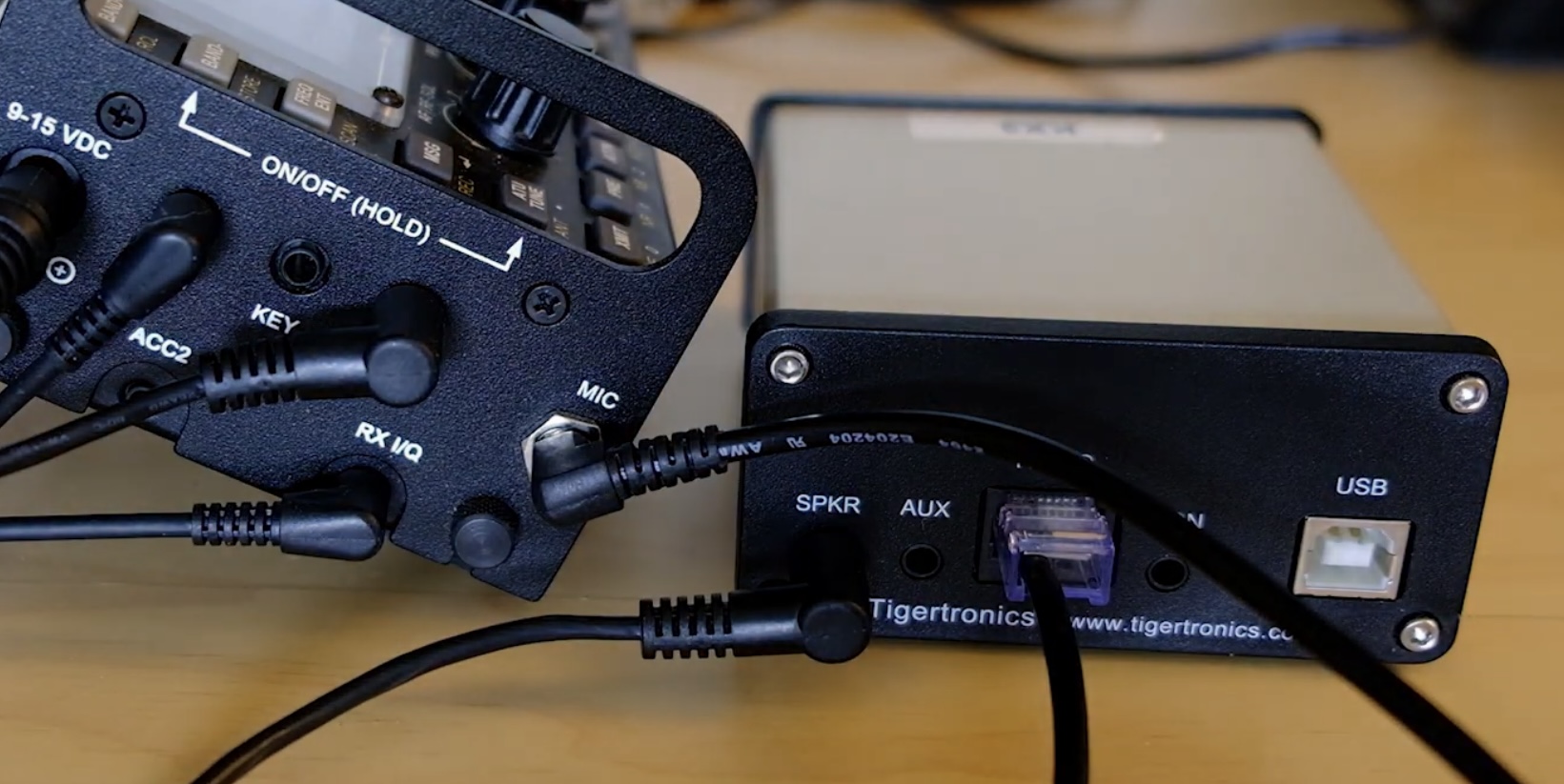
I sold my FT-818, so I decided to buy an interface cable to allow me to use the SignaLink with my Elecraft KX3.

Subscribe to:
Comments (Atom)