Sunday, 1 February 2026

CHOYONG LC90 SMART RADIO

The CHOYONG LC90 is a pretty cool radio and is probably unique in what it offers; FM, MW, LW and SW reception including SSB.  It also provides comprehensive Internet Radio Streaming facilities for Music, Podcasts and News! This is a fascinating area to explore and the LC90’s menu system makes it super easy to navigate through the 40,000+ stations currently available (subject to GeoFencing). 

Streaming is handled by the radio’s built-in Wi-Fi, but you can also add a Sim-Card  to provide the data stream when there’s no local Wi-Fi. It also has provision for an SDCARD so that you can playback your own MP3 songs. Sadly, there is no Airband!

Thanks to the BlueTooth facility, I was able to stream music from my iPhone to the radio and enjoy the rich 15W speakers of the LC90.

Despite being a lesser-known brand, the  build-quality of the unit is quite high, but to be fair, that’s reflected in the pricing of the radio - this ain’t no cheap Chinese tat! I’ve seen the LC90 advertised as high as £350 on Amazon, although the more common selling price is £235.


If you’re a frequent visitor to this blog, you’ll know that I never pay full price for new radio gear and this was no exception - I snaffled my LC90 for a lowly £146 from Ebay after waiting almost 12 months for the right listing to appear. And at this price, the radio definitely is a bargain!


Unlike Tecsun portable radios, the Choyong doesn’t come with a travel-case which is a great pity. If I ever take my PL990 outdoors, I always put it in its faux-leather case for protection and it’d be great if Choyong provided something similar.

The ergonomics of the LC90 are excellent and I really enjoy operating it - more so than my Tecsuns if I’m honest. The buttons are well placed and the legends are easy to read. The menu system is a joy to use and the (non-touch)  crystal-clear colour screen further enhances operation. With my experience of using portable radios, I found little need for the operator’s manual. The only thing which spoiled the enjoyment of the radio was the lack of a stand on the back. On my Tecsuns, I almost always use their built-in stand to have the radio sat at a 45 degree angle for comfortable operation on a desktop, I’ll have to buy one and stick it on myself.

Starting in FM mode with the telescopic antenna extended, it was easy to find stations and I have to say that I loved the audio from this radio! It was surprisingly deep and rich in sound for such a small package, thanks to the 3 drivers behind the speaker-grille. Holding down the FM button places the radio in Search mode and received stations can be stored in memory (and there’s a lot of memories). This search facility is replicated on the other bands too. I also like the fact that RDS information is displayed in FM mode.

MW didn’t pull in too many stations from my location, but neither do my Tecsuns. There simply aren’t that many around any more, but all the usual suspects were received. Sensitivity was below par.

The ShortWave bands were thankfully busy with Ham Radio contesters, so it was easy to find contacts on all the available bands. Strong signals from Europe came through well on the telescopic while, but I was eager to try the external antenna port so  I connected one of my small wires and pulled in a heck of a lot more signals.


As with any radio, it’s always worth considering using a small matching unit to improve the performance of your wire antenna across the bands. The tiny Pocket Transmatch from Kanga is a good example…
 

I should point out that the external antenna port (a 3.5mm mono jack) is located right next to the tuning dial which is crazy! It would be so much better if it was one the left edge of the radio (which is completely blank).


I’d say that side-by-side with the PL-990X, the LC90 had a less sensitive receiver, but the difference is small and the additional features provided by the Choyong made it the radio that I picked up much more often. It’s really grown on me quite quickly. So this is no DX radio, but to be honest, neither is my PL990X. When I want to pull in very weak stations I just go into my shack and switch on one of my ‘big boy’ radios. 

The biggest feature of the LC90 is the Internet Radio Streaming. Having the ability to choose from over forty thousand stations from across the globe is a real boon! Yes, we know you can do that on your mobile phone, but you’ll drain your battery and potentially miss an important call. Plus, your phone app won’t cover AM/FM/LW/MW/SW and won’t have LSB and USB. And it won’t have all those lovely buttons and dials that us radio freaks love so much 😂.

The LC90’s method of searching and selecting a station makes it a pleasure to use. It even has Voice Control and its recent integration with ChatGPT means it hardly ever fails to understand you (in any language)!

And then there’s all the News channels and Podcasts of the world. Imagine listening to your favourite Ham Radio podcast while pottering around the garden or tidying up the shack. No need to turn on your computer or use up your phone’s charge.  Talking of charging, the radio has a USB-C charging port which keeps your twin 2500mAh 18650 batteries topped up. You can seemingly run your radio for days on end before they fully discharge. If you want even longer run-time, simply swap out the supplied batteries for a couple of 4000mAh 18650s!

To test the LC90’s WiFi, I connected to my local router and experienced no problems. I connected with no issues whatsoever and I suffered no lag or buffering during streaming sessions. I later connected to my iPhone’s Personal Hotspot and again, it worked flawlessly. Finally, I inserted a 4G Vodafone Sim Card into the radio and that worked fine too.

Searching through thousands of Radio Stations is never going to be quick and easy, although it can be quite entertaining. When you select one of the stations shown on screen, you have to wait a few seconds for it to be loaded and begin playing. That’s fine most of the time, but it’s fair to say that some stations take longer than others, while some of the more obscure stations just never load at all. That’s not the fault of the radio.

The best thing you can do when you find a station that you really like is to add it to the Memory Bank. Alternatively, if you know the name of the station, you can ask for it verbally with a command such as “BBC WORLD SERVICE”. It doesn’t work perfectly all the time, but I’m sure it will get better with updates.

Since first coming to market around a year ago, a lot has changed on the radio thanks to Choyong’s regular firmware updates. They have listened to their customers and have made some fantastic improvements. Reading early reviews would be a complete waste of time, since it’s just not the same radio now, with the latest V4.8 firmware. And there’s more to come! A waterfall would be nice (wink-wink).

Conclusion
This isn’t the most sensitive radio in the world, nor is it the very best, but for me, it’s the one I find myself turning to over and over again. It’s so very easy to operate and it does everything it’s supposed to. In particular, I love the sound of the LC90 and at the end of the day, that’s one of the most important considerations when choosing a radio.

The appearance and ergonomics are great and so too is the build quality. All the buttons and rotaries feel firm and positive. The screen is clear and bright and brimming with useful information. I’m really happy with my little bargain and would go so far as to say I’d have been just as happy if I’d had to pay full price! My only real complaint is the lack of AirBand and the quirkiness of the internet radio, which doesn’t quite feel fully developed yet 😥. 

Other than that, this feature-rich smart radio is smart in every sense of the word and you’d be dumb for not considering it if you’re looking for a great portable.


COMING SOON : LC100

Please feel free to leave a comment below.

73, Tom, M7MCQ.

Friday, 19 December 2025

ICOM IC-7300 MK II

IC-7300 MK2 MINI-REVIEW

Having got shut of my Yaesu FTX-1 🙏,  I made the (very easy) decision to keep on using the wonderful IC-705 for outdoor use and to add the new 7300-II to the shack. And you know what? It feels great!!


As much as I really wanted to love the FTX-1 Optima, I found myself increasingly disappointed with it. Despite losing money 🙄 I was still excited to just put it behind me and get back to enjoying radio!

I had a 7300 a few years ago and it was a great radio but the Mk-II has just made things even better. That’s what you want from a new model - new features and improved function - are you listening Yaesu??

Icom have sold over 100,000 Mk1’s, making it one of the most popular and influential transceivers of all time. When introduced to the UK market (almost a decade ago), it was a genuine game-changer, bringing  high-end SDR tech at entry-level prices, setting new standards. It left everyone else in this sector of the market trailing behind for the next few years.

Apart from being a fabulous budget-priced 100W HF, 6M & 4M SDR transceiver with built-in ATU, it was also compact enough to be used outdoors and the 4.3” colour TFT touch-screen was perfectly visible in bright sunlight - as a result you’d often find it used for Field Days and POTA activations.

So what does the MkII bring to the table? Well of course it has all the benefits of the original version plus a few improvements…

  • An improved receiver! The old one was great anyway, but improvements are always welcome. The RMDR has been increased to 105dB for a better dynamic range.
  • Improved TX Phase Noise! A 12db improvement - now -139dBc/Hz @ 1kHz.
  • Improved Power Consumption! Radio only draws 700mA in standby.
  • Cooler Operating Temp! I never thought the old one ran hot, but cooler is good.
  • USB-C Conector! Much better than the old USB. AND it provides two com-ports!
  • LAN Connector! This makes Remote Control far, far simpler! Inline with the 7610 RC.
  • RX-In/RX-Out! So pleased to see this valuable addition.
  • CW Decoder! So now the 7300- can decode RTTY and CW.
  • HDMI Port! External big-screen display.
  • IPS SCREEN! IPS replaces TFT for better detail and colours

So all in all, a very nice collection of useful upgrades! And no losses. Thank you Icom for listening to your customer-base and giving them what they want.

Looking at the front panel there’s virtually no changes apart from the colour of the Power Switch and the ‘Mk2’ logo. On the back panel however, it looks significantly different… 

 
One of the most welcome additions to me is the RX IN/OUT connectors. This allows you to connect an inline BandPass Filter or to add a Receive-Only antenna (say a ground-mounted loop) or even add an external receiver in the form of an SDRPLAY RSPA1. The latter is my personal choice - more on this later.

Having extremely limited space in the shack means that the compact 7300 is a perfect fit, but the downside is that I have to locate the radio to the left of my sitting position. To be fair, that’s not really a problem, since I’m one of those people who prefers to operate their base station via their computer most of the time and that allows me to use my PC’s 32” curved screen, amplified speakers and my Elgato Wave 3 microphone.

So the first job was to attach the supplied EMC Filter to the back wall. I’m not entirely sure that these bulky things do any good, but it’s there so I’ll use it. Next up was to squeeze the 7300 onto a shelf next to a matching Icom speaker that I already owned. Boy, that was a TIGHT fit! Then I connected my trusty LDG Z100PLUS tuner and a USB lead for the computer connection. 

I also connected a LAN cable and initiated the network time-sync facility. The LAN connector is a fabulous addition to the Mk2 and I’m soooo glad they included it. Apart from keeping the clock time perfectly synced, it also negates the need for a computer for remote-control operartion - just like the 7610.

To be honest, I didn’t have access to a LAN port in the shack, so I bought a WiFi Extender which includes an RJ45 LAN port and plugged it in nearby. It works superbly and was an absolute doddle to setup! It has also boosted the performance of my computer’s built-in WiFi, making downloads much faster than they had been previously. And best of all, I paid for it with some Amazon Gift Vouchers that I’d received for my (67th) birthday. Result!!

It’ll probably come as a surprise to hear that I didn’t bother using the HDMI port at all 😮. To me, it’s little more than a vanity screen and is only of any real use to the visually-impaired.

With all the basics connected, I powered up and checked that everything was working properly. I heard IX1HPN on 20M and gave him a shout at 10W. He had a pile-up going and I struggled to get through so I increased power to 25W and still struggled, thanks to my extremely compromised ground-mounted vertical antenna 😢. After repeated attempts, he finally heard me and gave me what he called a genuine 59+.

The Mk2 receiver didn’t sound any different to the last one I’d owned. It didn’t sound any better than my 705 or the Yaesu FTX-1.  In fact, I believe that most modern SDR receivers sound pretty much the same and I’m convinced that 9 out of 10 operators who attach such great value to the Sherwood Table would come unstuck in a blind listening test!

IC-7300 Mk2 with my 5yr old IC-705❤️

The Noise Reduction on the 7300 doesn’t offer anything ground-breaking and that’s always annoying to me when I witness the absolute wonders of the NR2 on the cheap Hermes Lite II - nothing comes close to it! But, it is what it is and I find most of my noise-reduction success comes from making regular use of that little RF GAIN dial!

A mate of mine (M7XCA) reckons the Mk2 pulls in a fraction more noise than his Mk1, but maybe that's because his old Mk1 is a little less sensitive than it used to be. It’s hard for me to comment right now because I’m absolutely surrounded by Xmas lights, Xmas trees, Xmas animated decorations. I sure do wish I had no neighbours! 😂

The old 7300 screen was a TFT and that has been updated with an IPS screen, offering better colours and better performance in bright light. The difference isn’t huge, but it’s definitely an upgrade. Whether it’s more durable and longer lasting than the TFT is a question with no answer. All I can say is I hope it’s better than that crappy screen on my Yaesu FT3D🤬.

The new CW Decoder works extremely well and I found that the AUTO mode does a fabulous job of determining the speed and decoding accurately (with a clean signal).

Knowing that everything was working well, I downloaded the latest drivers from Icom’s website and then plugged in the USB cable to the PC. With that done, it was time to install the RS-BA1 Remote Control software and connect the lovely RC-28 external VFO Dial.


Once I’d got that running (I had to update the software to get it to recognise the 7300Mk2), I started to focus on installing an SDRPLAY RSPA1 receiver.

Originally, I thought that I could just plug my SDRPLAY into the 7300’s RX out, because that’s what everyone was saying on the YouTube (and even at Dealerships) but when I did, I got nothing!  You need to “activate” the RX antenna ports by switching RX-ANT on in the Function menu. The trouble with that is, you’re 7300 will then stop receiving and the radio’s panadapter will go dark. 

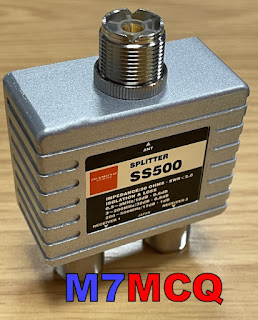
And then I recalled a similar experience with my IC-7610, where you need to place the external receiver into a loop using a splitter.  I've created a diagram showing how to connect it...

By using a decent quality splitter such as a Mini-Circuits ZCS-2-2+ or a Diamond SS-500, you can be assured that you are also providing a good degree of isolation between your transceiver's receiver(s) and the external receiver. Typically, you're talking about more than 30dB isolation, so there's very little chance of interference from one receiver to another.

At the time of purchase, the Mini-Circuits splitter wasn't available anywhere in the UK - fresh stock wasn't expected for another 3 months, so I turned to the Diamond SS-500 which is well made but at £70 is quite expensive and has an insertion loss of 0.8dB. The Mini-Circuits device has a lower (0.4dB) insertion loss, but costs around £90.  As usual in these post Covid times, stock shortages pushes prices up to ridiculous levels, and you have to choose between stumping up the cash or waiting months. I chose the former.

The Diamond SS-500 is good from 0.5MHz up to 500MHz which falls way short of the SDRPLAY's frequency range, but that's of no consequence to me, since I'm only interested in HF coverage. 

Before I could install the splitter, I needed to make up some PL259-to-SMA patch leads using short lengths of RG-316. Once that was done, I connected them all up.

I then loaded the latest version of SDRuno along with all the various add-ons and also made sure that OmniRig was running and configured for the IC-7300. 

With everything setup correctly I switched on the radio and ran SDRuno. The two interfaced perfectly and it was good to see the full layout and tools of SDRuno.

Version 1.4.2.1710 is the latest version of SDRuno at the time of writing and is incredibly rich in features. There are a couple of bugs, but the software writers are fully aware of them and are working hard to sort them out. I’m also going to install SDR-CONNECT V1.05 too, along with SDR-CONSOLE...

Anyway, the V.1.4.2 software ran perfectly and it feels good to have SDRuno back on screen, especially this latest version which allows you to have up to 16 virtual receivers running at the same time!! Things have changed significantly since the last time I connected an RSP to a radio and I'm looking forward to exploring and experimenting.

PLEASE NOTE> Once you’ve made these connections, you need to switch the Receive Antenna option on which can be found on Page-2 of the FUNCTION MENU. I’ve actually assigned the RX-ANT function to the VOX button for quick access.   Please note further(!) that whenever you use a splitter (no matter how good it is), you will lose a small amount of signal, so if you wish to avoid this, you can use an SDR Switch instead such as this one from ML&S.

Needless to say, you cannot use this Splitter method if you also want to add an external RX antenna such as a LOTG. You'd have to use the more traditional method of an antenna switch such as the MFJ-1708B, etc.


BEAR IN MIND that you don’t need an antenna splitter or an antenna switch if you’re happy to just use your external SDR for listening to your signals - just connect your SDR to the RX-OUT port, switch on the RX-ANT and away you go.

The final step of the 7300 installation was to configure it to communicate with the SUPERB remote-control app called SDR CONTROL FOR ICOM. I have used this with my 7610 and 705 using my IPad and it works flawlessly!! It’s simply the best RC software out there if you have an IPad.


SDR CONTROL FOR ICOM

So that's it for now. Everything is working very well and it's time to sit back and just enjoy playing radio without all the buggy distractions that the FTX-1 brought. Happy days - thank you Icom!

I'll post more after a couple of months use.

73, Tom, M7MCQ.


 .

Saturday, 13 December 2025

DX SPOTTER

The £60 DX SPOTTER from TopBytes is a fabulous little gadget which you can place anywhere in your shack for a constant stream of DX Spots. Alternatively, you can chuck it in your RuckShack and benefit from the spot information while outdoors on a SOTA/POTA outing.

It's a small WiFi-Enabled DX Cluster display powered by any USB power source. You can configure it so that when at home it automatically connects to your WiFi router or to your mobile phone's hotspot when operating outdoors.

It features a bright, clear 256x64 OLED screen providing you with a Real Time Clock, Callsigns, Frequencies, Modes, Info and Comments! A really handy little device which shows band activity at a glance.


You can find out much more by visiting the TopBytes website to read the online Instruction Manual. 

From ML&S website...

Key features

  • Dedicated DX cluster display for amateur radio stations
  • Built in WiFi - connects to your home or portable network
  • Works with standard Telnet based DX clusters (DXSpider, CC Cluster, etc.)
  • Pre configured to use the UK hamserve DX cluster by default
  • High contrast 256×64 yellow OLED screen with smooth scrolling
  • Shows callsign, frequency in MHz and spot comments
  • Status line with WiFi signal strength, custom display title and clock
  • Web based configuration portal - no special software required
  • Band and frequency filtering so you only see the spots you care about
  • Adjustable scroll interval and spot history (1–15 recent spots)
  • Stores settings in non volatile memory so it remembers everything after power off
  • OTA (Over The Air) firmware updates via secure HTTPS
  • USB powered - ideal for the shack, field days and portable operation

Typical uses

  • Shack monitor - keep DXSpotter on the desk to watch band openings without tying up a PC screen.
  • Contest support - track activity on your chosen band and spot new multipliers quickly.
  • Portable and field days - run it from a USB power bank and campsite WiFi or a portable router.
  • Learning tool - great for newer licensees to see when different HF bands are open and which modes are active.

Simple setup

  1. Power the DXSpotter from any 5 V USB supply or power bank.
  2. Connect to its built in WiFi access point and open the configuration page.
  3. Select your WiFi, enter the password, your callsign and preferred DX cluster.
  4. Optionally set band filters, scroll timing and display title.
  5. Save and reboot - spots will begin to appear within seconds once band activity is present.

Technical highlights

  • WiFi: 2.4 GHz 802.11 b/g/n, WPA/WPA2 security
  • Display: 256×64 pixel yellow OLED, wide viewing angle
  • Power: 5 V DC via micro USB, typically 1–2 W
  • Protocol: Telnet DX cluster over TCP, HTTP web interface, NTP time sync
  • Configuration: Built in captive portal and web server

Tuesday, 28 October 2025

DRONE : DJI MINI 4 PRO

Amateur Radio often takes me outdoors to some beautiful areas in search of a great take-off for my QRP transmissions. When I find somewhere, I often sit there thinking how good it would be to be able to record it with a short video and even benefit from a birds-eye view of the place.

And so I began to look at the idea of purchasing a drone. I’ve been considering this for quite some time to be honest, but my forced retirement and subsequent loss of income has held me back. I could, of course, have bought a cheap and cheerful device, but I know from a lifetime of buying tech that I wouldn’t have been happy.

Anyway, to cut a long story short, one of my mates bought a £900 drone with extras and almost immediately decided he wanted the bigger model in the range, so he had this new, unused one to dispose of. Thankfully, he offered it to me for a great price and so here we are!

The day before I picked up the package from my friend’s house, I obtained an OPERATOR-ID and a FLYER-ID online. The OID is simply a matter of paying £12 but the FID involves learning the CAA Drone and Model Aircraft Code and taking a very simple 40 question exam - weirdly at no cost.

In the UK, if your drone weighs less than 250g, you only need an Operator-ID, which is crazy! IMHO the Flyer-ID should be compulsory, since it does actually teach you something about flying a drone responsibly, whereas the OID teaches you nothing at all. Typical bureaucracy!😠

Another daft rule is that Public Liability Insurance is not a compulsory requirement for drones under 250g. Needless to say, I wanted to be insured  and so membership of FPV-UK got me £5M worth of cover, plus some other benefits. 

The drone in question is the DJI MINI 4 PRO FLY MORE. The “fly more“ means that it comes with extra batteries and a triple charger, allowing you to have approximately 90 minutes flying time - more on that later. In the box you get the drone, the controller, the batteries, a USB lead and some spare propeller blades. There’s also a little screwdriver included but it doesn’t look to be the best, so I’ll probably replace it with an alternative - the last thing I want to do is mess up the heads of those teeny tiny prop screws!

The drone was absolutely unused and as you’d find it in the shops. It came with its own carry bag which is a high quality item but (in my opinion) a tad too too small. Thankfully, I have a nice little Peli-1200 which turned out to be the ideal case, offering storage with protection from knocks and rain (not to mention security).

The Mini 4 Pro comes with a choice of two Controllers - one uses your mobile phone to act as a screen and the other has its own built-in screen. Thankfully, I have the latter, which is called the RC2 - it’s infinitely more useful. It also provides upgraded antennas (2 transmit, 4 receive) along with a bright 5.5” touchscreen.

Since my drone was secondhand, my first job was to get it registered and bound to my DJI Account and once that was done, the learning process could begin.

Both the drone and the controller have memory card slots, so I purchased a couple of MicroSD cards from DJI’s recommended list. I wanted a 256Gb for the drone because obviously this is where the movies and photos are stored. The RC2 Controller allows you to record everything that you see onscreen as you fly, so I figured I might as well install another 256Gb card in there too, so that if something happened to my drone’s card, I’ve always got a spare one with me. I should point out that the RC2 controller has its own inbuilt 32Gb storage and doesn’t necessarily need a separate memory card.

I was really quite nervous about my very first flight, so much so that I spent a long time watching training videos on YouTube, to avoid the common mistakes which befall many rookie pilots. I also took advantage of things like DJI’s Virtual Flying App which allows you (if nothing else) to get used to the controls.

My first ‘real’ flight was little more than a vertical take-off from the lawn to a grand height of 30 feet. I then immediately landed it - just to make sure I could! 😂

Once I felt safe that nothing bad was going to happen, I extended my aerial adventures bit by bit, including testing the Return To Home feature. My confidence built up slowly, but I remain cautious and avoid being too adventurous until I’ve gained some real experience and the controls become absolutely second nature. 

So, let’s look at the MINI 4 PRO.  It was launched just a couple of years ago and introduced some fantastic new features to the sub-250g arena including…

  • Omni-Directional Collision Avoidance
  • Advanced Return To Home System
  • Enhanced Camera System
  • Latest O4 Transmission System
  • New Rotating Gimbal for Vertical Shooting
  • 2590mAh Battery - up to 34 mins flight time
  • 4K Video at 100fps - Slow Motion
  • 4K Video at 60fps
  • Night Shots Video
  • Maximum Speed of 36mph
  • 48MP 1/1.3” CMOS Sensor
  • D-LOG M  & HLG profiles
  • Active Track 360
  • Waypoint Flight
  • Cruise Control
Below is my very first (and slightly boring) video which I made around our holiday-park. Since then, the weather has been very poor - especially the winds, which make it very difficult to fly.

First drone video 😂😁😂

The MINI PRO 4 is aimed squarely at rank amateurs like me - people who want the convenience of a light, compact drone with plenty of flying aids for casual and occasional use on sunny, calm days. If you want to work in less than ideal weather conditions and have a more serious interest in drone flying, you need something bigger, perhaps from the Mavic range. Having said that, many 'professionals' have given the Mini4Pro high praise.

________________________

PROS

Beginner-friendly: The drone is easy to fly, even for those with no prior experience, and features user-friendly controls. 

Safety features: It has omnidirectional obstacle avoidance and is designed to be safe for both beginners and experienced pilots. 

High-quality video: The 1/1.3-inch sensor captures high-quality 4K video and great stills in various conditions. 

Lightweight and compact: At under 250g, it is often exempt from complex registration and exams in many countries. 

Improved tracking: ActiveTrack mode is refined, and a new jog wheel offers more control when following a subject. 

Good value: With recent price reductions, it is now considered one of the best all-around value drones available. 

CONS

Wind performance: 
Its lightweight design can make it unstable in strong winds compared to larger drones. 

Price: The initial cost was a barrier for some, though this has improved with a recent price drop. 

Image quality: Some users report that higher-megapixel modes can produce noisy results, and a 12MP mode may be cleaner. 

Obstacle avoidance limitations: While generally effective, some users have found it can struggle in specific situations, like with close-up tracking, and may not always prevent collisions.

SPECS

  • Takeoff Weight: < 249 g. Standard aircraft weight (including the Intelligent Flight Battery, propellers, and a microSD card). The actual product weight may vary due to differences in batch materials and external factors. Registration is not required in some countries and regions. Always check local laws and regulations before use. With the Intelligent Flight Battery Plus*, the aircraft will weigh more than 249 g. Always check and strictly abide by local laws and regulations before flying. The Intelligent Flight Battery Plus is not sold in Europe.
     
  • Dimensions: Folded (without propellers): 148×94×64 mm (L×W×H)
     
  • Unfolded (with propellers): 298×373×101 mm (L×W×H)
     
  • Max Ascent Speed: 5 m/s (S Mode), 5 m/s (N Mode), 3 m/s (C Mode)
     
  • Max Descent Speed: 5 m/s (S Mode), 5 m/s (N Mode), 3 m/s (C Mode)
     
  • Max Horizontal Speed (at sea level, no wind): 16 m/s (S Mode), 12 m/s (N Mode), 12 m/s (C Mode). The max horizontal speed is subject to dynamic local restrictions. Always abide by local laws and regulations when flying.  
     
  • Operating Temperature: -10° to 40° C (14° to 104° F)
     
  • Image Sensor: 1/1.3-inch CMOS, Effective Pixels: 48 MP
     
  • Lens: FOV: 82.1°
     
  • Format Equivalent: 24 mm
     
  • Aperture: f/1.7
     
  • Focus: 1 m to ∞
     
  • ISO Range Photo: 12 MP 100-6400; 48 MP 100-3200
     
  • Shutter Speed: 12MP Photo: 1/16000-2 s (2.5-8 s for simulated long exposure); 48MP Photo: 1/8000-2 s
     
  • Max Image Size: 8064×6048
     
  • Still Photography Modes: Single Shot: 12 MP and 48 MP
     
  • Burst Shooting: 12 MP, 3/5/7 frames, 48 MP, 3 frames
     
  • Automatic Exposure Bracketing (AEB): 12 MP, 3/5/7 frames at 0.7 EV step; 48 MP, 3 frames at 0.7 EV step
     
  • Timed: 12 MP, 2/3/5/7/10/15/20/30/60 s; 48 MP, 5/7/10/15/20/30/60 s
     
  • Photo Format: JPEG/DNG (RAW)
     
  • Sensing Type: Omnidirectional binocular vision system, supplemented with a 3D infrared sensor at the bottom of the aircraft.
Best DJI drone in 2026…