Thursday, 18 April 2024

RADIO-KITS EXPLORER (PART-1)

PART 1 - THE BUILD

I just love building kits, despite me having zero electronics knowledge. I'm not sure why these kits attract me so strongly - perhaps it's the creative side of me that longs to 'make something'. Maybe it's my inquisitive nature which always wants to peek and poke around to see how things work. Whatever it is, I am always excited when a new kit drops through my letterbox.

Radio-Kits is based here in the UK, operated by Steve Drury (G6ALU). He’s offered a few kits over the years, but this 5W CW/SSB Transceiver is his latest.  The design is actually the progression of an older radio called the MKARS80 which sold in limited numbers for a period of about 15 years before becoming obsolete due to the unavailability of components. This new version is vastly improved and can now be offered as a 20, 40 or 80M transceiver. 

There's very little information about the Radio-Kits Explorer on the internet at the time of writing (March 2024) which is surprising - nothing on YouTube even! I found a post on the SOTA Reflector by M1BUU who had just completed the build and he was very happy with it, which is encouraging. I also found a post on the AE5X blog and he's about to start the build in April.

Initially, I thought the blue case might not be as visually pleasing as the professional steel/aluminium cases supplied by other manufacturers, but now I’ve seen it in the flesh, I really like it! You can of course choose to source your own case - how easy that would be is another question.

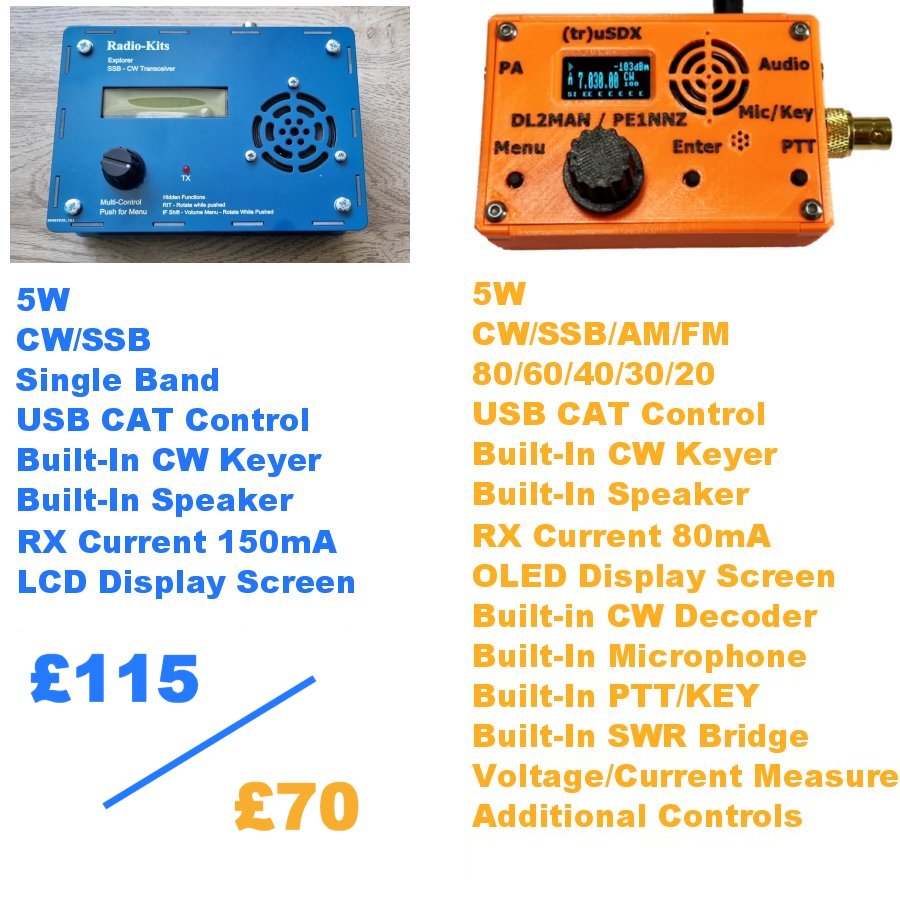
Size wise, the Explorer is bigger than I thought - it measures approximately 6" x 4" with a decent 2-line LCD screen just under 3" wide. There’s only a single control on the front panel which, from an ergonomics point of view, is less than ideal. It has a decent built-in speaker.

The kit cost me £115 plus postage. I guess the closest radio to this that I already own is the (tr)uSDX which is also available in kit form (£70) and is also a 5W CW/SSB Transceiver, but the big difference between them is that the (tr)uSDX is a 5-band radio while the Explorer is only single band. The 'orange wonder' also has quite a few extra useful features which are lacking on the Explorer.

Maybe the Explorer's receiver is a far better performer than the (tr)uSDX - I don't know yet, but we'll soon find out I guess.

The kit itself arrives in lots of sealed bags, separating components and keeping things organised. There are probably over 800 solder-joints to be made in this full kit, so that's a lot of soldering!! Thankfully, there is no SMD work.


Broadly speaking, the construction manual looks well written and includes great diagrams and photographs. Because it's a mono-band radio, there are only three circular toroids to wind, but there are five inductors/transformers - T4 and T5 being trifilar.  Looking at that part of the manual, I'd have to say that the winding instructions would be challenging for an outright beginner. Then again, some might say that a beginner should not attempt something as complex as this kit. 

I'll try to include clearer explanations of the winding process to make it more understandable for any newbies reading this. Note that the 80M kit requires twice as many windings on T37-6 than the 20M kit, so it’s that much more difficult.

Just like I did with the QDX KIT and the QCX KIT (amongst others) I will post on here throughout the build process, showing warts and all. If I mess something up, I will declare it and I will tell you how I got around it (or how it all ended right there). If it ends up in smoke, then so what? There'll be no tears. This isn't a $2 Billion space shuttle! 

This post is PART ONE which will show the build. PART TWO will be a separate post covering the testing and performance of the kit (as built by a clueless beginner ๐Ÿ˜‚ )

 First job was to print off the manual and in particular the PCB LAYOUT page, so that each component can be marked off as it's soldered to the board. This is a really handy thing to do and it slows you down, which is always a good thing!!

The first components to be installed are the ones from the bag marked "20M" and these include 1 resistor, 4 inductors, 11 capacitors and 8 crystals. None of these are polarised, so you can insert them any way around. My own pedantic nature forces me to insert the components in a particular way - eg all resistors are placed on the board in a manner that makes it easy to read their values - with the tolerance bands all to the right (or at the bottom if placed vertically). Having said that, I noticed later that I'd not fitted the yellow toroids all the same way ๐Ÿ˜ก I might desolder and turn it around๐Ÿ˜‚

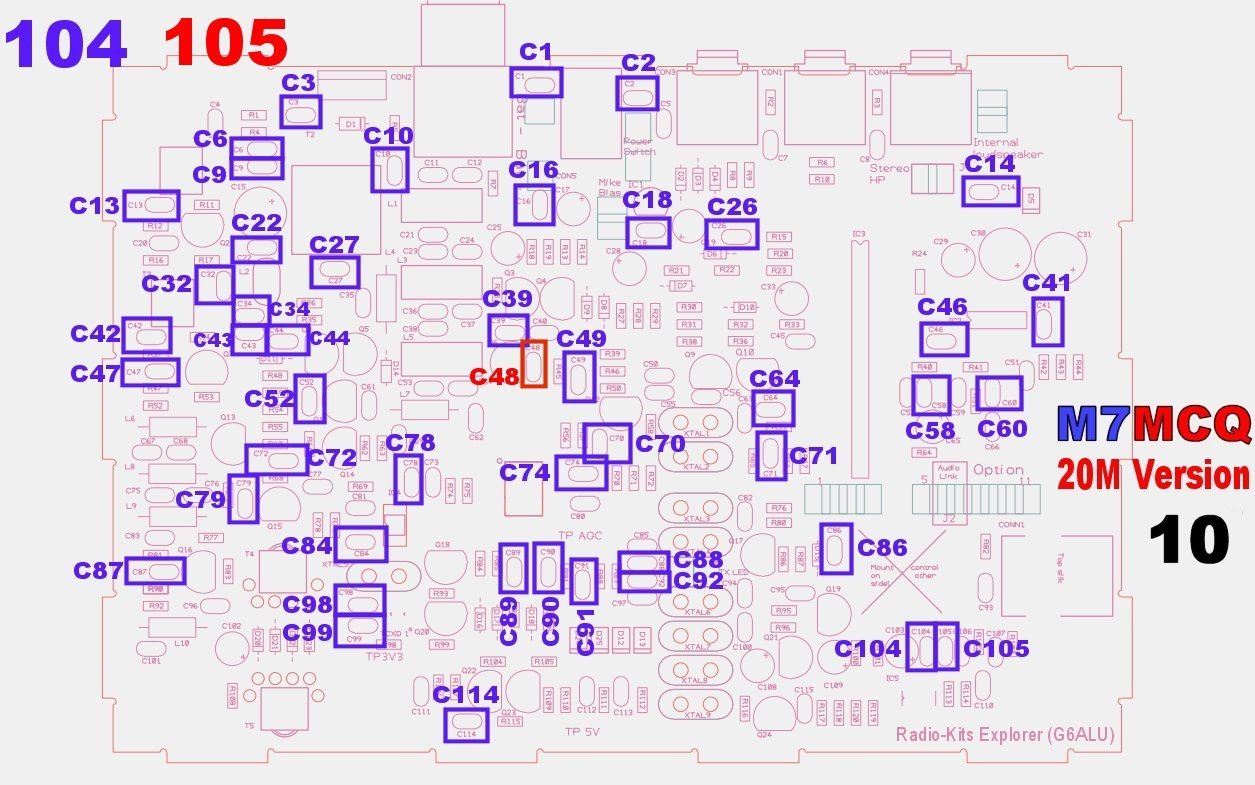
It very quickly becomes apparent that it can TAKE AGES to find things on the PCB because of how densely populated it is. Eg, I was searching for R93 for what seemed like forever. It wasn’t in an unusual place - I just couldn’t seem to see it! To help others quickly locate component locations, I’ve created some images (below) which will hopefully prove to be useful by showing you exactly where each component is located on the board to save you hunting around each time. I've grouped components together relevant to how they appear in the construction manual.


Before beginning, you'll benefit from laying out your components, identifying them and marking them up so they're easy to find and there's no chance of you picking up the wrong value....

I strongly advise that you buy a PCB HOLDER like the one below to make life easier for yourself. Good lighting and a magnifier really helps too. And don't go cheap on the soldering iron - you'll need a good quality iron for this kit - one which can maintain 350+ degrees with a nice, fine chisel-tip. All these resistors are the miniature-type and much smaller than you may be used to.

Populating the board with all the resistors, capacitors and diodes is long and laborious, so it's important not to rush through - it'll just end up in tears further down the line. Checking for correct component value, correct placement and good solder joints every single time is crucial - the key to success.

Just a word of warning about the diodes - make sure you get the orientation right because one bank of diodes is oriented the same way, while other banks alternate. It's easy to get it wrong if you're not focusing.


I used to insert a few components and then turn over the PCB and do the soldering, but it's not the best way for a beginner. Far better to insert a single component and then solder it and snip off the legs. It will take longer, but it's your best guarantee of getting it all right. Trust me!

It took me a good few hours, but eventually, the bulk of the components were in place and I was ready for the winding of the toroids, transformers and inductors.


There are five tiny binocular cores and a single larger one. Start with the smaller ones. T4 and T5 are both Trifilar wound which means that instead of feeding a single wire through, you feed three wires through that have been twisted together - don't worry - it's easy!

You  need to cut three lengths of different colour 34SWG wire (that's the thinnest) about 10-12" long. Put them together and twist one end tightly and solder the tip so they stay in place and are easy to thread through the core.  

Then twist the three wires all along their length - I put one end into a small drill chuck and held the other end while it turned. Don't over do it and make sure there are no kinks.

You're now ready to wind the cores.  T4 and T5 need 4 TURNS each and below are diagrams to explain what actually constitutes a turn....


Every time a wire goes through the core and back out, it is 1 turn. Just bear in mind that even though you are feeding through three wires at once, it still only counts as one turn each time you go through...
So feed the twisted wires through the core until you have completed 4 turns, leaving approx 40mm tails at the end. Then untwist the tails so you're back to three wires each side.

Then scrape off the enamel coating using a sharp scalpel knife, before tinning the area that will be soldered. Don't scrape off the enamel too close to the ferrite!


Once you've completed that task, get your multi-meter, and make sure that you have continuity between the wires on both sides...


There should be continuity A-A, B-B and C-C, but obviously nowhere else (check)!

Now you're ready to install T4 & T5, so cut two small pieces of double-sided sticky foam pads and attach to the pcb. Feed the six wires into the relevant holes on the pcb and when you're happy with the position, lay down the ferrite onto the sticky pad.

Affix two pads
 
Feed wires thru and pull gently from other side

T4 & T5 completed!


Next up are T1 and T3. These are easy to do - they have 4 Turns of 34SWG wire each side!  So, using two lengths of wire, each about 8" long, complete 4 Turns from one side of the binocular core and then turn it around and do another 4 Turns, leaving 40mm tails both sides.

Below is an image of this type of winding showing just one turn (you need to do 4)
Like you did previously, scrape off the enamel from the ends of the tails and tin them before fitting them to the pcb and soldering them. No need for sticky pads this time.

Next up is the L2, which is the last of the tiny binoculars and this time it stands upright on the pcb. It is wound with just 2-Turns of the 27SWG wire and is super simple to fit.

And now for the big one! The T2 is easier to handle because it's bigger but it uses thicker wire. You wind this one just like you wound T1 and T3. Cut two 10" lengths of the thickest wire (24SWG) and do 4 Turns from each side

Then add a single turn of the medium sized wire (27SWG) wire through one end. It should look like this...


When ready, carefully scrape off the enamel and tin the wires before soldering.


Now it's time to explain how you wind the circular inductors (toroids) - there are three of them and they're easy to do on the 20M version (less so on the 80M version).

If you've never wound a toroid, don't worry - there's no black magic involved. All you need to do is count the turns carefully and space them apart equally after you've completed it.

A turn is when the wire goes through the centre of the toroid, so count out loud each time you feed the wire through the hole and be mindful of the fact that the wire needs to be nice and taught - not loose and baggy - don't over stress it though.


When you think you've done the right number of turns, do a careful count - taking a photo of it on your phone can help, since you can zoom in easily.

Here's a photo of the inductors on my Explorer....

L1 and L5 need 15 turns, while L3 needs 16 turns


The rest of the build is pretty straightforward and the supplied build manual explains it all perfectly. Just watch out though for those parts which need soldering on the underside of the pcb!! 

I should point out that I didn't use the supplied heatsink - I just didn't like the look of it, so I used one that I had in the shack…


Here's some photos of the finished product, prior to testing...


So there you have it!! The next post will be all about testing the build and (assuming everything is fine) looking at the performance of the radio. Click here to read it.

Thanks for reading the post and I hope that someone benefits from it.

73, Tom, M7MCQ.


Wednesday, 17 April 2024

QRP-LABS QMX BUILD

EASTER BREAK : the perfect time to start a new radio kit? The QMX was not going to be straightforward - I knew that - but it was a challenge that I was willing to take on. I’d just completed the RADIO-KITS EXPLORER and felt ready to start another project while I was on a high ๐Ÿ˜‚.

The QRP-Labs QMX doesn’t have a lot of parts, but it is a tough little cookie - much more so than the Explorer. It’s not just a case of soldering a few bits and switching on - there’s a lot of tiny toroid winding, including some “Weird Twisted Sister” transformer work and then there’s the very tightly spaced components which make soldering a PITA (especially considering the larger ground plane). 

The manual is pretty good, although it sometimes uses images which are similar to the QMX but not actually the QMX. At the end of the day, this kit is far from straightforward. There’s a lot to cram into a small space and it sometimes feels like an Airfix kit because of the modifications you have to make to standard components. 

But before moving on, let’s all bow to the greatness of Hans Summers and his amazing design ideas. WOW! How the heck he comes up with these layouts I have no idea! It’s all very, very clever. But then when I try to squeeze the toroids into the tiny spaces around other components, I find myself saying “Would it hurt to have the PCB an extra 10mm wider”??

If I had to come up with a single tip for builders of this kit, I would say pay attention to the spaces around the toroids when placing the caps and diodes. If I was to build this thing again, I would have sat them just a fraction higher off the pcb so that I could manipulate them slightly to make a bit of room around the toroids. That way, you can move the enamelled wire around to get the best performance. 

Apart from the fact that everything is squeezed in tightly, the kit was pretty straightforward to complete and there were no massive issues, so I won't bore you with step-by-step details, because the manual will provide all the help you need. Instead, I'll post photos of my build, showing views which I would have liked to have seen myself.

I have to admit that I am extremely pleased with myself for having successfully built this kit without a single error. I powered it up and after installing the FirmWare, it worked immediately, without a problem. I’d heard on the forums that many folk were experiencing problems and maybe it’s being aware of those problems that made me more cautious. Whatever it was, I feel quite proud of myself ๐Ÿ˜‚

Here we go...

Damaged in transit
(But doesn't effect it)


These PCB Stands are a MUST!

Hans suggests topping up these holes to
improve structural integrity of the USB-C
connector, but they're WAY too small for me!

This photo shows the orientation of
the diodes for those who aren't sure

BS170's were actually soldered in with
the screw and washer in place.

Tiny, tiny toroids!


Needed a drink
after those toroids


This would have been soooo
much easier if different coloured
wire had been supplied


I broke off the terminal on one of these
and had to use a cut-off to repair it


All done!!!


IT'S ALIVE!!!

I'll post more when I get chance to use the QMX out in the field. Right now I don't have a resonant antenna with me and the swr is too high to operate on the one connected.

The good news is - it all seems to be functioning well on receive. More soon.

73, Tom, M7MCQ.

UPDATE (same day) - Just connected to a G5RV and used RBN to get a quick report on my CQ TEST M7MCQ transmissions…..


Tuesday, 16 April 2024

ALIEXPRESS BARGAINS?

QRPGUYS EFHW

These "NO TUNE EED FED HALF WAVA" are obvious rip-offs of QRPGuys' antennas. I'm the very first person who screams out that it's wrong to steal other people's property - either physical or intellectual, and yet here I am, supporting the thieves by purchasing these copies from AliExpress!

It's outrageous how Chinese manufacturers get away with all this theft, but then again, it's because people (me included) enable them.

When the copied product is something simple like this antenna, the buyer isn't even risking anything because I dare say there'll be barely any difference between the original and this fake - or is there???

The genuine No Tune End Fed Half Wave came to me as a kit and it looks like this....

You can see straight away that the original uses what appears to be a better quality toroid and the wiring of the toroid is different too! The genuine one has three primary turns of twisted wire, where the copy only has one properly twisted loop.


So in real terms, what does that mean? Well for each of the antennas I made up, I cut a length of wire to make it resonant on the required band using my RigExpert, so despite any differences in the wiring of the toroids, the end result is a resonant antenna. I might (for the hell of it) replace the toroids and wire them as per the original.

Some people warn that the quality of the copy-pcb may not be as good as the original but I don’t think it’s going to be any different at all - probably made at the same factory, knowing how the Chinese operate. Someone also suggested that the plastic-bodied BNC connector is not as good as a metal-bodied one, but the original unit has the same plastic BNC and I’m sure it’s absolutely fine at QRP power levels.

Anyway, all that aside, these super compact antennas are so cheap (£3) that I have a few of them. I'd be happy to pay £3 just for the pcb and hardware! Instead of buying one and changing the wire to suit the band I wish to work on, I simply fit the appropriate wire and wrap it around the pcb in a figure-of-eight to avoid tangling.

I have a 10M, a 20M and a 40M, ready to go. No tuner required. Super quick and easy to deploy out in the field. 

You might ask why I don't just use the one antenna and carry three different lengths of wire. Well that's because I'd have to carry one antenna and three wire-winders. I prefer the former.

DO YOU knowingly buy copies?? Let me know.

73, Tom, M7MCQ.


Monday, 15 April 2024

CW PUTIKEEG MINI PADDLE

£18 PADDLE BARGAIN!

I didn't need it,
but with an AliExpress Discount Code, I couldn't resist it! For £18 including free postage, I got this wonderful little paddle made by Putikeeg. Despite the postage being free and the huge distance involved, the package arrive in the UK pretty quickly!

I didn't realise it at the time of ordering, but it actually comes with a very neat plastic storage case which is padded to protect the key in transit. Additionally, it came with a tiny spanner and a hex-key to adjust the device! And to add even more value, they threw in a 3.5mm lead!

The paddle looks really cool and while it's not Begali, it ain't that bad! After adjusting it to suit your own particular preference, it actually works quite well. The adjustment is a little fiddly because once you've found the sweet spot, you have to tighten up the nut, which then moves the sweet spot. It's a case of anticipating how much the final tightening will alter things. It reminds me of adjusting tappets on a pushrod engine ๐Ÿ˜‚

The paddle has a 3.5mm stereo jack socket and a micro-switch for reversing the dits and dahs. On the base there are three neodymium magnets which do an amazing job of keeping the key secured to whatever steel base you use (usually the top of your radio or to a steel clipboard).

You also get a set of thin, self-adhesive silicon feet to reduce movement when not taking advantage of the magnets and the good news is, the magnets are still 100% effective with the silicon pads fitted anyway.

This paddle in TINY and is perfect for those hikes up hills and dales. One of my favourite places to operate from in the summer is a place called Nicky Nook which is a Trig Point near my holiday home in the Forest Of Bowland  and while it's not Mount Everest, it feels steeper and steeper as I head towards my 70's ๐Ÿ˜‚. Any weight-saving is very welcome. 


So how good is it in use? Hell, I don't know - I'm not qualified to say. It feels fine to me, but a proper CW operator who works at normal speed, might find it wanting. But who cares? It functions, it's tiny, it's reasonably well made, it's cheap and it makes me smile ๐Ÿ˜€

That'll do!

73, Tom, M7MCQ.


available in other colours
(and exaggerated sizes)
๐Ÿ˜‚


Thursday, 11 April 2024

R.S.GOOD.BYE

RSGB PRICE HIKE

I've been an RSGB member since I got my license and I have done it to support the hobby rather than for any sort of personal benefit. I don't really use the QSL Bureaux that much anymore and as much as I like the monthly magazine, I've decided enough is enough. The amount of money I have left to spend on non-essential stuff is rapidly dwindling.

I know £72 isn't an enormous amount of money, but in the current climate, I can find better things to spend it on. I'd be interested to hear other people's opinions.

73, Tom, M7MCQ


Wednesday, 3 April 2024

CW BEGALI BLUE TRAVELER LIGHT

THE NOT SO LIGHT TRAVELER!

I already have a
Begali Simplex Basic, so that's up for sale to pay for this new replacement. Why change?? Well because this replacement was so cheap I'd have been crazy to turn it down. How often do you see these come up for sale on the used market??

The Blue Traveler Light (aka Magnetic Traveler Light) is something which will better suit me in the long term because of its suitability for outdoor work. Why they call it "Light" at 700g though, is beyond me - it's far from light.

 
Thankfully, the item arrived pretty much as it was shipped to the original purchaser, complete with all the bits and bobs including the feeler-gauge, qsl card, beer mat, etc. It also included the telescopic storage box which I'm really pleased about, since it offers great protection for virtually no weight penalty.


That plastic storage container had me looking a bit stupid at first, because I struggled to open it. Eventually, I discovered that you've got to give it a bit of a twist and then it slides apart ๐Ÿ˜‚

When you see the paddle for the first time, it's a nice feeling! This is a beauty for sure! Begali gear is just so wonderfully put together and this one in particular is very, very nicely finished. 


The Traveler is available in black or blue and to be honest, I was especially pleased to find this blue one. 
The Traveler is fitted with two swing-out wings to give the key stability and they double-up as protective shields when in storage.


There's also a couple of belt-brackets for those who wish to strap it to their leg. Personally, I think that's a bit silly given the weight of the thing. Far better to just use it on a table-top, although there's probably some who would disagree with me.


This key has no springs - it uses repelling magnets and it feels fantastic. The barest touch of the paddles produces a clean, sharp dit or dah. Gold contacts, sealed precision bearings and superb engineering will see this key outlive its owner by quite some margin!

Unlike the Basic, the Traveler has a 3.5mm TRS socket built-in which makes life easy. As you can see from the photo above, there's a matching blue lead.

Underneath the key it looks every bit as well finished as it does from above and you can see in this shot that there are four rubber feet to aid stability on a desk surface. Having said that, with a heavy hand I find that it still moves about quite a bit if it's sat on a polished, smooth surface. Best to use a little non-slip mat with it.

As for my progress learning morse, I have to admit that it's going slowly! I've been trying to take the advice of others by focusing on listening rather than sending, which is what I was foolishly doing originally.

I find myself being drained of energy at work (mentally, not physically) and then when it comes to leisure time, I feel like I've got so many things to do that it's a constant battle to find spare time.

I've been trying to commit to 15-30 minutes a day to make progress and finding it hard to do. Maybe it's time to tell myself to just commit to a smaller timeslot of 10-15 minutes and let it grow from there.

At the end of the day though, I know I'll get there in the end. I should just chill out and it will be what it will be ๐ŸŒ

73, Tom, M7MCQ.


Thursday, 28 March 2024

QRP-LABS QMX


QMX
: a feature-packed, high performance, 5-BAND 5W, CW and Digi-modes transceiver kit, including embedded SDR, 24-bit 48 ksps USB sound card, CAT control, synthesized VFO with TCXO reference.

I am only just starting out on the looooong journey to learn Morse Code and I already have a few radios perfectly capable of transmitting CW, so why purchase a QRP-LABS QMX??

Well apart from the fact that I just love to build kits,  I also have an enormous amount of respect for Hans Summers’ amazing designs. I have already built two of his magnificent QDX Digital Transceiver Kits and they perform so incredibly well. The transmitted signals are so pure and clean and everything just works without any fuss or trouble.

The QMX is no different but in addition to being a first class 5W, 5-Band Digital Transceiver,  it has the added bonus of having CW Mode with built-in keyer and decoder! And the high performance microcontroller provides a pure signal with click-less operation in Full or Semi break-in.

Did I order the self-build kit??  I looked at the Assembly Manual and also read about a lot of the problems that constructors were experiencing and thought that it might be a step too far for me. The QDX kit is relatively simple, but the QMX is definitely not for a beginner like me - for a start  it has a 6-layer PCB which means that any reworks greatly increases the likelihood of PCB damage, so I ordered a pre-assembled unit.

PLEASE NOTE that at the time of writing, there is a SIGNIFICANT WAITING LIST for assembled radios and when you order one, you are placed in the queue. I was at position #630 and they only assemble about 25 per week, which roughly equates to a 6 month wait! ๐Ÿ˜ต

With the assembly fees, an aluminium enclosure and postage to the UK, the final price might seem a little choppy compared to something like a (tr)uSDX (a superb all-rounder), but the QMX is in a different league and is much more ‘focused’.  Although the truSDX performs well with CW (as well as SSB), the fact is, it’s an 8-bit system and is being pushed to its absolute limits all the time. The QMX on the other hand is a very high performance bit of kit with a 24-bit USB soundcard and an embedded SDR receiver.


>>>UPDATE<<<
I decided to cancel my fully assembled
QMX and order a kit instead!

As usual, the supplied (online) construction guide is absolutely first class!! There's no way you could improve on this (except for a couple of generic images) and I'd suggest that you read all the way through it prior to starting your build.  Hans' support has always been excellent, so if you do hit a problem, I'm sure he'll be there to help you one way or another - along with all the fine constructors in the GROUPSIO forum. 

There's probably less than 150 solder-joints to be made in this kit, which seems like nothing to the 800+ of the Radio-Kits Explorer, but I fear this build much more than I did the Explorer.

To avoid spending hours of frustrating trouble-shooting, I'm really going to have to pay attention to this build and use every ounce of my (limited) kit-building experience to avoid silly errors.

The first step (for me) is to read through the manual looking for all those little "warnings" and "cautions" which, if ignored, could lead to big problems. I use a bright orange highlighter pen to make sure that I don't miss them once I start the build.

Another useful thing to do is to put aside components which have "special needs", such as those which are soldered to the underside of the pcb when they could easily be soldered to the upper-side by mistake.

Also worth noting are the necessary mods which are highlighted on the QRP-Labs website such as the potential Q103/Q104 drains short which needs checking before applying power for the first time.

So it's Easter Weekend and that's the perfect time to start the build. I'm off to the caravan tonight (Thursday) for a nice, long weekend and I hope to have finished the kit by the time we head home on Tuesday.

Results to follow...