Wednesday, 6 December 2023

MALAHIT DSP2 SDR REVIEW

Having sold my 30yr old AR3000A (for a fantastic price), I was looking to purchase a modern, STANDALONE SDR Wideband Receiver but didn't want to fork out big bucks for one. And I wanted something portable with a full colour screen and a Scope & Waterfall. Something that was easy in the hand - not too big and not too small. Then I spotted a likely candidate on YouTube.
 

As as Subscriber and follower of the excellent TECH-MINDS channel, I get to see Matt (M0DQW) reviewing all sorts of ham radio goodies and on the 4th December I watched his review of a rather nice looking bit of Russian kit called the Malahit DSP2.

TECH-MINDS VIDEO OCTOBER 2023

I'm quite a big fan of Russian (and Belarusian) radio equipment (like the ColibriNano and Belka DX), but I don't particularly like paying full price, so I try to purchase from the second-hand market.
 
It's very odd (some might call it fate) that after watching Matt's video, I swung over to HamRadioDeals.co.uk and spotted that he’d put it up for sale on that same day! I messaged him and bagged it for a couple of hundred quid. Bargain? We'll see!

Anyway, the radio arrived from Matt the day after paying for it and it was well packaged for the journey. I knew I could rely on him because I previously bought a (tr)uSDX from him. Being just 2 months old, the DSP2 was of course immaculate and being such a busy chap, I'm sure that Matt has barely used it beyond the time spent testing it for review purposes. 

I noticed that Amazon had a few for sale around the £400 mark and their platform provides a good amount of protection for buyers who might otherwise end up being duped, but in all fairness, AliExpress and Bangood in China have these radios for £300 or even less. Whether they're selling unlicensed fakes is another question.

I mentioned ‘unlicensed’ because these particular receivers are built in China under license to the Russian MalahiTeam  and are commonly referred to as clones - legitimate licensed clones. They come with V2.3 firmware, whereas all the rip-offs have to use V1. To confuse buyers, unscrupulous Chinese sellers badge and market their radios as the DSP-3, 4 and even 5.

The fact is, the creator of the Malahit DSP2 SDR  (George Yatsuk, RX9CIM) was virtually forced to sell licences to Chinese manufacturers because he was unable to sell the radios himself due to the ‘nearby conflict’ and the subsequent sanctions and restrictions. At least if George sold licenses he could generate an income for himself and his small team and continue his work (preparing a DSP3 probably). 

Thankfully, one particular Chinese manufacturer chose to purchase licenses and came up with  completely different aesthetics for the radio - something which appealed to many buyers. Instead of looking DIY, this one wouldn't look out of place in a Ham Radio store alongside the big manufacturers of shortwave radios. Their design and high standards of build and materials led to what is probably the best of all the DPS-2 legitimate clones.

And that brings me to another point - many people prefer the look and feel of a traditional shortwave transistor radio - I like them too and I have some in my collection. But if I'm totally honest, I'd also like them to offer a bit more and that's what the DSP-2 brings to the table - a somewhat traditional radio appearance, with all the modern, colourful bells and whistles of SDR.


SO WHAT IS A MALAHIT DSP-2 SDR?   

It's a 100kHz - 2GHz Software Defined Radio (receiver) with a 3.5" LCD colour touchscreen, a powerful processor and great DSP functions. It has CW, LSB, USB, AM, AM sync (upper and lower),  FM, WFM and DSB modes. It also has a USB connection for CAT control, IQ and Audio. Note : the frequency coverage is not complete - there's a gap between 380MHz and 404MHz. There's also a built-in CW Decoder!

Because this is a legitimate, fully licensed clone, you benefit from being able to get free FirmWare upgrades and at the time of writing, V2.40 has been released by MalahiTeam which adds two more modes of operation - RTTY and FT8. Yes, the radio can now receive (and display onscreen) FT8 decodes 😲

Decoding a -22dB signal

Please be aware that updating firmware is always an opportunity to turn your radio into a paperweight and never more so than with one of these clones. So many people are duped into thinking they’ve bought something they’ve not and then they try to install firmware which is not the correct version, resulting in a dead radio - forever! I updated mine from V2.30 to V2.40 without an issue, but I knew that my radio was a legitimate licensed DSP2.

The radio feels and looks like a high quality item and not at all cheap - the manufacturing standards seem to be very high. The rotary dials feel smooth and don't have any unwanted lateral movement. The display screen is beautifully clear and bright and the touch-facility works pretty well, with decent sensitivity.  The aluminium case gives the radio some heft, weighing in around half a kilo and it feels really solid.


Included in the box is a carry case, the radio, 29" telescopic whip, USB-C lead, stylus-pen and a decent manual. You also get a useful carry-strap and a stand which attaches to the back of the radio allowing you to sit the unit on a desk at the perfect angle for viewing and operating. There's even a set of rubber feet. This is very reminiscent of my Tecsun PL-680 package - it's nice to see something so complete.


The DSP-2 is powered by an internal 5000mAh battery, giving good periods of use between charges and the BMS prevents you from damaging it by operating at too low a voltage. Charging is done by connecting a USB lead and doesn't take very long at all. The battery looks easy to replace if it ever did fail in the future.


Operating the radio is pretty straightforward and the menu-system is fairly easy to follow. Needless to say, there's an awful lot of options with an SDR receiver, so it might feel a little overwhelming if you've never had one before. Not to worry though, because you don't need to delve deeply to access the very common options. Once you become more familiar with it all and feel a little more experimental, you can venture much further. The manual (read it!) helps a lot and it contains a number of colour images to tie in with the text.
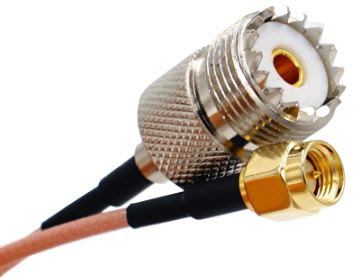

If you are pretty new to SDR's I would suggest that your first experiments involve a local FM Broadcast Radio Station. That way you will be assured of a strong, reliable and constant signal that you can listen to as you play around with the many options. I would also recommend that your first trials with the receiver are with an external antenna connected (if you have one), but make sure you use a pigtail connected to the little SMA connector to avoid straining it with the weight of a large connector and thick coax.

As you can see in the image below, the DSP2 is capable of decoding Multipath RDS text which is a nice feature for those who spend time listening to Broadcast stations. I should mention that the speaker audio on the DSP2 is surprisingly good and listening to WFM Stereo is very pleasant through headphones too.

RDS Screen

By tapping the upper part of the waterfall, you can switch the display from a panadapter to an RDS screen or even a Retro Tuning Scale, the latter being a little odd on a modern receiver, but it's there if you want it. To be fair, the scale is editable, so you could clear it and add all your favourite station markers such as BBC-R4,  BBC-R1,  HEART,  etc,

RETRO Screen

Customised Retro Screen


The DSP2 has 50 Memories with AlphaTags (5 banks of 10), which seems a little on the skinny side to me, especially considering the vast frequency coverage available. I could fill 50 memories with AirBand frequencies alone!  A good thing though, is that the memory saves not just the frequency, but a lot of other parameters too, such as Mode, RFgain, AGC, PreAmp, Tuning Step, etc, - that's very useful. You also have options on how to monitor those memories.


The first thing that impressed me about this receiver is the NR (Noise Reduction). Wow!! It really is stand-out and even better than some of the professional ham radio equipment I've bought. There's none of the Dalek-Speak character to it and you can fine-tune it to suit the noise at your particular location. Another feature which works extremely well is the AGC. It has four useful decay-rates and the settings are easily accessible.

HOW GOOD IS THE RECEIVER?   Well I have to be careful here, because on the one hand it's all too easy to get giddy about these cheap radios and to overstate their performance, but it's also easy to not give credit where credit is due. I own some fine receivers including the glorious Icom IC-7610, so I have to get radios like that out of my head when listening to the DSP2. I guess I should compare it to the radio that it replaced - the AR3000A - but then again, that was over 30 years old.

How about comparing the HF part of the DSP2's receiver with something like the wonderful BELKA DX? That makes sense - to me at least. So I set up both radios side by side and had them connected to the same antenna via a switch. I made sure that both receivers had similar gain, no pre-amp and no other settings which may enhance the performance of one over another. Each radio had the same model amplified-speaker attached to keep the audio more fairly balanced.
 

Now bear in mind that this is just my own very amateur and very subjective rating! There's no oscilloscopes or fancy lab-gear involved - just my two ears and what little there is between them.

Comparing big SSB signals on both radios was easy, because both radios performed the same. There literally was no difference. Tuning to weaker stations on the various ham bands was where I'd find differences - or at least I thought I would! Truth is, they both performed exceptionally well and it was difficult to find a difference between them. I moved to the bottom of the ham bands and switched to CW mode. Here I was finding that I ever so slightly preferred the sound of the Belka, but honestly, I was really nit-picking. Switching to AM, I flicked through my favourite shortwave broadcast stations and in the main I was favouring the DSP2 although the difference was absolutely marginal. The final test was on various VOLMETS and again there were no detectable differences. 

Detectable differences - that's the key I guess - because in my opinion too many people rely on the lab-reports from places like Sherwood and blindly follow the league tables. For example, I bought the Yaesu DX-101D which (at the time of writing) is No.1 in Sherwood's Tables and I hated that machine! I sold it and bought the Icom IC-7610 which is in 21st position. I didn't hate the receiver performance of the Yaesu - I hated the ergonomics. The 7610 by comparison, was a dream to operate and the receiver sounded every bit as good as the Yaesu to me. I go off what I can hear - not what a piece of lab equipment can detect.


The next comparison was with my FX-4CR HF Transceiver. Again, I matched the settings as closely as possible to ensure fairness. Without boring you to death, I can tell you that both receivers were a good match for each other. I did notice though, that without an antenna attached, the meters read -127dBm on the DSP2 and -119dBm on the FX-4CR.

Now bear in mind that the DSP2 has some mighty fine digital signal processing available which can make an almighty difference to the clarity and readability of any given signal. These features put the DSP2 ahead of the Belka and the FX-4CR's receivers.

I guess I should point out that the DSP2 does have a little weakness in that it seems vulnerable to interference from local Broadcast Stations and I live right next door to WinterHill where the North West UK's TV & Radio stations are transmitted from. It's not really that bad apart from one radio station in particular called HEART FM on 105.4MHz. It bleeds all over the place.  To be fair, HEART FM also affects my Yaesu FTM300 and FTM500 on 145.400MHz - it just acts as an attenuator on that frequency, rendering it unusable there.

ERGONOMICS    I find the DSP2 extremely easy to use. It took just one day to become totally familiar with it and I feel like there's nothing which would require me to turn to the manual again. Initially I thought the touch-screens sensitivity was below par and I found myself tapping harder and harder with my finger to get it to respond. I then realised that you just have to hold your finger/stylus slightly longer (I'm talking a fraction of a second). From what I understand, the earlier DSP1 suffered from some noise from the screen and a firmware update fixed the issue but lowered the touch-sensitivity. This has long since been resolved in the DSP2 and you can even switch off the screen altogether with a short press of the Power Button.

The rotary encoders on top of the radio feel great and of high quality. It's a bit odd, but you get a couple of alternative knobs in the box and I'm glad, because I much prefer the knurled finish of the replacements. The buttons on the left side of the radio also feel good and work well. 

I'm pleased to report that the USB port is the C-Type - a big upgrade from the DSP1's MicroUSB.


So am I glad that I sold my AR3000A   and replaced it with the DSP2? Well of course I was sad to see my old buddy go after all these years, but I also had to admit that it was feeling very tired in the company of my other modern SDR radios. The 3000A will always hold a special place in my heart but I'm very, very pleased to have the DSP-2 in the shack. It has so much potential.

I'm particularly happy with the addition of RTTY and FT8 through the V2.40 firmware update. Of course this also means that you can connect the DSP2 to your PC and run software like WSJT-X.  This weekend I'm going to try to connect the radio to SDR UNO (just for the hell of it).

I will play around with the receiver much more over the coming Xmas break and report back on performance at higher frequencies. In the meantime, don’t forget to visit TechMind’s YouTube video-review of this radio.

If you have any comments, please leave a message below. 

And thanks for visiting the blog!

73, Tom, M7MCQ.

COMMENTS
“John” sent a comment with some interesting points and I inadvertently blocked it (sorry bud), so here’s a copy….

Great review. I just received this radio and am loving it so far. I'm very much new to HAM stuff - my previous radio is a Yupi 7100, so the screen. and functionality of the DSP2 seems amazing to me!

My only negative so far is the lack of save slots that you touched on. However, as a newbie, I would go further. It's so nice to have the bands all saved with their appropriate modes that I don't feel I can overwrite any of them... which leaves no real save slots at all! I have found that if you set up a scanner/monitor page, you can save in the 50 slots that comes with each of them (10 x 50) but you have to first set up a frequency range and then plod through a scan, saving frequencies as you go... there is no way to just find an interesting frequency and just save it (if you don't want to overwrite the 50 with settings).

This limitation is a bit of a pain. I'd have liked to, for instance, saved the various frequencies of my local airport, but this doesn't seem possible... and of course I'd like to save the frequencies of any interesting signals I come across and feel I'm stuck to writing them on paper now.... so much for tech...

Anyway, great to read your review - that is really my only negative in an otherwise lovely radio. I wonder if they can add more save slots in a firmware update? Cheers, John.


Wednesday, 29 November 2023

CW BEGALI SIMPLEX BASIC

 CHOOSING THE RIGHT MORSE KEY  

I always remember when I started to learn how to paint (in watercolours) - many people told me to buy Student Quality paint and brushes and someone told me to buy Artist Quality. I went for the cheaper option and boy, was that a mistake!! I made very little progress and was regularly frustrated. As soon as I switched to more professional materials, I progressed in leaps and bounds.

And so when it came to investing in a morse key, I was going to apply the same logic, but I really needed two keys - one for permanent home use and one that would live in my RuckShack for outdoor activities and for my stays at the caravan holiday home.

Until I knew for sure that I would be sticking with CW, I decided to buy an inexpensive key first. Nothing cheap and nasty, but nothing overboard either - something which is largely 3D Printed. I went for a CWMORSE  Dual Paddle and overall I’m quite happy with it, but if you read my review, you’ll soon realise that it’s not from the top shelf.

Later, when I realised that I was fully committed to the Morse Code journey, I considered the purchase of a higher quality key for home-use and it was on VE99K’s Blog that I found a likely candidate in the form of a Begali Key. I was already aware of this Italian manufacturer but had thought them to be out of my league until I read Mike’s blog-post and realised that their most basic iambic paddle key is pretty competitively priced and yet it still benefits from the Begali craftsmanship and quality materials.

In Europe the SIMPLEX BASIC costs around €130 but you can find them second hand for much less and there’s very little to go wrong with them. Of course even this, the cheapest of Begali keys, will be outside many people’s budget and there’s no doubt that you can ‘make do’ with almost any key, but I’m a big believer in investing in the best tools you can afford at the time.

When the Begali arrived and I opened the box, I was a little underwhelmed initially by the condition of the red paddles - only because one of them had some markings, probably from where they remove it from the mould. It was nothing major, but it just set me back a bit considering the manufacturer's reputation.

Anyway, the rest of the construction seems perfect and it all looks to be built to a very high standard. Inside the box you get a drink coaster(!), a QSL Card, a cleaning cloth and a Feeler-Gauge to set the gap in the contact points.

You also get a 3rd party 3.5mm stereo to stereo jack lead - I didn't use this - I fitted a 3.5mm female-socket instead, to enable me to use any lead I want with the key. You can see from the image above that you are required to solder a lead to the key yourself. To be honest, I'd have preferred Begali to have fitted a static 3.5mm socket to the base, but hey-ho.

With that little job done, I adjusted the points with the supplied feeler-gauge and then plugged the key into my little FX-4CR, set at 15wpm (the speed I'm currently learning at) and started tapping out my familiar CQ TEST CQ TEST M7MCQ string. To be 100% honest, I didn't feel that it was a whole lot better than my cheap CWMORSE key! 😮

Maybe my expectations were set too high because of the reputation of Begali. I adjusted the key some more, closing the points gap ever so slightly and that helped for sure, but it still didn't rock my world. 

I do have to bear in mind however that I am an out and out beginner at this, and I recognise that I may be able to detect some benefits later when I've spent a lot more time with CW. Perhaps it's like Hi-Fi, where the laws of diminishing returns kicks in - the more you spend, the smaller the improvements get.  I'm guessing that there are no night and day differences from one price range to another - it's all about subtle improvements.

I also note that the Begali's pivot point is different to the CWMORSE's. Could that make a difference to the feel of the keys? Maybe so. I increased the speed of the keyer to 20wpm and tried again. And that's when I detected that the Begali is probably easier to operate higher speeds. As daft as it sounds, I seemed to make less mistakes at higher speeds than at slower speeds with this key.

I should like to point out that despite the 1.4kg heft of the cast-iron base and rubber feet, the key moved around in my heavy hands, so I stood it on a non-slip mat from the £shop. 

I've used these particular mats before and know how incredibly well they work. They're very sticky - an odd material, but very effective. The only remaining movement is the flexing of the feet. 
Anti-Slip Mat

Ah well, it is what it is - "time will tell" as they say. I'll stick with the Begali and see how I feel in a few months time. It seems that keys are a very personal thing and what suits one person perfectly, might not suit another person at all. 

Again, I hold my hand up and admit to my lack of experience in this area. For those interested, here's what Begali say about their product...

The Simplex Basic may be our least expensive key, but it is a very capable CW instrument that can hold it’s own against many far more expensive keys on the market.  It is a iambic key with a heavy (1.4 kg or more than 3 pounds) cast base and gold plated components, using long springs for the return force. Like our other keys it is manufactured using NC machinery for absolute precision.  Micro-threaded screws are used for all adjustments.  

The arms are held by 4  ball bearings that are imbedded in the base, and they are made of a light-weight  alloy that provides very low moving mass - this allows excellent responsiveness at high speeds even when set for a very light touch. The contacts are 925/000 silver.  

The key comes with a protective dust cover.   The base of this key is made by melting and casting phosphatized iron. As a result, no two bases will be identical, even though the overall shape and dimensions are ensured by the mold. A rough uneven surface with individual patterns is characteristic for this process.  

With its uniquely shaped base and finger pieces this key is not only a precision instrument for the CW operator but also a piece of art that you can proudly display!

Thanks for visiting the blog.

73, Tom, M7MCQ.


Monday, 20 November 2023

LEARNING CW (MORSE CODE)

  MY CW JOURNEY (so far)  

Let's not pretend that this is anything more than a diary of a simpleton trying to learn a new language! I've just downloaded an app for my iPhone and iPad called MorseMania. It starts out free but you have to pay a small fee to fully open it up (which I did), but even the free version is a really useful start. 

I'm not expecting this to be an easy journey - in fact I think it's going to be pretty tough - I'm almost 65 and I've never considered myself good at learning new skills. People keep saying that if you have a musical talent, you will find CW more easy to grasp -  well I don't know a quaver from a crotchet, so there's no hope for me, lol. People also say you need good rhythm and timing - oh dear!

Anyway, I'm not trying to join the Royal Signals Corp - I just want to make some contacts on the CW portions of the bands. I want it for that reason and for the accomplishment - the challenge! I'm curious how far I'll get by the end of the year, not least because I've got 11 days off work over the Xmas period.

I've noticed that there are lots of people with lots of conflicting advice on how best to learn the code. Everyone has an opinion on the subject and some opinions are really quite strong. At the end of the day, you just have to go with what makes you comfortable I guess, because you know your strengths and weaknesses.

I've made my mind up that I intend to learn by listening to the sound of the characters if I can - this is quite a popular method anyway and not many people argue against it. There are a few letters however that just don't seem to stick with me, possibly because they're so similar to another letter, so for those I will use other techniques.


One thing's for sure! I will try to benefit from the time I spent learning how to paint and will use the same positive mantra to get through the tough parts...

  • Practise often!
  • Accept there will be lots of mistakes.
  • Accept that you may progress slower than others.
  • Don't try to over-achieve.
  • Red wine helps everything (lol).
  • End sessions on a high, never on a low.
  • Don't tell yourself (or others) that it's impossible!
  • Create and stick to a practise schedule.
  • View it as a fun activity and enjoy it!
 

20th November 2023  DAY 1  

Day-1 saw me learning a few letters of the alphabet. MorseMania has a few set-lessons and they start with two letters - E & T. Simple! At the next level it adds A & N, then I & M, then S & O followed by D & U. 

Some letter are ridiculously easy to remember, like E, T, S and O and some others can be made to be easy by associating them with something - like "Dawg Did It" for D (-..).  Similarly, I used "The Dawg Did It" for the letter L  (.-..). For others, it seems that you've just got to muscle it. 

I was managing these 10 characters pretty easily and was impressed with myself, but as soon as I moved onto the next level (adding R&K) it all started to unravel. Grrrr! I couldn't understand how 10 letters felt so easy and adding just another couple had such a big impact. It was like I'd used up all my RAM and needed an upgrade. And this was just in the first 20 minutes!!

Obviously, I was expecting too much and that was my first real lesson - don't do too much, too quickly. Softly, softly, catchee monkey. So I went back to the start to get the first ten firmly in my head so that the introduction of an extra two wasn't such a burden on my little old brain. 

In-between MorseMedia sessions, I was using my Iambic Paddle to send a few strings of code. I learned to send "CQ TEST CQ TEST M7MCQ" for the purpose of seeing how far my signal reached via the RBN (Reverse Beacon Network).

Most people reckon that you shouldn't touch a key until you can receive CW at 8-12wpm. I can see the logic in that, but not everyone's the same and I didn't think that getting comfortable with the key would be a problem, but a trusted friend (G0VGS) explained that one needs to understand the cadence (the rhythm) of the letters before you can properly send them.

I thought about this and started to understand. We all know the unmistakable call of CQ in morse. It isn't just -.-.  --.-,  it has its own sound and shape!  So it was decided; I would keep away from the key until I had learned the characters and could reliably decode slow morse.

21 November 2023  DAY 2  

Another 20 minutes in the evening. Rather than move onto another level, I rather boringly repeated the efforts of the night before.  I felt that I needed more muscle memory. 

Had a coffee and then got up to Level 10 with no errors (fourteen letters including the R&K and C&P). Repeated this level over and over. I felt like carrying onto the next level but decided it was best to finish on a high.

22  November 2023  DAY 3  

Best to start each new session by repeating the previous level and making sure you can still do it error free. If I made any mistakes, I did the level again. Then onto Level 11, adding B&G.  Oh dear, this felt like a step up, but soon enough the new letters sank in. Up to this point I hadn't really used any techniques to recall letters, but for the letter B (-...) I decided to write it down on paper as shown below and that really helped me to get a grip of it.

Trying the same method for the letter G didn't really work out for me, so I just had to muscle it into memory. At this level I found that it was taking me longer to recognise some characters. I wasn't making any mistakes, but I was definitely slowing down.

23  November 2023  DAY 4  

I know this might sound a bit odd, but there are many occasions where I'm trying to study something in-depth and I suddenly feel very tired! It's weird, but it happens quite often and it's usually in the evening after I've finished work.

I guess it's my body's way of saying "Hey fella, give me a break"!  

And that's how I felt tonight after I'd had my evening meal and sat down to practise - I felt real sleepy, real quick! I don't think it helps having eaten quite a big meal either, so I've now adjusted my schedule so that I only start my practise session when I'm rested and wide awake.

So, after a short Nana-Nap ðŸ˜‚ I started work again and managed to complete Level 13 of MorseMania. Now up to 18 letters without errors - albeit quite slow again. Onwards and upwards! 


MY THOUGHTS SO FAR... 

So I've finished Day-4  and I'm thinking - Hey, you're doing pretty darned well.  I've gone from believing CW was an impossible dream, to being able to recognise 18 letters with just a couple of hours work!! 

Yes, I know there's a long, long way to go, but I am so pleased to have conquered that first barrier and reached the stage where I'm actually excited and looking forward to cracking off those last eight letters of the alphabet. 

At this rate I'll be selling my PreppComm MMX 😂


24  November 2023  DAY 5  

20 minutes of practise this morning saw me complete the whole alphabet - yes!! I'll be honest though - the full 26 letters has slowed me down somewhat. When I hear some characters I really have to think about it - and then I'm quite annoyed because it turns out to be a letter that I previously found very easy to identify! Grrr.

But, I'm happy that I've got this far with so little effort. I've decided that I'm not going to move onto numbers and punctuation yet - I'm going to stick to the 26 letters of the alphabet and focus on increasing my recognition speed and learning the sound instead of counting the dits/dahs.

A friend (Chris, G4HYG) told me about the CW WorldWide Contest running this weekend and recommended listening in to it, to see if I could pick up any of the code. It'll probably be too fast for me but I'll give it a go.

Speaking of speed, I chose to complete all the MorseMania exercises at 15wpm right from the start because there's something about very slow speed morse that just doesn't work for me. I think it's better to learn at a pace you hope to later work at.

I'll update this page when I have made significant improvement and moved onto the next stage.


73, Tom, M7MCQ.


KQ2RP wrote a New Years Resolution list on his blog - not for himself - but for others to adopt. Here's the list...

  • I will remove the mic from my rig and put it in a drawer. 
  • I will unhook the computer from my rig (so I don’t run digimodes) 
  • I will learn all the Morse characters by sound and memorization, building my Morse reflexes - NO associations, shortcuts, tricks, gimmicks, songs, visualizations. 
  • I will use Koch method trainers (see ref list at bottom) to ensure I don’t get stuck under the '10WPM hump.’ 
  • I will commit myself to practice receiving code for no less than 15-30min a day. 
  • I will not let myself get discouraged. 
  • I will listen to the code practice sessions on W1AW and write down what I copy on a pad to check myself As I get the characters down pat, I will practice sending them I will hang out on the CW portions of the bands and listen in on other QSOs to get a feel for how they go. 
  • As soon as I am comfortable that I know all the characters in my head, I will get on the air and make QSOs - just me, my radio, my key, my headphones a pencil and a pad. 
  • I will be very nervous. I will make many, many mistakes. In the beginning I will miss a lot of the information the other station is sending. If I miss a letter/number, I will forget it immediately and focus on the next one. I will probably be able to fill in the blanks later. 
  • I will ask them to QRS and repeat if I am having trouble. I will probably be embarrassed. It will be OK. 
  • I will do this over and over again…and I will get more and more confident. 
  • I will make use of NAQCC QRS nets and SKCC Elmers to increase my proficiency. As my comfort level increases, I will push myself to have QSOs with stations sending a tad faster than I am comfortable with. 
  • I will participate in CW contests and events as often as possible. My speed and accuracy will increase. 
  • I will be a CW operator!!


Friday, 17 November 2023

WHICH QRP RADIO??

THINKING OF BUYING A QRP RADIO?

There's an absolute mountain of them out there and it's difficult for beginners to know which one would be best for them - there's so much to consider and a lot of it comes down to budget, portability, band coverage, feature set, preferred mode of operation and even aesthetics.

QRP is (loosely) determined as using up to 5W power output in CW mode and 10W in SSB. Anything above that isn't usually considered QRP, although people who regularly use 100W or more think of 20W as QRP (incorrectly in my opinion).

Some QRP radios are limited (or designed) to work in one particular mode such as Digital, while others will operate in every single mode available! The radios which are dedicated to a single mode, such as the QRP LABS QDX, will usually perform much better than those radios which try to do everything  (unless you pay a lot of money).

I've owned quite a few QRP radios and swapped and changed regularly over the last few years of being licensed. I've gone to a lot of effort in finding mint condition used radios at a low, low price so that I can sell them on without losing money (and sometimes even making money).  I would strongly advise others to follow a similar line instead of just forking out for new radios which will always lose a chunk of their value as soon as you open the box!  Having said that, if you absolutely know that the radio you're buying is going to be a keeper, then by all means search out a deal on a new one so that you benefit from dealer-support and warranty.

So let's look at some of the radios available. These are the ones that I have personally invested in and have used myself. There'll be lots of other radios that I've never had the opportunity to try and other people may advise you to look elsewhere for your QRP equipment. Just bear in mind that many people give advice without ever having owned something they're recommending - I don't do that.

The list...

  • (tr)uSDX
  • Elad FDM DUO
  • Elecraft KX2
  • Elecraft KX3
  • Flex 1500
  • FX-4CR
  • Hermes Lite2
  • Icom IC-705
  • Preppcomm MMX
  • QRP-LABS QDX
  • QRP-LABS QMX
  • Xiegu G90
  • Xiegu X6100
  • Yaesu FT-818
Somewhere on my blog there's a review of each radio, so I'm not going to go into great detail on this page - you can simply click on the blue-links to read the individual reviews after you've read this post. On here I'm going to give a very short summary and suggest why you might want to add it to your short-list.

To read a full review, click on the link above each photo!

I'll say straight away that I love this little value-for-money gem. I've actually got 3 of them 😮 and use them regularly. I have one at home, one at my holiday home and one in the glovebox of my truck. They are super compact and have a built-in speaker, built-in microphone, built-in keyer and even a CW decoder!! They have a tiny (but clear) OLED screen which on later models includes a bit of colour. The radio also has a great user-interface, making it easy to operate even for newcomers. It covers 5-bands and pushes out around 5W depending on band and power source (you can attach a regular psu/battery or power it up using a micro-usb lead and get around 500mW output (handy for extreme qrp experiments)). 

If you want to save more money, you have the option to purchase this radio as a self-assembly kit. Please be aware that there are some fake clones out there, so be sure to purchase only from an approved supplier. I will never forget the first day I received this radio - I unpacked it, connected my end-fed-half-wave and broke into a pileup, receiving a genuine 59 on the first attempt! Highly recommended for people wanting to "dip their toes" into the qrp waters.
 

Considered by many to be the KING OF QRP! This Italian beauty has an excellent receiver which takes some beating, especially when used with the magnificent SW2 software - it truly is amazing!! On its own, the FDM DUO is a stand-alone HF/6M SDR transceiver capable of putting out up to 9W and needless to say, this is an all band, all mode radio. It is small enough to take out portable and substantial enough to be used in the shack as your main transceiver (especially if you opt to buy the matching 120W amplifier). When connected to a PC/Laptop (indoors or out), the radio is capable of providing you with 9 independent receivers with staggeringly good filters and noise blockers!! Yes, this is a hefty amount of money for a QRP rig, but it is that good. Highly recommended if you are quite technically minded and can afford it.
 

This is an extremely popular 10W QRP transceiver and for good reasons. It is very similar in terms of performance to its big brother (the KX3) and yet it's much smaller and cheaper. Nevertheless, £1,000 is a serious amount of money and if you add the desirable options, that price will jump up closer to £1,600. This is a full blown SDR radio covering 80-10M, all-modes with superb performance and a built-in battery. These are much sought after radios and usually retain a lot of their original value. You could (if you want) connect it to an Elecraft amplifier to make it usable at home in the shack as your main radio. The Elecraft doesn't have any dedicated software like the Elad, so maybe not the radio for those looking to take full advantage of an SDR. Still, an excellent radio for POTA/SOTA.
 

The top of the line portable Elecraft. A superb performer with almost everything that an outdoor operator could wish for. 160-6M SDR, 15W output, all mode, with one of the best receivers on the market and 
a built-in battery. A superbly intuitive user interface and lots of optional extras available (taking the price close to £3000). 

The KX3 never felt rugged enough to me for regular outdoor work. Chucking it into a rucksack just never felt right - I was always guarding it. Back home though, you can connect it to one of Elecraft's excellent amplifiers if you have the license for it, but you do end up with quite a bunch of leads trailing all over the place. These radios have been easy to find on the secondhand market and prices fluctuate wildly. I bought one for £700 and sold it for £800. Then I bought another for £700 and sold it for £1700. Crazy! Like the KX2, there's no dedicated software available 😓. A lovely, lovely radio though.
 

The little Flex 1500 is not stand-alone, so you will always need to connect a computer in order to use it. If that's not a problem, then this is probably the most Value-For-Money SDR out there. You can pick them up for a couple of hundred quid and use them with the amazing POWER-SDR software by K9ENS. The radio will push out a clean 5W and covers 160-6M bands, all modes. The software is easy to use and incredibly comprehensive at the same time. To avoid any operational lag, you'll need a decent laptop, so you'll have to factor that cost in too. Obviously not as convenient as a stand-alone, but a great performer. Highly recommended!
 

I have to say upfront - I'm a bit of a fanboy when it comes to this radio - I absolutely love it and even though I own some amazing radios, this is the one I probably use the most. It's not the best at any one thing in particular, but it somehow flicks all the right switches for me.

It's a high performance 10-Band SDR which fits in the palm of your hand. Its output can be adjusted from the mW range up to 20W and has a superb receiver, a full colour screen, a spectrum scope, a waterfall, built-in speaker (a good one) and even a built-in microphone. And all for £450 - not only that, it's also superbly built!! There's a real pride of ownership with this little gem and the designer (Yu Hongbo) is one of the most approachable and helpful guys out there. Now I understand that many people are very wary of buying  radios directly from China, but rest assured that you are safe as long as you purchase directly from his website.
 
I have used this little transceiver both outdoors and indoors and have been amazed at how well it performs. Regular firmware updates continue to make this radio better. If you want to invest in a mid-priced QRP SDR radio, then this is well worth considering. Highly recommended!
 

I had heard lots of great things about this little DUC/DDC SDR radio and really wanted it to work out, but in the end it was too much of a technical challenge for me (I have very limited networking knowledge) and so I ended up selling it quickly (thankfully with no financial loss), but later, I bought another one (the PLUS version) and it's now lodged firmly in my shack. The 5W transceiver covers 130kHz to 30MHz and has performance on par with radios costing at least twice the price.

The Lite 2 is not a stand-alone radio and is useless without a computer attached. Most buyers would be looking to leave it at home anyway and would access it remotely from anywhere in the world which is a really attractive proposition, but to achieve that, you need to be quite techy (and have a license which permits remote operation). Although I'm computer literate, I have zero networking skills, so I struggled to do anything other than operate it directly.  Only consider the Lite 2 for remote work if you are very technically minded and a bit of an experimenter. 

If you want an extremely good SDR transceiver to operate from your shack (possibly with an amplifier) for an extremely low amount of money, this could be the one. Read the review and make your own mind up.


If you want the most advanced QRP Shack-In-A-Box Transceiver in the world, then there's currently nowhere else to go other than an Icom shop. This technological marvel does it all! A Full-Colour Touchscreen, a Waterfall, a Bandscope, GPS, Bluetooth, HF, VHF, UHF, DSTAR, RTTY & PSK Decoder, AirBand, Broadcast Coverage (inc LW/MW), a Wireless LAN, MicroSD, QSO Recorder a built-in Li-ion battery and a Charger. Up to 10W output. Phew!!

This amazing transceiver has it all and can easily be used as your only radio (just buy an amplifier for use in the shack if you feel the need for more power).  There's virtually nothing to touch this radio at this price level and I'm just amazed that 4 years after it hit the shops, Yaesu still haven't responded to it by building something similar. HIGHLY RECOMMENDED for those looking to operate on HF/VHF/UHF with a single radio. 
 

This one's a bit different in that it is a CW ONLY transceiver.  But it's much more than that! It's actually a QRP CW ENCODER/DECODER which means that you don't even need to know Morse Code 😮 How cool's that??

We all know that the most reliable (or effective) way to make DX contacts with QRP radios is in CW mode. Those dits and dahs just seem to penetrate all the noise and reach far flung places with relative ease. The MMX (a three band 5W radio) reliably decodes morse code and allows you to reply by simply typing a response on the supplied keyboard. It takes some time getting used to the vagaries of the MMX tuning, but once you've put some effort in, you will soon be able to rack up some previously unattainable contacts for your logbook. Read the full review before committing.

 
This is a DIGITAL ONLY 5-Band, 5 Watt Transceiver and it comes as a kit which may or may not challenge you depending on how comfortable you are with following instructions and soldering. Personally, I really enjoyed the challenge - so much in fact that I bought a second one! For an extra £45 you can have it pre-assembled. The performance of these transceivers is exceptionally good and I just can't recommend them highly enough.

There's another fabulous transceiver from QRP-LABS called the QMX and this one adds CW to the mix (and it's rumoured that it may be upgradable in the future to include SSB). 
 

The G90 has an awful lot going for it, not least of all the fact that it is a 0.5-30MHz all mode SDR transceiver capable of outputting 20W! It has a small colour screen with panadapter and a great Icom-style DTMF microphone. It's not the most sensitive receiver in the world, but outdoors with a decent take-off, you'll be hard pushed to fault it. The only thing that I never liked was it's peculiar  size and shape. It kinda feels awkward. It offers superb value for money and works well with the Xiegu amplifier. Recommended!
 

This was a disappointing experience for me. I really wanted to like this radio but I ended up moving it on very quickly. It had quite a few bugs and some features just didn't work at all. Worst of all though were the number of birdies that were present right across the bands - some were ridiculous (IMHO). 
I'm aware that the X6100 has proven to be popular among many outdoor operators and on paper the radio looks amazing, but IRL it turned out to be disappointing. I'd recommend the G90 over it any time - especially because it's a lot cheaper and works perfectly.
 

On sale for over 20 years, this little gem from Yaesu has been the go-to radio for outdoor QRP operators. Or it was until they ceased production earlier this year. As good as it was, no one could deny that it was getting a bit long in the tooth and was in need of a massive update.

Competition from Icom's (IC-705) knocked it into a cocked hat, and while the 705 costs over twice as much as an 818, it gave operators everything they could ever wish for (apart from an internal atu). I'm sat here with my fingers crossed that Yaesu will soon launch a modern replacement that will blow away anything currently available. But there's no sign of it at the time of writing.

Nevertheless, the FT-818ND is still a fabulous All-Band, All-Mode Shack-In-A-Box with a built-in battery and is an amazing secondhand investment. Just be aware though that the 817's can be up to 20yrs old and many owners expect silly amounts of money for them. If you can afford an 818, buy one. Read the article for more info.

And that's the end of the list. Thanks for reading my ramblings and I hope you've found something useful amongst it all. If you have any comments, leave them below and if you have any questions please feel free to email me m7mcqio83ro@gmail.com

73, Tom, M7MCQ


Monday, 13 November 2023

YAESU FT-DX10 vs ICOM IC-7300

FT-DX10 REVIEW by VK4DX

I was reading a review of the Yaesu FT-DX10 Transceiver by Mike (VK4DX). It's an excellent and very honest review of the DX10 and he makes sensible comparisons between it and the IC-7300. Click on the image to read his review...