Wednesday, 5 October 2022

ELAD TM-2 TMATE2

 ELAD TM-2 TMATE2

I spotted the TMATE some time ago and nearly bought one. Back then it was sold (from memory) by a company called Woodbox Radio and it was a pretty basic design with a large dial and a few programmable buttons. It was pretty expensive for what it offered, so I held off for a cheap second hand one - which never came. I wanted it originally to control my SDRPLAY RSP1A and when I purchased an Elad FDM DUO, I thought it might be handy for that too. But like I said, a cheap one never came along.

 THE ORIGINAL TMATE
 
So here we are some years later and it appears that the unit has progressed somewhat and the latest incarnation is the ELAD TM-2. The unit is much more attractive to the eye and it features a large tuning dial (optical encoder) with 2 additional rotary encoders (all metal) and 6 programmable buttons. There's also a lovely LCD screen to provide tuning, signal strength and mode information, etc.

BUT it's still expensive - almost £300 with postage 😦


And that's why I still decided against purchasing one. Sure, they're incredibly handy when using an SDR receiver connected to your laptop, but boy, that's a good chunk of money for such a limited device. Yes, I know it will work with the Elad transceiver and a boat load of 3rd party SDR software, but it's still pretty darned expensive.

Anyway, I just bought a used one for £130, delivered!! Boxed and virtually unused!

The TM-2 is a simple Plug&Play device, requiring no drivers, so you really do just plug it into a USB socket on your PC and away it goes - it takes its power from the PC. That's similar to my ICOM RC-28 (except the RC-28 costs the same but doesn't include an LCD screen)!

ICOM RC-28
 
Although the TM-2 has a definite Elad identity, it can, of course, be used with a variety of SDR software and the one of greatest importance to me is SDRPLAY's SDRuno.


The TM-2 integrates perfectly with SDRuno, requiring very few alterations to the software menus to get it going. The main VFO Dial obviously tunes your active receiver (VRX) and pressing it like a button, locks the LO. The dial and software provides you with progressive tuning which is a feature I really love on my Icom radios.

If you have more than one receiver setup onscreen (as you often do with SDR software), then you can have the TM-2 LCD screen change colour as you move from one receiver to the next. Another handy feature.

The primary functions of the two smaller knobs (E1 & E2) control volume and filter-width, but by pressing the buttons, they cycle through other functions....

E1 Encoder

The function of this control can be selected by you: pushing the knob and selecting the current function among the five available:

- VOL adjust the VRX audio level (AF level or volume).

- RFG adjust the AGC gain (if AGC is enabled) or the RF gain (if AGC is disabled).

- SQL adjust the squelch threshold.

- NR adjust the amount of Noise Reduction

- NB adjust the threshold of the Noise Blanker

E2 Encoder

The function of this control can be selected by you: pushing the knob and selecting the current function among the two available:

- HIGH adjust the selectivity filter high frequency limit.

- LOW adjust the selectivity filter low frequency limit. 

It's worth noting that the information on the LCD screen updates instantly and there is no discernible delay between the PC screen and the TM-2 screen. And that includes the signal strength meter!

The row of Function Buttons at the bottom of the TM-2 perform specific functions in SDRuno and they are....

F1 – Decrease Step.

Decreases the tuning step to the next lower value (if available).

F2 – Increase Step.

Increases the tuning step to the next higher value (if available).

F3 – Knob Lock

Locks/unlocks the tuning knob; the locking status is indicated in the RX Control panel, to the left of the frequency dial and by the LOCK LED on the Tmate 2 window.

F4 – Assignable Button

The function of this button depends upon the current parameter controlled by the E1 encoder:

- VOL MUTE on/off.

- RFG AGC on/off.

- SQL squelch on/off.

- NR Noise Reduction on/off.

- NB Noise Blanker on/off (NBW only).

F5 – RX Mode

Selects the current receiving mode.

F6 – VRX Selection

Assigns the Tmate to the next VRX of the same instance.

It may sound a little confusing, but in practise, it's actually pretty simple - just like how the Elad FDM DUO works. It certainly makes using your SDRuno much easier and more 'natural'.

The device itself is very well made and has some heft to it so it doesn't get pushed around as you operate it. 

Am I glad I bought it? YES! Is it great value for money? NO! Well, not at full price, anyway. I guess it's like anything else - it's worth what a buyer is willing to pay for the features and functionality of such a thing. If the SDRdx was the only radio I had, then I wouldn't hesitate in buying a Tmate because it just gives you that 'real radio' feel. You pay your money and take your choice.

It’s such a pleasure having the TM-2 next to the laptop in the shack. Makes ALL the difference!


Thanks for visiting - leave any comments in the box below.

73, Tom, M7MCQ 😊


Tuesday, 4 October 2022

THE PATH TO DXCC

Having seen on my QRZ page that I have 75 countries under my belt, I was a little disappointed to discover on my LOTW page that I only have 61 😥

It would appear that confirming contacts on QRZ does not necessarily mean that it's also a LOTW confirmation. I was just curious about getting the DXCC award for "mixed" modes and fully expected to see 75 countries under my LOTW belt.

It's obviously not a big deal - it's a small goal. But it's nevertheless discouraging to find that I need another 39 countries instead of 25. And obviously the ones I've got so far were the "easiest" ones.

It would really help (on QRZ and LOTW) if people could be bothered to confirm contacts. I know that logging is no longer compulsory, but even if you aren't bothered yourself, it's still nice to do it for the sake of those who might be chasing points/awards.

Apart from having to be lucky enough to make contact with a rare DXCC, it appears that you'll probably have to do it a number of times before you'll be lucky enough to find someone who confirms - a task made all the more difficult for a QRP operator. 

Ah well, onwards and upwards 😂


Monday, 3 October 2022

WSPRLITE FLEXI REVIEW

WSPRLITE FLEXI & BAND PASS FILTERS

I've been after a WSPRLite Flexi for months, but they've been unavailable on the SotaBeams website with no stock-update available. Presumably it's due to the global shortage of components. I saved a search for one on eBay but have received zero notifications, so obviously, when someone buys one, they tend to keep it!

Thankfully though, I popped onto HamRadioDeals at lunchtime and was lucky enough to catch an advert which was just minutes old! I quickly messaged G7UFO and snapped up this rare little beauty. The sale included a 3 BandPass Filter board which saves me some money.

So what is a WSPRLite?? Well it's described as an Antenna Performance Analysis System. It's basically a tiny test-transmitter (or beacon, if your prefer). You can attach it to your antenna and leave it running over a period of days (up to 45) and it will transmit up to 200mW WSPR signal every couple of minutes and hopefully be picked up by WSPR beacons all over the world. You can then go look at how well your antenna performed on DXplorer.net.  You can also use it for real-time propagation reports and that's probably going to be its biggest use by me. You can use this system to spot openings for rare DX. If someone has heard your 200mW signal (or less) thousands of miles away, there's a good chance you can have a qso with them at 'normal' power levels on your transceiver!

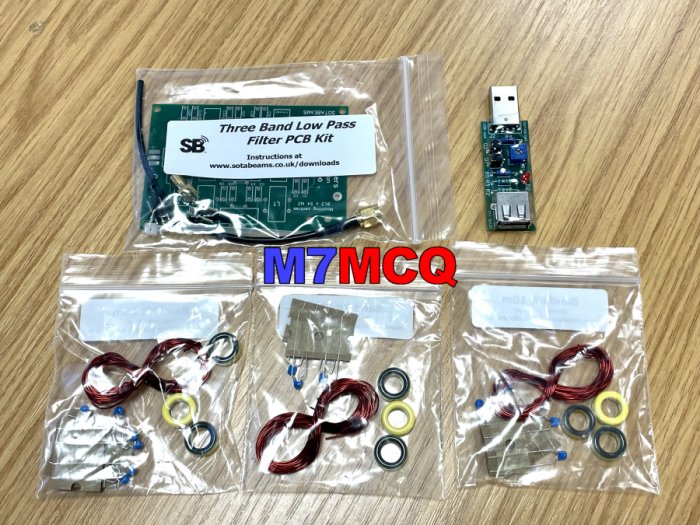
The unit is roughly 2" square and has a micro-USB for power/programming at one end and a female SMA antenna connection at the other. That's it! Unlike the earlier version (the classic), the Flexi has no passband filters inside, so it's recommended to introduce some externally and SotaBeams facilitates this with a PCB kit which allows you to decide which filters are important to you.

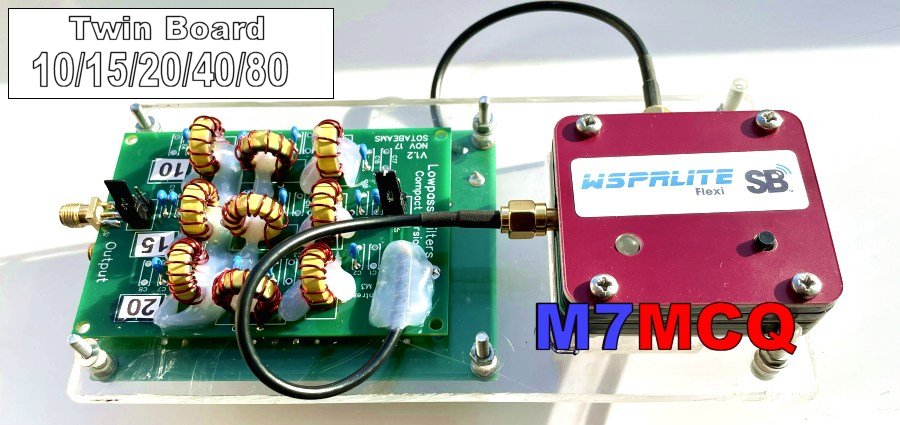
The board which came with mine has filters for 80M, 40M and 15M which isn't what I'd have chosen, so I've ordered another board to give me 20M and 10M (it includes 15 by default so I’ll be doubling up, I know).

The previous owner mounted the WSPRLite and PassBand onto a perspex base to keep them together and provide a stable platform. It's a great idea but I'll probably look for a different solution when I've built the second filter board.


The extra PassBand Filter kit arrived along with a USB "Stay Alive" dongle. The latter stops the USB Battery Packs from falling asleep inbetween the WSPRLite transmissions. It's pretty much a necessity! 


After building the kit, I decided to stick with the perspex idea for now and simply mounted the new board on the reverse side. I also put my trusty "Hot Glue" gun to good use, fixing the wobbly toroids in place. It's not pretty, but there's no point trying to make this little project look like a commercial product when it's just a tool, sat hidden in a corner somewhere, quietly doing its thing, with no operator interaction required.

The newer (and smaller) lowpass filter board


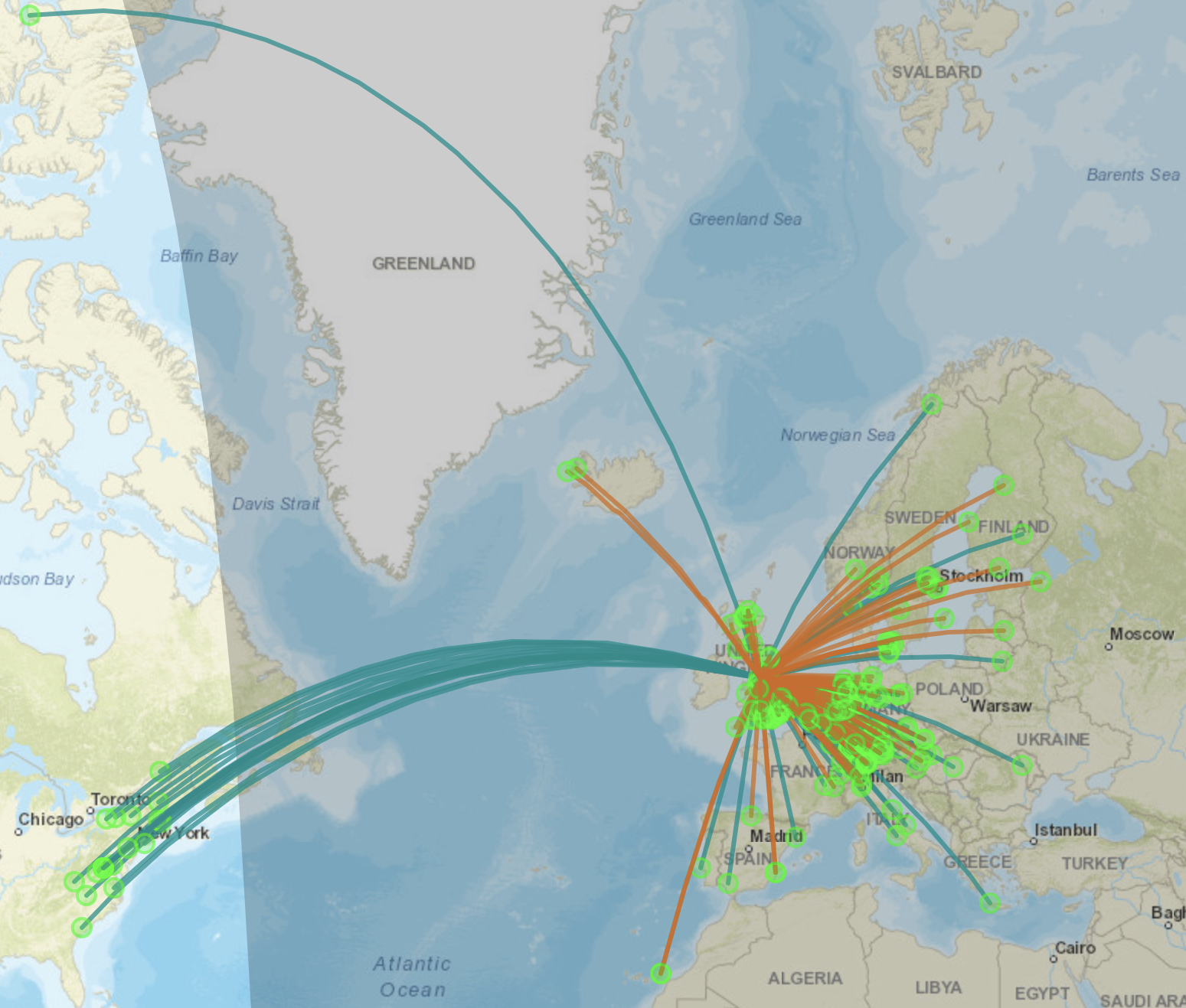
For its first test I flung it on top of a bookcase in the conservatory and connected it to an EFHW which is resonant on 20M. I left it all day while at work pushing out 200mW and got the following results back...


On my EFHW-2 (10ft above ground)


On my EFHW-1 (20ft above ground)

Not bad considering the 20M band isn't particularly good right now. I'll repeat the tests on 10, 15, 40 and 80M (with the Elecraft T1 tuner inline). I'll post spot-maps on here as I get them. It's going to be interesting (to me at least) to see the differences between different antennas at the same location and same orientation. In addition to the EFHW's I will try my SotaBeams Linked Dipole, SotaBeams BandSpringer, my 1/2 size G5RV and some Homemade Verticals.

I'm particularly interested in how well the G5RV compares because it seems like no one has a good word for them and yet I've had some cracking QSO's with it even though it is sited in the worse possible location you can imagine!

Specifications

Dimensions :- 40 x 50 x 10 mm 
Beacon power: 200 mW (software configurable: 5 mW - 200 mW); 6m limited to 100mW 
VSWR: better than 3:1 recommended 
Maximum reverse power < 100 mW (power levels above this will damage the WSPRlite's USB chip) 
Bands covered: 630-160-80-60-40-30-20-17-15-12-10-6 m 
USB current: 150 mA maximum (5 Volts). 
Antenna connector: SMA socket 
Power connector: micro USB socket (lead supplied)

ICOM ID-52E QUICK REVIEW

ICOM's LATEST HT


The Icom ID-52E
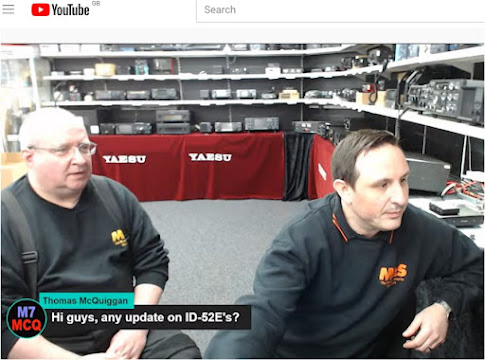
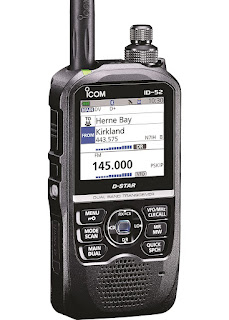
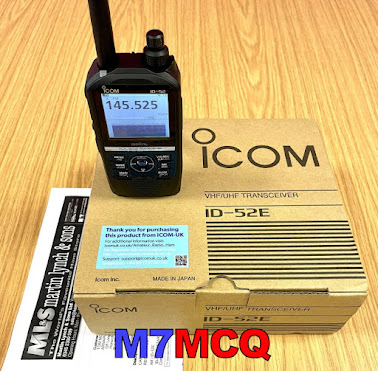
is Icom's latest and greatest handheld transceiver with all the bells and whistles that you could ask for. It was launched a few months ago, but availability has been dreadful due to the global silicon-chip shortage, so I was very happy to receive a call from Martin Lynch & Son to say that a batch had eventually arrived and one of them was on its way to me. I'd enquired about the availability of them during one of their live-chat sessions😊.

The ID-52E (ID-52A in America I believe) replaces the ID-51 and unlike the Yaesu FT5D, it's radically different to the previous model. Despite the differences between old and new, there's still a great deal of familiarity between b'oth models, meaning that that there isn't a steep new learning curve. As with most modern Icom radios, they are extremely intuitive and jumping from one radio to another is a breeze, be it an ID-52, IC-705 or even an IC-7300.


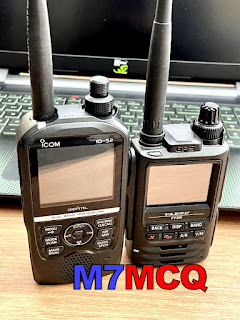
The ID-52 feels quite large, like the Kenwood D74 - certainly one of the bigger handhelds out there apart from my Yaesu FT-550L Airband transceiver. It's a good thing though - it feels beautifully made and sits better in the hand than my FT3D, which in my opinion, is a bit stumpy! 

The radio comes with a BP-272 battery which is the same as the one fitted to the IC-705. I also have the large capacity BP-307 which makes this radio seem very bulky, but if you want all-day power...

The quality of this (rather expensive) radio is obvious to all. The plastics are good, the buttons are good, the rotaries are good and the 2.3" screen is fabulous! The radio also looks good. Appearance is obviously secondary to performance, but it's nice when a great radio looks as well as it performs. The FT3D by comparison is not very attractive at all (and with those dreadful tacky red buttons, the FT5D is even worse IMHO)!

Some people may be surprised to find that the screen is not a Touch-Screen, but personally, I don't mind that one bit! In fact, I prefer it not to be. The trouble with touch-screens like the one on my FT3D is that they are just too damned small to be practical. I often struggle to touch the correct option on the FT3D screen especially up in the corners and the fact is, you still have to use the keyboard for some selections and navigation anyway! I'd prefer to have a nice, solid screen with options selected from the keypad. Another thing I don't like too much with the FT3D touch-screen is that it seems to flex when being pressed. Hmmm.

The ID-52 is a Dual Band VHF/UHF transceiver with DSTAR capability. It can simultaneously receive VHF/UHF, VHF/VHF, UHF/UHF and can even receive DV/DV meaning, for example, you can listen to two DV Repeaters at the same time. Bear in mind, that some other handhelds declare the ability to monitor two DV frequencies at the same time, but the difference with the ID-52E is that you can hear both frequencies at the same time. 

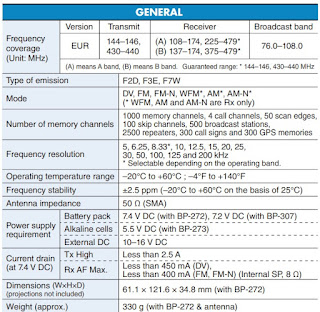
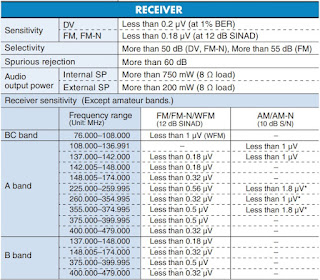
It can also receive Airband on both VHF and UHF, so Military aviation frequencies can be monitored! Coverage is basically 76-479MHz. The FT3D by comparison has a wider receive range of 0.5MHz – 999.99MHz which is pretty impressive but sensitivity across that very wide range has highlights and lowlights as you'd expect. Neither radio includes SSB modes like the fabulous Kenwood TH-D74. And that's pretty amazing when you think about it - the TH-D74 was launched 5 years ago and still leads the way!


The built-in BlueTooth makes it easy to use BT headsets or to communicate with your Android or IOS devices, whether you're wanting to use the free Icom software apps to control the radio, program it or to send images, etc.

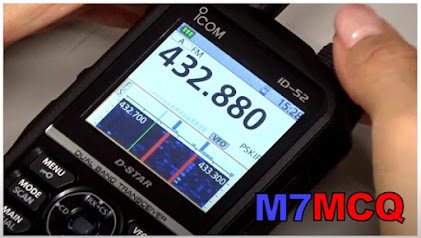
One of the very best features of this new radio has to be the inclusion of a proper bandscope. It is really well implemented - much better than on my FT3D - the two are like chalk and cheese. The scope on the ID-52 reminds me of that on the IC-705. A major plus point for portable operation.


Speaking of the IC-705, it's worth noting that the ID-52 uses the same battery, so if you have a 705 you can take advantage of having a spare battery for either radio. In fact, now that I think about it, I bought the large capacity BP-307 for the 705, so I’ll be able to use that too with the ID-52.

Icom's CS-52 Programming Software is free to download and is easy to use. No need for RT Systems here! Within minutes of getting the radio, I was using CS-52 and had entered all my favourite AirBand frequencies, Broadcast frequencies and I moved my favourite repeaters to a Group of their own for quick access.

There's a fabulous function which (no matter where in the world you happen to be) identifies the repeaters close to your current location. This is possible because of the built-in GPS and Icom's eagerness to make the ham operator's life easy by including a list of the world's FM and DV Repeaters and Reflectors!

Having built-in GPS, the radio can show you which are the closest repeaters and reflectors to your current location and quickly get you connected. You can of course add any new repeaters or hotspots to the list.


Using DSTAR on Icom radios is pretty straightforward once you understand the basics and there are plenty of great video guides on YouTube about it. It seems far easier to use DSTAR on an Icom radio than on a Kenwood. Dstar audio has always been good for me and I don't see much of a difference between it and C4FM. I have no bias either way.

Picture-Sharing is another feature of the Icom but personally I have no use for it. I just don't understand why it was implemented in the first place. What's the point? Perhaps someone can point out its usefulness to me? I'd much rather they'd given me SSB HF receive.

SD-CARD fitment is getting to be be pretty standard these days and the ID-52E makes great use of it. Apart from being a place to store or backup memories, it can also hold you Settings, GPS Log, QSO Log, Firmware Updates, etc, but can also hold your QSO Recordings! Yes, like all modern Icom radios, the ID-52 has a built-in QSO Recorder. Such a great feature which I don't think Icom make enough noise about!

Imagine being out and about in the hillsides having QSO's with people who are giving you lots of information which you may wish to recall later - well don't worry about writing it all down - you can listen through it again when you get home. Fabulous!

The SD-CARD is also used for holding your TX AUDIO recordings. Yet another fabulous feature and one which should be standard on all radios. 

Broadcast FM Radio is available between 76 and 108MHz. It's sometimes nice to be able to listen to your favourite radio station while monitoring calling frequencies or you can put it in FM Radio-Mode exclusively. The built-in speaker sounds really very nice and is loud enough to use in noisy environments such as town centers. Considering the high level of waterproofing on the Icom, you wouldn't expect it to be able to sound so good. The FT3D actually suffered in that respect because of its waterproofing.

You can also opt to use headphones or the Icom Speaker-Mic (ICOM HM-186LS). The speaker-mic is of very high quality - I just love how Icom products are put together. The volume of the mic-speaker is marginally lower than the radio, so you'll end up increasing the volume (or raising the mic to your ear). Thankfully, the radio's audio levels go extremely high, so there's no problem anyway.

I can confirm that the ID-52E works perfectly well with Apple AirPods as headphones. They sound great. I could not, however, get them to work on VOX, but then one doesn’t really need to 🤷🏻.  Just talk into the 52’s mic as normal. The great thing about the AirPod Pros of course is the fantastic noise-cancellation. 


Of particular note is that this HT has high quality TX audio. It knocks spots off my other handhelds - apart from the TH-D74

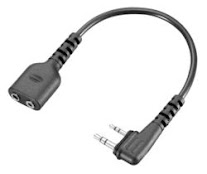
Probably due to the waterproofing, the microphone socket on the radio is deeply recessed which means that your standard headset connectors won't fit. Thankfully, Icom offer a special adapter to overcome this issue which I will be ordering. The price of it is a bit ridiculous at £24 but everything in this hobby is ridiculously priced!


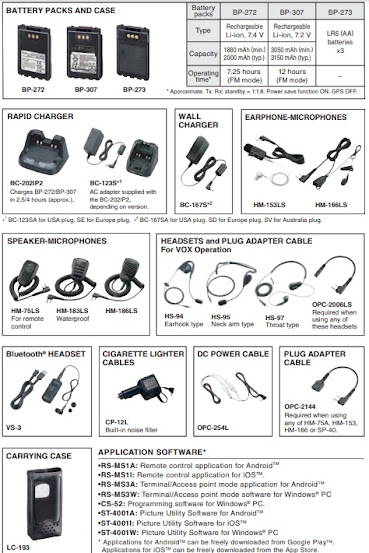
So it's pretty obvious that we have a very highly specified HT here. It's superbly put together using top quality materials and construction techniques. It has high levels of waterproofing and great performance. I would strongly recommend investing in the LC-193 Soft Leather Case to protect the radio. I've never really liked using cases, but my opinion has changed somewhat since dropping my FT3D a couple of feet resulting in unsightly marks to the plastic case.

You will benefit from downloading the ADVANCED MANUAL from Icom's website to take full advantage of all the available features. You'll also need to dedicate time to studying it all. That's the fun of it too though - just when the new-radio feeling is fading, you can discover more things to bring the sparkle back.

I've not yet had the chance to take this HT on a long walk and test it thoroughly, but brief sensitivity tests alongside the FT3D show signs of superiority. The ID-52E not only sounds better, but it also pulled in a stronger, cleaner signal than it's Yaesu chum. I tested it using a Diamond V2000 and a high quality antenna switch.

So in summary, I would recommend the Icom ID-52E. It's expensive, but it's also a very good radio. If you're a 51 owner, you'll probably not want to spend all that money on an upgrade, because the 51 is still a cracking bit of kit, but if you're on the market for a new Dual Band DSTAR handheld and don't currently own one, then this is well worth considering - especially if you’ve got a big birthday coming up and your other half is begging you to have a special treat - yeh right! 😂  

What do I not like about the Icom ID-52E? Well there's nothing I really dislike, but for this kind of money I would have very much liked to have a wider receive range including LW, MW and SW with SSB. That would have been the icing on the cake and made the ID-52 perfect!

Just remember to leave some money for some nice accessories...


THE EAGLE HAS LANDED!


ICOM's BLURB...


ID-52E Dual-Band D-STAR Digital Transceiver £550 RRP 

The ID-52E is a VHF/UHF dual band radio with D-STAR and FM dual mode functions. The ID-52E supports conventional FM communications as well as D-STAR simplex, repeater, regional, and worldwide calls over the D-STAR Internet gateway. With the ID-52E, you can call a friend in another city, or even internationally through D-STAR repeaters, with digital clear audio. In addition, the ID-52E can send digital voice with data, text messages, GPS location information and pictures.

Worldwide Communication Through the D-STAR Network
The ID-52E provides D-STAR simplex, repeater, regional, and worldwide calls over the D-STAR Internet gateway as well conventional FM communications. Call a friend in another city, or even internationally through D-STAR repeaters, with digital clear audio.

Picture Sharing Function
Share pictures with other users and see received pictures on the colour display. Pictures taken on an Android device can be wirelessly transferred to the ID-52E via Bluetooth.

DR (D-STAR Repeater) Function
The expanded DR (D-STAR Repeater) function makes D-STAR and FM repeater communication easier to use. Combined with the GPS function, selection of an available local repeater is available with a couple of button pushes, based on your location. Additionally, DR mode supports reflector linking controls.

Terminal Mode and Access Point Mode*
Connect the ID-52E to the Internet through a Windows PC or an Android device. The Internet gateway (using Terminal mode and Access Point mode) enables you to access the D-STAR repeater network, even from areas where no D-STAR repeater is directly accessible via radio.
・ Terminal and Access Point modes are compatible with Icom RS-RP3 Gateway Software. If your D-STAR repeater is running G1 or G2 software, please contact your local Icom Distributor to upgrade software. ・ You need an Internet connection with an IPv4 Global IP address. If you use a cellular system, you need an IPv4 Global IP address assigned to your Android device. ・The RS-MS3W optional software is required to be installed in the PC (Download from Icom website). The RS-MS3A optional application software is required to be installed in the Android device (Download from Google Play). USB cable is required. Type-A: User supplied. Type-C: OPC-2418. micro-B: OPC-2417.

2.3" Large Colour Display
The ID-52E features a 2.3-inch colour display (320 × 280 pixels) which provides excellent viewability. The display background colour is selectable from black and white.

Bluetooth Enabled Features
The optional VS-3 Bluetooth headset enables hands-free wireless operation. In addition to the PTT and volume up/down buttons, the VS-3 has three programmable buttons that can be assigned functions to improve operation.

You can connect to an Android device through Bluetooth. With the Android device together with the RS-MS1A Remote Control Software installed, you can wirelessly control the ID-52E to change operating frequencies and other settings.

Handheld Radio First! Waterfall Display
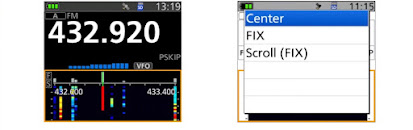
The waterfall display shows not only the existence of signals but also the changes of signal level in chronological order. You will have an overview of the band conditions in more detail, including busy frequencies currently used, or open frequencies not used. The band scope mode is selectable from center mode, Fixed mode and Fixed scroll mode.

V/V,U/U,V/U Dualwatch Including DV/DV Mode
The Dualwatch function monitors the VHF/VHF, UHF/UHF and VHF/UHF bands simultaneously*. You can quickly respond to a call from the Main and Sub bands. Two DV signals can be decoded at the same time.
* AM/AM mode Dualwatch is not possible. AM signals can be received on only the Main VFO (A band).

VHF/UHF Airband and FM Broadcast Receiver
Airband reception is expanded from VHF to UHF military Airband (225 to 374.995 MHz). FM broadcast stations can be listened to while using the dualwatch function.

Integrated GPS/GLONASS Receiver
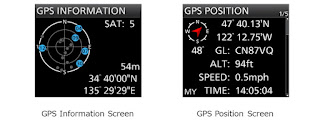
D-PRS mode is supported by the internal GPS receiver for sending your location and showing received station location, distance, and direction from your current location. In addition to your location, the ID-52E displays your current Grid Square information. The GPS position data can be used for Position Auto Reply, Near Repeater Search, and GPS log functions.

microSD Card Slot
You can store QSO Recording, TX Voice Memory, pictures, QSOs and GPS log data. Firmware upgrades, Repeater lists and other personal settings onto a microSD card (up to 32 GB). This can then be uploaded into the ID-52E radio.

Micro USB Connector
The ID-52E has a Multi-function USB port as well as USB host function, for charging the Icom battery packs, PC Programming, read/write contents to the microSD card, Terminal/Access Point mode support, as well as CI-V control as well as audio.

IPX7 Waterproof and Tough Construction
IPX7 waterproofing and pro-grade construction make the ID-52E ideal for operating in harsh outdoor environments.

Other Features
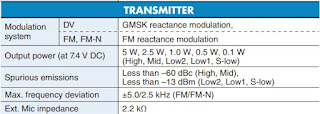
• 750 mW loud audio output power
• Improved heat dissipation efficiency for stable operation
• DV fast data mode uses data in place of voice frames
• QSO log in CSV data format
• Accessories for the ID-51E/ID-31E such as battery packs and microphones can be used
• DV/FM near repeater search function
• Voice recorder function
• External DC power jack


COMMENT RECEIVED FROM DK5CH : 

Hi Tom,

very nice blog. I also own an IC-705 and now an ID-52E. For me the microphone and VOX work for the ID-52 in combination with the Airpods Pro. However, I have to set the BT headset type in the ID-52 to Microphone instead of Normal. Audio sounds very good, but the build in microphone is hard to beat.

VOX is working, but I don't use it, pressing the PTT on the 52 keys the rig and voice is picked up by the Airpods. I really love operating outdoor with these two radios in combination with the excellent Airpods.

Best wishes and take care!

Christian - DK5CH

Thanks Christian! I’ll try that. 

73, Tom, M7MCQ


Thursday, 29 September 2022

MAT-TUNER mAT-K100 REVIEW

MAT-TUNER mAT-K100 ATU FOR TS-590SG

The Kenwood TS-590SG built-in tuner is pretty awesome, but it just cannot find a tune for 160 or 80M on my EFHW.  It manages fine on all other bands right up to 6M, but not at the other end of the scale. I don't use 160/80 that much but I don't like the idea of being restricted.

I connected my LDG AT-200 PRO and that could find a match anywhere but it's quite old and clunky and there's no integration with the TS-590SG.  It's also the least intuitive ATU I've ever come across! 

So, I searched for a cheap modern solution and found it in the MAT-TUNER mAT-K100 which comes as standard with a Kenwood interface. You can also buy an Icom interface which makes it a little more versatile. I think the Icom cable costs about £20.

ML&S, RadioWorld, Lamco, were asking £189 for the K100 but Moonraker had them up for sale at £149 so that was a no-brainer!  Waters & Stanton (and associated Nevada) don't appear to sell MAT tuners any more.


The parcel arrived quickly and well packed. It included the tuner, the Kenwood interface lead and the operating guide. The unit is very compact which suits my small shack perfectly. The construction quality of the mAT-K100 looked pretty darned good, with a real nice milled aluminium finish - better I'd say than any of my LDG tuners.

 
On the front panel are two simple LEDs and around the back you have a couple of SO-239s, a GND lug and the 4-pin interface socket. I was pleased to see that the 4 pins in the connector were quite substantial and not the usual ones which feel like they're made from "fuse-wire" :-) 


Once I'd detached the AT-200PRO and installed the mAT-K100, it was time for testing. Needless to say, the integration with the 590 was perfect. There are no buttons to press on the K100; it's all done from the radio's AT button. A simple press-hold sets off the tuner and quickly finds a match, which is then stored in one of the K100's 16,000 memories!

The K100 supports almost every Kenwood radio which is either  AT-250 or AT-300 compatible, so that includes the 570, 590, 850, 870 and the flagship 990. It also supports a few other Kenwoods like the older TS-2000 and the TS480SAT, etc, but the much older 430/440 radios are just too old to interface with this ATU.

Coverage is 1.6 to 54MHz and has a power-handling range of 0.1 to 120W (30W Digital). 

Tuning speed is impressively fast, but a full tune from scratch might take up to 5 seconds depending, of course, on how close to resonance your antenna is. All matches are stored in memory and recalled with lightning speed when needed. It pays to run through all the bands at various locations (CW area, PSK, FT8, Phone, etc) so that tuning time is minimised because you've already tuned there and it's all in memory.

A small but valuable feature is this ATU is powered from the radio, so no need to faff around connecting it to a DC supply.

The MAT-TUNER mAT-K100 looks great, works VERY well and is relatively cheap at Moonraker's price. I especially like the fact that it is so very well integrated with the Kenwood (and presumably the Icom range) which means that you can just totally forget it's there!


Specifications:

- 1.6-54 MHz continuous coverage

- 0.1-120 watts SSB/CW power 30 watts on PSK and digital modes.  

- 100 watts max SSB/CW above 50 MHz.

- Tuning time 0.1-5 seconds for full tune cycle.

- 16,000 frequency memories

- Impedance matching range 5 to 1500 ohms

- Dimensions  20D x 13W x 4D cm

- Weight 0.8 kg


Friday, 23 September 2022

(tr)uSDX MODS

Tru Bling!

I work with stainless-steel everyday and so it was pretty inevitable that I should ask the CAD Department if they could copy the plastic lid, personalise it and make a couple of replacement lids for my (tr)uSDX radios.

They won't really serve much purpose other than stroking my vanity and generally looking great on the radios. I also took advantage of the opportunity to reduce the screen aperture size by 1mm all around - now it looks much more 'fitted'. Previsouly, there had been a tiny gap around the screen and it bugged the hell out of me.  Additionally, I fitted a stand to each radio. They cost £4 each from Amazon and come with self-adhesive backing. LINK HERE.

And before you ask, no I am not able to make any more steel faceplates. Sorry, but I had to pull some strings to get these two done. I intend to replace the black screws with stainless-steel hex heads. Here's some pix...


Modified with new screws


Thanks for popping by!

(tr)uSDX Review here