After getting our new holiday home in the Forest Of Bowland, I decided that I had no need for a Base Station at home, since I'd be going away every single weekend. I hardly spent any time in the shack to begin with, since most of my radio-time is spent outdoors with one of my QRP rigs. So I sold my base station and put the money toward the new caravan.
At the caravan I setup my radio gear and pretty much leave it there. I also setup a telescopic mast for quick installation of a wire, so everything's pretty much sewn up and ready to go within a few short minutes. But that leaves the shack at home pretty bare. In fact, we recently decided not to have a weekend at the caravan, but instead stay at home - and it was at that point that I realised I was 'HF deficient'
At home I still have an FTM300D and an FT-7250(2M/70cm, C4FM) but no HF other than a tiny (tr)uSDX, so it was time to look for a cheap base station. To be honest, my very first thought was a used Yaesu FT-DX3000 because I think they're one of the most underrated HF rigs out there! I have very fond memories of the one I used to own and before I knew it, I'd found one on HamRadioDeals. The only thing that stopped me from buying it, was that it looked really grubby.
Soon after I spotted a beautiful Kenwood TS-590SG that was advertised as two years old at a decent price. These are currently £1500 new, so I was glad to make a bit of a saving. When it arrived, I was really very pleased with the condition of the radio. The radio is surprisingly compact and fitted perfectly into the shack next to my Yaesu speaker (a remnant from my FT-DX101D ownership).
I've never had a Kenwood base station before - in fact the only Kenwoods I've ever bought were a TH-F7and a TH-D74💖(both handhelds). I'm very aware that Kenwoods are generally considered to be the kings of audio and the TS-590 has been on the periphery of my vision for a long time, but I've just never got around to trying one before.
Before I bought this, I studied the spec and general opinions of existing owners. It seemed that no one had a bad word to say - quite the opposite in fact! The vast majority of owners absolutely ❤️loved❤️ their 590 and the newer "SG" model just put icing on top of an already excellent cake with...
.... much improved receive performance and TX-spike performance (close to TS-990), CW Decoder, ANT Out, Improved Multi-Knob, 10 LCD Screen Colours and better styling.
The TS-590SG is a good old fashioned SuperHet so there's no fancy scopes or waterfalls, just a very clear and straightforward LCD screen with an option to adjust the background colour. After owning some of the most advanced transceivers on the market, it felt like going back to basics - but in a very good way.
The TS-590SG hit the UK shelves in 2015 and is still very relevant in 2022 with its 32bit DSP, USB connector, built-in SoundCard and Remote Control capability, but it still has that old school feel about it and it's so nice to have all those buttons, knobs and dials. Kenwood is not a company for changing its product lines every two minutes - they make a radio, they make it well and it keeps on selling.
The "SG" update has turned a great radio into a superb radio thanks to technology borrowed from the mighty flagship TS-990S including some sharp roofing filters (with a first IF of 11.374MHz) and an IF AGC. In addition, Kenwood has improved the reciprocal mixer dynamic range, almost matching it with the SDR competition. After testing the radio, Rob Sherwood said it offered the best bang for the buck on the market!
Now it's my understanding that the original 590's had a TX overshoot problem, but this has been eliminated in the new SG. As far as I know, there are no other known issues with the radio. It appears to be a rock solid workhorse which is admired by rag-chewers and contesters alike.
Having been a big user of SDR radios, I am pretty used to having a panadapter and so I was pleased to see that the TS-590SG has a phono output for an external receiver, which means that you can easily connect a cheap (eg. SDRPLAY RSP1A) receiver and share whatever antennas you have connected to the 590 👍👍👍
SDR SOFTWARE
The rear panel of the TS-590SG is well laid out and has decent spacing between connectors. There are two SO-239's for antennas A and B and a phono socket (RCA) for the RX-Only antenna. There's a second RCA connector for DRV (external receiver or transvertor).
Accessory wise, there's a few bits and bobs that can be added to the radio such as a very high-accuracy TCXO and a Voice Recorder, but the latter is of no interest to me personally. Frequency stability on the other hand is very important to me, so Ibought an SO-3 TCXO and installed it.
There's also a range of microphones but the last three years has taught me that the stock fist-mic is usually one of the best sounding mics you can plug into the connector. Nevertheless, if I find a bargain MC-60 I'll give it a go.
I'd just like to point out that the Kenwood TS-590SG feels superbly well made! I mean the whole thing feels slick and all the buttons and dials are solidly fitted with very little lateral movement or "slack". This is better than I've found on transceivers costing three times as much!
My home QTH isn't the quietest place (electrically speaking), so it's not really fair to talk about the radio's noise-floor, although it certainly doesn't seem any worse than any of my previous radios. It does, however, have a gorgeous rich sound to the audio and is less tiring to listen to on SSB. Those fabulous roofing filters no doubt contribute to the great sound of the Kenwood, as does the Noise Reduction system.
The radio has a buit-in equaliser for both TX & RX and there's some useful presets plus a custom user-defined setting. The trouble is with these things is that you can get carried away with them and end up with a setting that is excessively biased one way - way too thin or too thick and heavy. I think I'll end up assigning the RX Eq to one of the PF buttons for quick access.
The TX audio is equally impressive according to those who were good enough to help me with tests. I've not bothered altering the TX-Eq and probably won't.
Tuning around with that velvety smooth dial is a pleasure and when you com across a signal, rest assured that you've got the tools to improve it, no matter how poor it is. Using the RF Gain, Noise Reduction and the Filter Shift & Width you will pull out all but the very faintest signals. The Beat Cancel button (1&2) works amazingly well to get rid of annoying whistles and beeps on your frequency, without degrading the desired signal too much. I really like that feature and use it quite a lot.
The ATU : WOW! Normally I don't even discuss built-in ATU's except on Elecrafts, because they're always pretty "average" but I have to give credit where credit is due. The TS-590SG has a superb ATU and it's super fast too. If you have something like a 40-6M EFHW, you won't need an external atu - simple as that - it'll tune all bands without an issue. Brilliant!
Finally I'd like to mention how very easy it is to work Digital modes - this thing is a breeze to work with on FT8, WSPR, etc. Just follow this super simple guide. It makes you wonder why some other manufacturers make it so damned difficult! 😡
So, there you have it. I managed to find a cheap marvel and I'm super happy with it. Even though I've previously had some high-end radios in the shack, I don't feel I'm losing out massively by using a TS-590SG. Sure, if I did a lot of work from my shack, I'd have kept the 7610, but I'm an occasional user at home, so I reckon I've done pretty good choosing this rig.
THE COMPETITION...
I guess the biggest competition for this radio would be the ICOM IC-7300 and if you 're specifically looking for an SDR, then that would be the natural choice, especially with Icom's super intuitive operating systems - it's certainly the cheapest option! I've had a 7300 myself and for the money it's a fabulous entry point into SDR radio. I could have got a used one for less money than the 590, but I decided I wanted to go back to a more 'traditional' rig and I personally feel that the 590 actually performs much better than the 7300.
Using the radio's built-in DSP functions, the RF Gain, a touch of attenuation and altering the filter width/shape, you can get a low noise floor and a lovely clean signal, as shown in the video below (watch the S-Meter)....
The TS-590SG's external-receiver connector (DRV) is a great feature! This is an antenna-splitter which is very convenient! It's nice to see that you can switch off the splitter by the simple press of a button, if for example, you wanted to focus on a particularly weak signal momentarily. This built-in splitter is infinitely more convenient say, than using a clunky MFJ-1708B(not to mention cheaper, lol).
It doesn't matter how good your radio's SDR screen is, you can't beat having the flexibility and rich feature-set of software like SDR UNO, SDR CONSOLE or HDSDR and being able to control everything on the computer screen.
SDR UNO (with OminRig installed) can operate your radio flawlessly and provide you with a staggering range of information and options all on one big screen. You can even have multiple receivers open. And if you spin the physical dial on the radio (or press any buttons), it changes on the computer too. UNO is also constantly being modified and updated with an amazing array of features. I believe they're currently writing a completely new multi-platform version called SDR CONNECT which should be released at the back end of 2022.
Kenwood also supply some free software (ARCP-590) which allows you to control the radio but it obviously doesn't provide any panadapter features. It does, however, give you access to all the controls and menus in a nice, easy to access way. Please note from the screenshot below that you must download the correct version for your 590S or 590SG. Installing the wrong one (as I did 😁) will result in an error.
So apart from being cheap, the IC-7300 just doesn't compare to the TS-590SG (in my humble opinion). The 7300 only has one antenna connector, whereas the 590 has 2 TX and 3 RX connectors. The 590 has an output for an external receiver - the 7300 doesn’t. The 7300 ATU is like most other manufacturer's - average. Basically, the 7300 is a low-cost, entry-level SDR transceiver for people who are perhaps new to radio or for those who just want something very simple - it's a fabulous choice. The TS-590SG is more of an ‘experimenter’s’ radio.
73, Tom, M7MCQ.
Martin Lynch & Son Review
UPDATE 10/10/22
Managed to find a very nice MC-60 described as "Boxed-Unused, Like New". The original box and instructions were included too.
There have been some reports of this mic being susceptible to RFI but I've certainly not experienced any problems. Then again, a lot of people have lots of RFI in their shack which needs sorting out instead of blaming it on an item that makes them more aware of their problem.
The MC-60 is a very solidly built bit of kit and it won't be moving around the desk. It's simple and functional, with no frills. It could really do with an LED to remind you that it's in transmit mode and I might try to add one. The pre-amp switch is located on the underside of the base which seems a bit daft to me, so I might try relocating that too. There's no real need for either modification - but it's good fun to experiment isn't it? 😂
If you have any comments or questions, then please post in the comment section below or email me directly on m7mcqio83ro@gmail.com and remember, this post is just my own personal ramblings - I'm not an expert, but I have at least bought and tried the equipment that I talk about :-)
YAESU'S LATEST MOBILE VHF/UHF/FUSION transceiver will probably be remembered for being one of the few new radios to hit the shops during the Covid period! Well, maybe that and the IC-705 if it makes it to the stores before another outbreak cripples the world's supply chains again.
The FTM-300D appears to be a replacement for the FTM400 although no one at Yaesu is admitting that yet, since there are probably still a few thousand of the old units to sell. Although I personally don't think it's as attractive to the eye as the 400, the 300 certainly is a welcome update and it offers me something that my old 400 never did AND it does things which my 991A doesn't do.
Because I like to use the WIRES-X software in the shack through my computer, I had no choice but to buy the FTM-300 because my only other option was to tie-up my handheld FT3D which seems a little crazy.
So here we are at the end of July 2022 and looking around all the UK supplier's websites I can see that there's no stock! Well actually, LAMCO showed them being 'In Stock' but a quick phone call produced the usual "Oh sorry, the website mustn't have updated itself'. So with no option but to wait for a new batch to enter the country, I placed an order with Martin Lynch & Sons. £400
10 days later, the unit arrives (thanks ML&S) and I quickly unbox it and store the packaging in the attic with all the others.
Putting the FT3D next to the 300 it would appear initially that Yaesu had shared the same screen - which would have been a good thing - but sadly the 300 isn't a Touch-Screen. Why?? Not a clue - seems crazy to me to invest in the creation of a nice touch-screen and then not utilise it in your other radios. Go figure.
Whilst lacking the benefits of a touch-screen, the 300 is nice and easy to operate. The buttons on either side of the head unit are clearly marked and make complete sense, as do the rotary controls. The menu system (what they call Easy To Operate (E2O II)) is intuitive and doesn't give you that 'bogged down' feeling when you're trying to reach a particular setting.
One of the very best features of this new radio is the true Dual Band capability which is achieved by the inclusion of two independent receivers which means that you can not only monitor two separate bands, but can also monitor two different parts of the same band. In fact, you can even monitor two C4FM frequencies!!
That's great news! But you can also switch on the CrossBand Repeater function. This won't work in C4FM to C4FM, but it will work in one analogue mode to another analogue mode, or even C4FM to analogue mode. It basically receives on one frequency and instantly re-transmits on another (FM) frequency. Cool!
The radio has 50W power on all bands with options to reduce that power to 25W or 5W. I've not tried it yet, but I think there might be a way to modify those settings (using the hidden service menus) so that you can get a 10W setting, which would make much more sense to Foundation Licence holders like me. Having said that, this radio will be permanently be connect to WIRES-X on my PC with a dummy load connected.
The FTM-300D has well over 1000 Memories and a small number of your favourite stored memories can be arranged into a special group which can be put into MCS mode which monitors them in the background and then stops when it finds an active frequency to allow you to communicate if you wish to. I've not spent much time with this feature, but in my mind, it's like having a number of Priority Channels that you'd like to monitor even though you might be doing other things on a different VFO.
Another great feature is the BandScope which in VFO Mode will show activity on 30 channels either side of your tuned frequency. It will do the same in Memory Mode but only 21 memory channels at a time.
The RX audio sounds pretty good and I'd say there's no need for an external speaker unless you want to alter the tone to better suit your hearing. It's pretty loud too with a 3W speaker which is mounted to the top of the base unit.
Other sophisticated features include Yaesu's AMS mode, DG-ID and GM (Group Mode) which make good use of the radio's built-in, high-precision GPS. That GPS is also used by the radio's APRS communication system. Whenever you transmit to someone in C4FM or DV mode, your GPS Position is also transmitted and their position is received, allowing navigation to one another.
The head unit can, of course, be separated from the main unit and mounted in a different location which is handy for use in the car and in some shacks. The radio has a welcome SD CARD facility and I'm pleased to say that they've placed it on the head unit which makes it much more convenient to access for those occasions when you want to remove it. You can use a card up to 32Gb. The radio can record your QSO's in .wav format - that includes your speech and that of the other operator. On a 32Gb card there's room for many hours recording.
The supplied microphone is like no other Yaesu mic I own and it feels comfortable in the hand. Unsolicited audio reports at this early stage have been very complimentary. I like the large MUTE button at the top of the mic - I find it very handy. Another nice feature of the FTM-300 is the built-in BlueTooth which works very well with Yaesu's own BT Device but not so well with any others I tried. The good thing about Yaesu's SSM BT-10 is that it works very well with both my FTM300, my FT3D and even my Icom IC-705!! Understandably, audio reports using the bluetooth mic aren't quite as complimentary but there's been no complaints either.
So there you have it, it's a great little radio and I really am very pleased with it thus far. It's great to have DualBand back in the shack after selling the Alinco DR735 - I really missed that.
The FTM-300 is easily the more up to date and higher-spec radio when compared to the 7yr old FTM-400, but understandably, some people will want the bigger touch-screen of the 400. Personally, I much prefer the great feature of being able to monitor 2 C4FM rooms (say NWFG and CQUK), something the older 400 just cannot do.
I'd also prefer to have the wider receiver coverage and the built-in BlueTooth. The 400 also lacks the very useful Memory Groups of the 300 and the SD card location on the head-unit.
99% of the time, this little beauty will be connected to a PC and a dummy load running WIRES-X, because my main VHF/UHF radio is the IC-9700, but occasionally I'll switch the antenna over to the FTM-300D to benefit from its wideband receive.
REMEMBER, these are just my own personal opinions and I fully understand that others may prefer the 400. Someone pointed out that they like the 300 for in the shack and the 400 for in the car. The bigger screen in the car makes sense.
Thanks for visiting - please take a minute to leave a comment below
The (tr)uSDX is something of a marvel! Okay, so it's no KX3, but neither is it £1500. It's a supremely affordable QRP transceiver which can be purchased pre-built or (if you're into diy), can be ordered as a simple, easy to build kit. Because I'm tight-fisted 😂 I bought mine second-hand from YouTube's TechMinds.
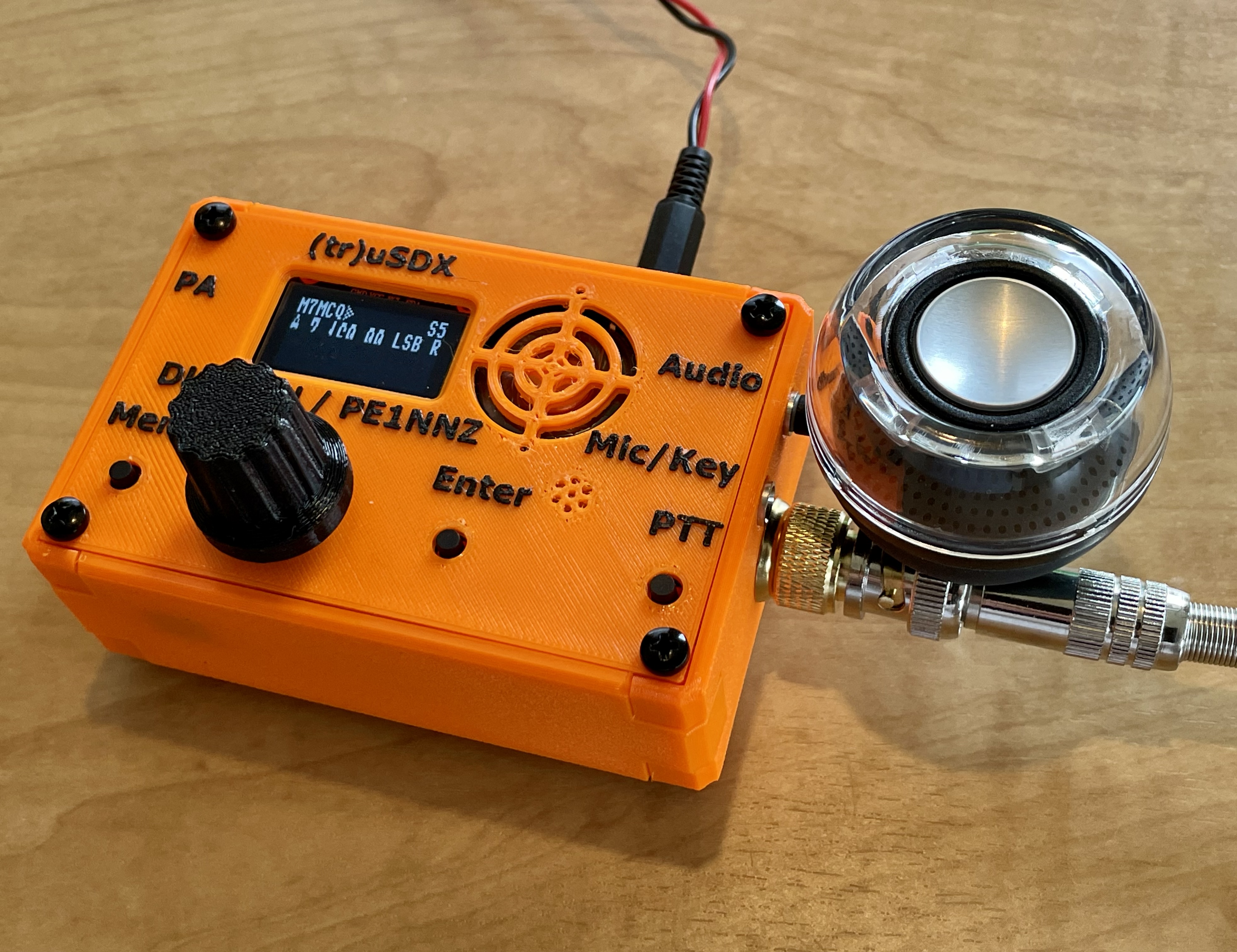
Everything about the (tr)uSDX looks cheap - it's encased in a 3D printed enclosure with all the associated crude detailing and tacky colours. The VFO encoder knob is also 3D printed. The case is held together with bulky screws and it has those stick-on rubber feet that you can buy from the £Shop.
The sound from the built-in speaker is pretty shocking and the audio is generally poor. The receiver isn't particularly sensitive and when sat next to my beautiful little BELKA DX receiver, you feel like maybe you've made a mistake purchasing the (tr)uSDX.
But that's where the negativity ends!DL2MAN's (tr)uSDX (usually pronounced True SDX) is a fabulously cheap little transceiver which is not much bigger than a pack of cigarettes and weighs next to nothing. It has a small but clear OLED screen which provides an amazing amount of information. The screen is not easy to read in direct sunlight, so be prepared to shade it with your hand.
This is a 5-Band radio (mine is configured for 80-60-40-30-20 (but other configurations are available)) providing around 5W output and CW/LSB/USB/AM/FM modes. There's a convenient built-in microphone and PTT-switch (which can even double up as an emergency CW key), making the radio pretty self-contained. Needless to say, you'd be better using an external mic and speaker, but at least they're there as a backup for those occasional days when you reach your SOTA Summit and realise you've left the mic at home! The radio has a socket for a CW Key (straight or paddles).
The receiver's noise floor is fairly high, but again, you have to remember the price point of this radio and accept the fact that it's not your DX base station - it's your "stick it in your pocket" radio, your "pop it in the glovebox" radio. And when you're sat on the beach or on top of a hillside with a bit of wire, you'll be pulling in plenty of signals strong and loud enough to be able to have some fantastic QSO's in any mode you like!
A couple of minutes Audio of my (tr)uSDX
As soon as my (tr)uSDX dropped through the letterbox, I quickly connected it to a 9V supply and an EFHW and tuned around 40M. On 7.144 I found PA0PIW and although he was in a mini-pileup, I thought I'd shout into the built-in mic and see if he could hear me. He almost instantly read back my callsign and gave me a good signal report! That was very pleasing and I look forward to taking this little beauty up to my local Sota point to see just how far I can get. My second attempt got me a 55 from F4HEC in France (he’s the one featured in the recording above).
Navigating around the (tr)uSDX's operating system is fairly straight-forward. The primary function of the rotary encoder is (as you'd expect) to control the frequency of the VFO, but if you push it down and turn, it controls the volume. Single pushes of the knob alters the tuning rate and a double-push changes bands. Single-clicking the Enter Key changes modes, while double-clicking changes filter width and a long push brings up the RIT function. Nice!
The rest of the radio's functions lay in the Menu and it's all surprisingly intuitive - no doubt thanks to the software skills of DL2MAN's partner - PE1NNZ who's done a fabulous job. When you first get hold of your (tr)uSDX you can put it into 'Practise Mode' so that the PA is shut down while you learn your way around the radio. Speaking of PA, there is a connector on the side of the radio to allow you to connect to an External Amplifier.
DL2MAN's website is a great place to learn more about the (tr)uSDX and its heritage; there's lot's of great tutorial videos there too. Manuel seems like a real nice character and his videos make for easy watching. His command of the English language is pretty good too. There's also a very useful FORUM.
The (tr)uSDX can be run on a wide range of voltages using the small DC connector port and can even be powered from a 5V USB power pack. At 5V the TX power is limited to 500mW but even that is a great feature for those wishing to play at the lower end of QRP levels. This USB port can also be used for CAT Control and Programming.
As I mentioned earlier, the OLED screen provides lots of info and can be tailored to suit your personal preferences. You have the frequency, the VFO indicator, S-Meter, Filter Width, Rx/Tx indicator, Mode, Tuning-Step and even your CallSign. Things like the S-Meter can be altered to show reflected power, forward power, swr, watts, efficiency and more, but the latter can only be done in CW mode.
Another great feature of the (tr)uSDX is the built-inCW Decoder! Again, just think about the price of this tiny transceiver and ask yourself would you really expect a CW Decoder to be included?? I wouldn't!
CW DECODER
And it works really well too. I usually set the CW Speed to 20wpm and it pretty much decodes everything I can hear as long as the signal is strong. Occasionally I have to drop the speed down when I know the sender is particularly slow, but otherwise, it does a great job. The radio can also SEND an automated CW Message from memory which can be a great assistance when calling CQ or running an RBN test.
Note that I fitted an SMA to BNC adapter but it leaves a gap, so I inserted a brass ‘Cup Washer’. Perfect fit! I also use a compact (but very clear) plug-in speaker from Amazon. Highly recommended!
Although I've got a SotaBeams EFHW and LINKED DIPOLE, I sent off for a QRP GUYS 'No Tune' End-Fed-Half-Wave antenna which covers 80-10M. This will be the perfect companion for the (tr)uSDX. It comes in Kit-Form and only take a few minutes to put together. All you then need to do is connect the appropriate length of wire to suit the band you wish to operate on. No counterpoise is required. Conveniently, all the wire-lengths are printed on the antenna former.
It was a simple task to cut the wires and trim them to attain the best SWR using my NanoVNA. I'm guessing that most of the time this antenna will be used in a Sloper configuration by throwing one end up into a tree, thereby allowing me to leave my telescopic mast at home.
Just bear in mind that although this antenna looks incredibly compact, you do have to carry around all the various lengths of wire for each band - and they range from 13ft to 125ft 😮
Super simple to build!
As I write this mini-review of the (tr)uSDX, I am reminded of the infinitely more expensive PreppComm MMX which I purchased a few months ago. The MMX is a small CW-ONLY 3-Band, Decoder/Encoder which has not only cost me a small fortune, but has caused me months of disappointment and anxiety. And even now when all the troubles are supposedly behind me, I am left wary and cautious about using it.
The (tr)uSDX kit on the other hand, has proved to be a product that just worked from the get-go. Not only does it do what it's supposed to do, it does it with ease and reliability. It has some amazing built-in tools to diagnose problems, has a built-in SWR Bridge and even a PA efficiency indicator to help you tweak the toroids, if you're so inclined.
The levels of support for such a cheap product are amazing and I'm very pleased to have it in my arsenal. I reckon I'm going to get more fun and enjoyment from this budget rig than some of my other much more expensive radios! We'll see 😊
During my 2 weeks holiday at our static caravan in Scorton, I went up to Bodie Hill which overlooks Morecambe Bay and set up station using the (tr)uSDX and my 20/40 linked dipole. I had a great take-off point and will definitely go again.
It was pretty early in the morning (because I had other things to do in the afternoon) and there wasn’t a great deal of action but I still managed to have some great chinwags with operators across the globe with my 4W. I was very happy!
The radio performed incredibly well and I was impressed with how sensitive it was at this price-point. You see questions on the internet like “How good is the (tr)uSDX” and “Can the (tr)uSDX REALLY perform as well as people say”? Well the answer is yes!! For the money, it cannot be beaten as long as you give it a helping hand by choosing a decent operating location. Having said that, I've been having SSB chinwags with Americans from my home qth with a compromised antenna.
Here’s some pix from my BIWOTA ACTIVATION TODAY…
I love this radio❤️ so I ordered another kit in green.
When the green one arrived, I did the same as I'd done with the orange one - just plugged it straight into an EFHW and tuned around 40M. I heard a signal coming in from what I thought was Russia, but it turned out to be a Ukranian operator chastising Russia and Putin for their "Special Operation". Then I had a QSO with GM0WRR in Scotland and MI3JXG in Ireland and DL5PIA in Germany.
Fitted a power lead directly to the PCB. Still kept the regular jack though, in case I need to power an accessory.
Quick PSKR Test - 3500 miles
Quick RBN Test - 3400 miles
Before I forget, DL2MAN has a great video on preparing the (tr)uSDX for Data HERE.
HANDHELD MICROPHONE
Although the built-in microphone really does work, it is not very convenient having to lean over and shout into the radio. There is a kit available in America for a small electret mic but apart from the fact that it looks pretty crumby, I don't want to pay the ridiculous international shipping fees. So looking on Amazon I found a Speaker Mic which was only £15 so I took a chance and bought it.
Being a lowly M7 licensee, I have no knowledge of electronics but I figured out from the (tr)uSDX details on the net that I could possibly get this TYT Mic working, so I tried to get it right in my head before giving it a go. I sketched this little schematic...
Well that was the theory, but it didn't quite work out 😢 The microphone part worked fine! And on receive, the audio from the radio did come through the speaker-mic (great!) but when I pressed the PTT I got a high pitched tone (it wasn't acoustic feedback).
I wondered if it was because I hadn't included a ground wire to the audio jack-plug but I didn't think I'd need to because the ground was already supplied in the other jack. Perhaps that's my ignorance showing - I'll have to try again by adding a ground wire. No harm done (so far). I'll keep experimenting and update later.
DL2MAN's Schematic
UPDATE 30 OCT 2022 : I WAS BEING DUMB!!! The Spkr/Mic wasworking after all. The noise that I could hear during transmit was due to the radio being in CW mode - which produces a tone. D’oh!!
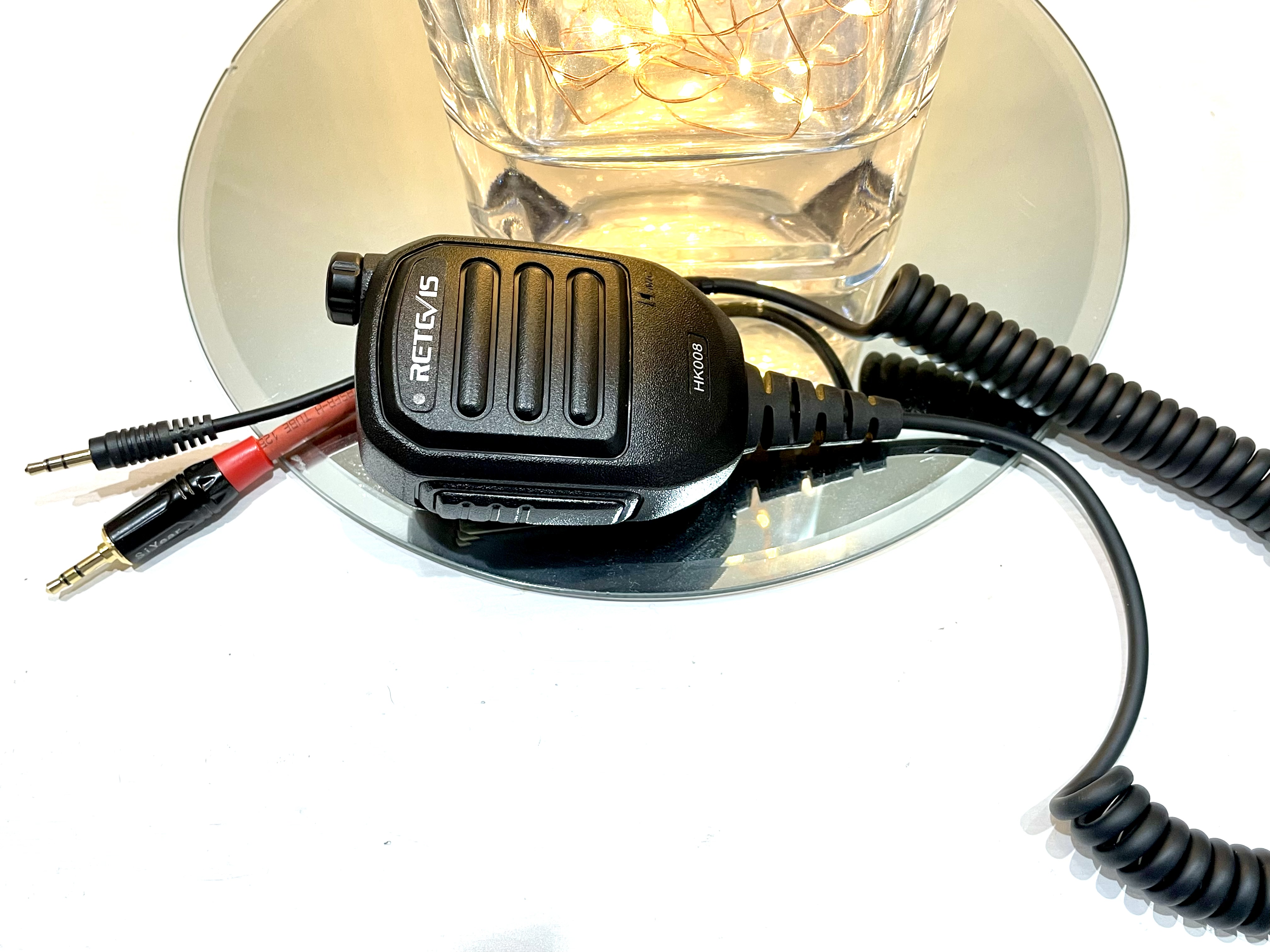
UPDATE 8 OCT 2022 : Manuel has uploaded a video showing how to make a RETEVIS HK008 speaker-mic work with the radio. The HK008 actually has an amplified spkr which may be really useful when operating outdoors in noisy environments! There's a rechargeable battery inside the case too. I've ordered one to play with, but I'm still going to try and resolve the issue with the TYT spkr-mic when I have some free time.
Here’s the one I put together. I used the only 3.5mm jacks that were left in my “bits” box. I swap them for a neat connector later. It’s worth saying that the RETEVIS is much louder than the TYT due to the built-in amplifier. It’s also nice to have the volume control too…
Got connectors printed! 👍
Finished Product
Finally, I want to mention the fact that this radio can be an experimenter's dream and many people have carried out mods - even changing the screen to a larger unit. More on my level is the type of mod that requires little technical expertise, such as tuning the RF section to achieve better efficiency and power. DL2MANhas a great video showing how easily this can be achieved....
There are lots of videos of the (tr)uSDX on YouTube, so go there to discover answers to any questions you may have about the radio. I hope you enjoyed this little review of the (tr)uSDX and consider ordering one for yourself - I'm sure you'll love it!
UPDATE 23 APR 2023 : Found a compact PowerBank at a Radio Rally. It’s almost exactly the same size as the base of the (tr)uSDX and has a Micro USB connector which folds neatly away when not in use. It offers 5V, 1A output, 1500mAh. Perfect for brief, low power activations or a bit of RX.
UPDATE 5 JULY 2023 : Ordered a 3rd unit in blue. Just arrived.


.png)




uSDX-3Dview-M7MCQ.jpg)


uSDX-decode-M7MCQ.jpg)


uSDX-picnic1-M7MCQ.jpg)




uSDX-diy-7web-M7MCQ.jpg)

blue1-m7mcq.jpg)