

ELAD Elettronica was established in 1990 by Franco Milan - a designer with decades of experience. ELAD excel in technological innovation and skills in the world of electronics. They are electronic engineers first and foremost, producing high end test equipment, but being Italian, also have an eye for beauty and style - this thing wouldn't look out of place in a stylish lounge!
The FDM DUO is a smart, compact (7"x6"), very well constructed radio which can be used as a standalone QRP radio up on a SOTA Summit or is equally happy at home in the shack connected to a linear amplifier. If one receiver is not enough for you, then simply connect it to your PC and run the FDM-SW2 software - enabling you can work on two separate bands at the same time with four independent frequencies on each band - effectively 9 receivers in total!

Depending on the power supplied to the radio and the band used, the FDM DUO will typically output 5W at 12V and up to 9W at 13.8V (and down low into the mA range ) in all modes (except digital). Output drops according to the voltage of your supply, so using a low-voltage battery will drop the TX output typically to 5W. Personally, I use a 13.2V LifePO battery so I should get close to full TX power when playing outdoors. It's worth noting that the Elad has a current draw of 500mA in receive mode, so this would be considered too high for many POTA/SOTA operators. I wouldn't let that bother me for a POTA outing because I've always got my truck close to hand with extra batteries, should I need them, but for SOTA that's a different story. Back in the shack (where a radio like this would probably spend most of its life), a 13.8V PSU will always guarantee max power out.

The RX range of the Elad is 10Khz to 52MHz, so it is also a good choice for ShortWave Listeners. Performance below 54MHz is superb and if you use the PC software you can actually go much higher (at reduced quality).
You can choose from Black or Silver finish, but me being me, I opted for the Special Edition "RED" version in 2019. This special edition came about after Martin Lynch reviewed the radio on YouTube and suggested that it was "like holding a Ferrari in your hands", so the MD of ELAD decided to do a short run of red radios, lol. The finish on the steel case is very nice and looks pretty durable. The legs at the front of the rig might look a bit flimsy but they are in fact quite robust. The VFO dial feels smooth and dependable and the screen is bright and crystal clear.


Under the cover: there's a very fast analog-digital-converter which samples the received HF directly into digital signals and a downstream DSP module provides for filtering and processing, while another ARM processor handles the signals of the control unit. One highlight of the FDM-DUO is the possibility to use it standalone without a computer.
It's a perfect companion for QRP fans, allowing you to have an advanced SDR with you even when you're working far from home. The controls are very easy to use for a small QRP transceiver and in addition to the big VFO knob, there are two smaller knobs for volume and filter-center/width (amongst others). Six blue buttons below the LCD-screen access the most important functions directly, while less frequently used settings are available via menu system.

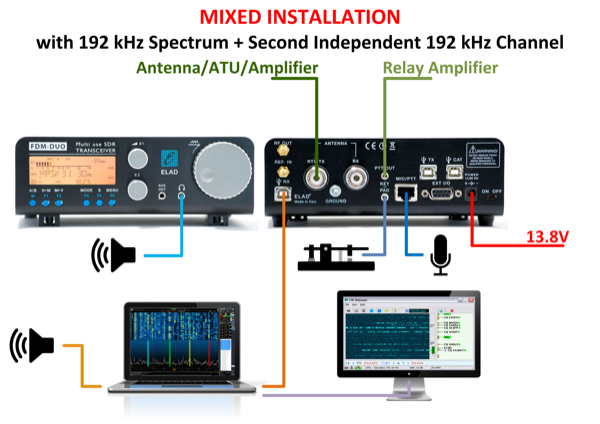
On the rear of the panel you have an RF OUT (0db), REF IN, RX-USB, two SO-239 connectors (one for a TX/RX antenna and one for an RX-ONLY antenna), PTT-OUT, KEY/PADDLE, RJ-45 MIC connector (Icom compatible), two more USB ports (TX & CAT control), a DB9 connector for accessories, a power connector and a small ON/OFF switch.
When connected to a PC, FDM-DUO is a very advanced SDR receiver and transmitter with capabilities which are usually available only in large radios. The device receives from 160M to 6M. A 16-bit ADC with 122 MHz sampling rate is built-in.
Selectable modes are:
LSB,
USB,
CW,
AM
FM,
Extra modes with the Software are:
Sync-AM
Multiple CW modes
DSB
ECSS
RTTY
WFM (incl. Stereo and RDS!)
RTTY,
DRM
IQ Out
The Elad has a built-in, onscreen CW DECODER, which is always a nice addition.
The accompanying PC software is called FDM-SW2 and is constantly being updated. The software gives you a staggering amount of control over the radio - much more than any other SDR software out there!
Just stop for a moment and think about other Standalone SDR Transceivers on the market from the big boys like Icom and Yaesu - do they provide you with FREE comprehensive software?? No! Hell, you'd be lucky to get basic-control software.
Elad on the other hand provide FDM-SW2 (always being updated) totally free of charge and it permits you not only to control the basic functions of the radio, but let's you delve deeply into the nooks and crannies of the radio and change pretty much anything you want in search of a better signal.


You can open multiple windows and spread them across your monitor in a layout which suits your method of working and they can even be spread across multiple monitors. One big plus to me, is the fact that you can properly resize windows to fill your screen(s).

The Noise Blocker on this radio is just staggering (to me at least)! Occasionally at my home QTH, someone in the neighbourhood switches something on 😡 which virtually wipes me out and the only noise blockers which can deal with it are the one on the Elad and the one on my TS-590SG (to a lesser extent). All others have failed completely.
Setting up pre-recorded voice messages (eg for calling CQ) is easily configured and these messages can be set to automatically repeat. If you have a USB headset or a USB microphone connected to your PC, you can choose which one to use to transmit from.
There's so much more that can be done from within the software - it really is quite amazing the amount of control the manufacturer has chosen to give to the operator. So much so, you might find yourself resetting the radio to the manufacturer's default settings when your tinkering has gone a little too far, lol.


The ELAD FDM DUO is a cracking little QRP radio with a stunning receiver which will never fail to impress you and the software just takes it to another level. It's also easy to hook up to a linear for those wanting to use it in the shack as their main rig.
Everyday operating of the Elad is really quite straightforward and although you do have to remember what some of the buttons do, it only takes a couple of days to feel completely comfortable navigating your way around all the options. The VFO dial is large and nice in the hand.
Although the screen is quite small, it is extremely crisp and easy to read - there's bags of information on there too. The colour of the backlighting can be altered and you can even set it up to change when transmitting - say to red.
When connecting up to a PC to run the FDM-SW2 software, I find it much better to use a TMATE-2 instead of mouse and keyboard. Having said that, you usually find yourself working a combination of the two.

If you want CAT Control, then you only need one of the three USB leads.

You will note from the images that a matching speaker is available - the SP1A. External speakers from radio manufacturers are a great annoyance to me - I think they're outrageously expensive! Not so with Elad.
They cost £135 brand new and are super stylish and superbly well engineered! The SP-1A is an amplified speaker which conveniently has a PowerPole pass-thru. It has decent power output and has a built-in 3-stage DSP circuit. It fits in very well and completes the station.
To see the beautiful matching 100W Linear Amplifier, click the image below...

Here's a video recording of me speaking to W2RE using the ELAD and a G5RV...
This beautiful, high performance transceiver from Italy is a shining star in the SDR world, for sure. It's completely standalone but is backed up with some of the very best software available on the market for those who want to link up to their shack PC.
It's small enough to be thrown into a rucksack and be taken with you on your travels, but that (relatively) high current consumption will mean that you probably won't want to take it to the top of a mountain with a small battery. Having said that, not many people spend all day on top of a mountain 😁 You tend to bag your 10 contacts for the activation and enjoy the local scenery on your descent. My HobbyKing 8400 LifePO battery has never failed me.
I see the ELAD FDM DUO as a top-end performer that is absolutely perfect for the shack or Field Day or a POTA outing. You'd be very hard-pressed to find a better receiver - especially if you take advantage of the software on a computer, laptop or tablet.
I guess some people would baulk at the £1k price tag of a 5-9W radio and put their money into one of the run of the mill 100-Watters out there. As a lover of QRP though, I prefer to do things a little differently. Not everyone will. Are there better receivers out there? Of course - at three times the cost! Are they three times better? Of course not!
Here's a black edition that I bought for my static caravan. Up there in the Forest Of Bowland the noise levels are extremely low!


Dave Kennett (K8KFJ Sadly SK) put together 3 amazingly useful videos on how to get the most out of the ELAD FDM DUO and I have to admit that there were plenty of tips that introduced me to features I wasn't even aware of! Bear in mind though, that these videos are for owners of the Elad who want to invest time in learning everything about this wonderful transceiver. They are not reviews.
ELAD GUIDE - Part 1
ELAD GUIDE - Part 2
ELAD GUIDE - Part 3
RX Stand-Alone Specifications
- Frequency range: 10kHz - 54MHz.
- Direct sampling receiver operating @122.88MHz, ADC: LTC2165 16bit.
- DDC (Digital Down Converter) made with FPGA Xilinx Spartan 6.
- Filters & Std-Alone Demodulator made with ARM STM32F4 microcontroller with floating point unit.
- Demodulation: CW, CWR, LSB, USB, AM, FM narrow.
- Selectable LSB and USB filters; 1600Hz to 3100Hz with 100Hz step plus 4000Hz, 5000Hz and 6000Hz values.
- Selectable AM filters from 2500Hz to 6000Hz with 500Hz step.
- Selectable CW filters; 2600Hz, 1500Hz, 1000Hz, 500Hz, 300Hz and 100Hz plus 4 CW peak filters applied after 100Hz filter to obtain an overall filter of 20Hz bandwidth.
- Selectable FM filters: narrow, wide and data.
- Pitch setting: up to 1kHz with 10Hz step.
- RIT feature.
- Three audio volumes: main, auxiliary and sidetone.
- Squelch: off and 10 on levels.
- Gain Control: automatic (AGC) and manual, with settable threshold.
- Noise Reduction: off and 10 on levels.
- Noise Blanker: off and 10 on levels.
- Auto Notch: off and 2 on levels.
TX Stand-Alone Specifications
- Supports bands from 160m to 6m.
- Modulation and filtering made with ARM STM32F4 and DDS AD9957 with 368.64MHz clock.
- Modulation: CW, LSB, USB, AM, FM narrow.
- Microphone input (ADC 48KHz@16bit) with selectable gain (+/-12dB). Tx bandwidth selectable. Compression gain settable.
- Key and Paddle input for CW operation, supports Iambic A and B, settable CW speed for Paddle, settable CW delay.
- Not filtered 0dBm output on SMA connector (can be used as test equipment or as digital RF generator).
- Up to 5W output power on all bands plus Max Selection (e.g. 8W@14MHz).
- PTT Output to drive external amplifiers.
Main Features
- VFO A and VFO B, with dedicated frequency, step and mode.
- 200 MEMORIES with dedicated frequency, step, mode and alphanumeric label.
- QuickMem feature: up to 20 re-callable memories for band selection (memories 180 to 199).
- QuickStep feature: allows to quickly change step without modify VFOs or MEM step.
- Tune feature to facilitate antenna tuning with external antenna tuner.
- VFOA=VFOB feature.
- VFO to MEM and MEM to VFO features.
- Std-Alone Split feature, VFO A for RX and VFO B for TX.
- 2 customizable keys (F4 and F5) with various functions: CW message sending, split management, tuning knob lock, CW/CWR choice.
- 2 frequency entering modes : with step and digit by digit.
- Integrated CW decoder.
- LCD color programmable with RGB values for the various operating modalities (RX, TX , PC remote control, ...).
- All programmable components (ARM RX, ARM TX, Flash for FPGA, User Interface microcontroller and USB controller) are firmware upgradable.
General Specifications
- Antenna connectors: RTX SO-239, RX SO-239.
- CAT USB control interface with FTDI controller, manages also RTS and DTR signals to transmit.
- Proprietary EXTIO Interface to connect accessories.
- 10MHz Reference Input on SMA connector.
- Power supply: 2.1mm DC Plug, 13.8VDC.
- RX consumption: typ. 500mA@13.8VDC.
- TX consumption: <2.2A@13.8VDC (5W output).
- Size: Width 180mm (7.00"), Depth 155mm (6.10") including Knob and connectors or 130mm (5.10") only enclosure, Height 70mm (2.75").
- Weight: 1.2Kg (2.4 lb), shipment package 2.2Kg (4.85 lb).
Operation Specifications with FDM-SW2 Software
- Up to 4 simultaneous virtual receivers in single channel mode.
- Up to 8 simultaneous virtual receivers in double channel mode.
- Dedicated Audio Channel for each virtual receiver.
- Dedicated CAT Channel for each virtual receiver.
- Supports connection with external programs using Virtual Serial Ports and Virtual Audio Cables.
- Selectable IQ USB stream in two main modalities:
- Stand-Alone : 192ksps single channel and 192ksps double channel,
- Remote : 384ksps, 768ksps, 1536ksps, 3072ksps, 6144ksps in single channel mode and 384ksps in double channel mode.
- Remote Split operation, VFO A for RX and VFO B for TX. TX frequency and TX mode are managed by FDM-SW2.
- Play Files feature. CW messages sending feature. Advanced Transmit Feature with Equalizer, VOX, Compressor, and Filtering functionalities.
- CW Skimmer integration management (DX Spot visualization & tuning capability).
- Direct Digital Modulation using FDM-DUO USB soundcard based on CMedia chipset digitally interfaced with ARM microcontroller.
 |
| Two of my favourite radios |
Thanks for visiting - please take a minute to leave a comment below
73, Tom, M7MCQ.


