Monday, 24 April 2023

RADIO RALLIES

THE END


Last weekend I attended a RADIO RALLY. I wish I hadn't bothered!  It was quite poor.  I'm sorry if this upsets some people, but I'm just saying it how I see it. Of course this is just my opinion and others may think it was fabulous - but it wasn't.

Considering that Covid has denied us so many Radio Events, you'd think that this one would have been a little special - that it would be attended by all the main retailers and maybe even by Yaesu/Icom UK. But no, that's just wishful thinking.

Maybe I'm expecting too much. Maybe my visits to non-radio events at the NEC and other venues are clouding my judgement. 

 
I look at Radio Rallies subjectively and positively by default  because I'm a radio enthusiast and I want it to be good. But looking at it objectively, they remind me of "Jumble Sales" from the 1970s.

The vast majority of stands (tables) are filled with absolute junk from years gone by. I'm not talking about sought-after classic radios - I'm talking about bric-a-brac! There were even things there that had nothing to do with amateur radio such as piano keyboards, cassette tapes and even a Haynes Ford Mondeo Manual. Good God, if you set up a committee to try and make a show as bad as it could be, this is what you'd include.

I could have gone around taking photos of all the dreadful stands, just to make my point, but it would have identified people sitting behind the tables which I didn't want to do.

I keep hearing stories about amateur radio being a dying hobby, full of old blokes using their walking sticks to beat up any unsuspecting FT8 fans - and you know what - that's how it feels at these rallies. There's hardly any feelings of excitement or vigour generated by them. Just mountains of old junk from some silent-key's shed.

I'm probably sounding disrespectful but I'm not trying to be. I just think that Rallies are a great opportunity to get people together and promote the growth of the hobby instead of clearing out your old crap. There is nothing modern and exciting about a Radio Rally anymore. Even some of the (local) Radio Clubs who had stands seemed more interested in displaying their past than their future. 

I hung around the RSGB stand and got nothing from them. There was no engagement and it seemed to me that they were their to sell their books and memberships. Very little meaningful interaction with people. 

The venue itself was big enough and bright enough, but OMG the men's toilets were horrific! It smelled like a cesspit in there! Jeez, this isn't the 1970's!!

On a more positive note, there were the traditional component stands brimming with useful connectors, adapters, ferrites, electronics, etc. There were also two decent retailer stands - one was CANNY COMPONENTS from Newcastle and the other was LAMCO from Barnsley. 

The staff at Canny Components always work very hard at these shows and bring along a vast array of stuff. It's a great stand and they are usually flexible on price. I bought a battery for a good price. This is why people go to these rallies - to hopefully grab a bargain and come away feeling good.

LAMCO had a smaller stand in the corner of the hall and had no bargains to offer the visitors.I looked through their selection of antennas and was about to buy a whip. I asked the owner for the price of it and using his phone he looked up the price on his own website and told me they were listed at £110. Obviously, I asked him what was the best price he could do (it was almost closing time) and he told me £110.

I didn't buy the antenna. I couldn't believe that they would drag all this stuff from Barnsley to exhibit at a Radio Rally and not offer a penny discount off their regular prices. If he'd had given me a sob story and said "All I can do is knock a fiver off" I'd have bought it. But to be so utterly inflexible lost him a sale.

Thankfully, another trader showed great flexibility and I bagged an absolute bargain! It was a QRP-LABS QCX 5W CW TRANSCEIVER. I cannot work CW at all, but I have built a few QRP-LABS kits and just love them. 


After Tax, Import Duties and Postage, a QCX will cost a UK buyer around £100. If you want the aluminium case to go with it, the figure goes up to £130. Here was one with both items, boxed, unopened and even had a full colour printed spiral-bound manual (which you can't even buy) and I blagged it for £10!!!!  How good is that??  I also managed to buy a couple of decent books for a bargain price (both new) from the Bolton Wireless Club stand.


So although I was extremely lucky to come away with a lovely radio-kit at a bargain price, I drove away from the venue deciding that it would probably be the last Radio Rally that I'd ever attend.  My days on this Earth are getting limited and I don't feel inclined to waste them on another radio-archaeology event.

If the format changes and if some genius finds a way to inject new life into a Radio Rally, then I'll be the first to queue at the door offering any help I can to support it.


73, Tom, M7MCQ.


Thursday, 20 April 2023

SHARK-RF OPENSPOT4 PRO

OPENSPOT4 PRO - THE BEST HOTSPOT?

This isn't a technical review - it's just a Foundation License holder looking at a product from a low-level users point of view. There are lots of people who are pretty new to the hobby and want to know about a product without being bombarded with tech-talk. They just want to know what something does and how it might benefit them in their hobby. If you want something more detailed, don't worry, there's plenty of other reviews online.

My OpenSpot2 has been super reliable over the last three years and I've enjoyed many a great QSO that would have been otherwise unavailable to me. Recently though, it started to disconnect from my radio over and over, so I decided to think about a new hotspot.

For those who don't know, a HotSpot allows you to connect with Repeaters and Gateways across the globe. You basically transmit from your radio into your hotspot which then relays the signal to a physical repeater of your choice, via the internet. 


This is great for me because I'm not within reach of many physical repeaters using RF. Sure, I'd prefer to be able to use my radio alone to get into the repeaters, but that's just not an option from my two most often inhabited locations (Home & Caravan).

My very first HotSpot was a DVAP DONGLE for my Kenwood D74, which had to be tethered to a computer in order for it to work, but nowadays things have got much better and some HotSpots now work independently. There's a wide variety on the market and many of them use a Raspberry Pi as their engine, which can make them quite chunky in some cases.

Looking around on the market, I could see that the Shark-RF offerings still had no real competition in terms of size, convenience and capability, so I considered their latest and greatest - the OpenSpot4PRO.

The unit arrives in a very flimsy, thin cardboard box. Inside is the unit itself and a USB lead. That's it!! There's no stylish Apple-esque packaging to be found here, despite the high cost - you are left feeling a little underwhelmed.


I always add my phone number to portable devices
because I'm notoriously good at losing them 😂

If you pay the full retail price for an OpenSpot4PRO, you're probably looking at £300+ with shipping and import duties, so the initial unboxing disappointment might be more strongly felt than it was for me - because I managed to find a used one on eBay for just £175. I saw it with no bids and just a few minutes left to go in the auction. I was fully expecting there to be a swarm of last-second bids, but no. I won at £175 and then felt worried that everyone else knew something that I didn't 😂

The main reason for me considering the OpenSpot4PRO (apart from my OS2 going rogue) was the ability to Cross Mode with DSTAR. As far as I'm aware, the OpenSpot4PRO is the only hotspot that can do this!

With onboard transcoding hardware, the OpenSpot4PRO voice quality is exceptionally good and you can even use it without a radio by using the Shark-RF App which provides you with the ability to operate with nothing more than your iPad or PC, etc. I've tried it with my iPad and it worked flawlessly. That's a real boon for when you're on a break at work and just want to monitor (or even join in a QSO using your iPad's mic).

My OpenSpot2 allowed me to use my Kenwood D74 or my ICOM ID-52 for DSTAR and it also allowed me to use my YAESU FT3 for C4FM. Great!

The OpenSpot4PRO let's you use a DSTAR, a C4FM or a DMR radio and work in any of the modes, not just its native mode. So if you have say an Icom IC-705 DSTAR radio, you can engage in DSTAR, DMR or FUSION activities. Perfect!

Visually, the OS4 is not a lot different to the OS2 - maybe a little bigger (slightly) and it has a couple of convenient buttons on the face to switch the device on/off and to activate the wi-fi. The buttons are nicely recessed to avoid being accidentally activated in your pocket.

The device has a built-in battery which has a (claimed) battery life of 30 hours - that's 3 times better than the OpenSpot3. I seriously doubt that it would last 30 hours in continuous use, but then I can't even think of a situation where I'd need it to. It is, however, likely to last long enough for 2 or 3 hours solid chatting - and that's fine with me.


Setting up the OpenSpot4PRO is a breeze once you understand the procedure...

1. Switch it on and put it in AP mode. When you first buy an OpenSpot, it should do this by default, but mine was secondhand so I had to force it by holding the Wi-Fi button for 3-4 seconds.
 

2. Using a PC, mobile phone or tablet, go to your Wi-Fi settings and search for a connection called OpenSpot4. Connect to it.
 

3.It should automatically open a browser to allow you to alter the HotSpots settings. If it doesn't, simply type http://openspot4.local in the URL bar and that will bring it up.
 

4. If your OpenSpot is brand new, you'll be taken through a number of steps to get your device setup including the Country you live in, the frequency you wish to transmit on (check your bandplan),  the default mode of operation (C4FM, DSTAR, DMR), your preferred room or talkgroup and a few other settings. Once it's setup and running, you can start using it with your radio. 

The OpenSpot4PRO has  performed really well and hasn't given me any headaches at all - even during Cross-Mode operation. I'm very pleased indeed with it. I can switch from using my home wi-fi to my phone's hotspot when outdoors, switch between modes, switch rooms and all done very easily.

Would I recommend it?? At £300+ I’d have to think long and hard about it. If it was only for occasional use, I’d look for a secondhand OS2 because £300 is a LOT of money for me. But if you save a search on eBay and find a bargain, yes! Apart from its capabilities with a radio, I also love the fact that you can use it without one! Plus of course, it is self powered. That's a very nice feature. And then there’s the simple cross-moding.

If you read through the comments at the bottom of the page, there's sure to be people who have different requirements than me and find the OpenSpot4PRO lacking something that they need. That's always going to be the case, but for me personally, it does everything I need and lots more.


And finally.....

It turned out that my OpenSpot2 wasn't faulty after all. The problem was the USB power-supply that it was plugged into 😲 Out of frustration, I tried a new USB-PSU, not expecting it to be that and it worked superbly. Lesson learned.

TECH-SPEC

openSPOT4 Pro

The openSPOT4 Pro extends the feature set of the openSPOT4 with onboard transcoding hardware:

  • The openSPOT4 Pro has the best voice quality in cross mode operation
  • Supports D-STAR® cross modes: use your D-STAR® transceiver to access DMR, C4FM, NXDN® networks, or your DMR, C4FM, NXDN® transceiver to access D-STAR® networks
  • You don’t need a transceiver for the Pro! Use the free SharkRF Link app on your computer or phone to talk.
  • Supports call audio playback on the web interface
  • Supports 10 configuration profiles

Compatible digital radio protocols and networks

  • DMR (BrandMeister, DMRplus, DMR-MARC, Phoenix, XLX, TGIF and others)
  • D-STAR® (DCS, REF/DPlus, XRF/DExtra, XLX)
  • System Fusion®/C4FM (FCS, YSFReflector, XLX)
  • NXDN® (NXDNReflector)
  • P25 (P25Reflector)
  • POCSAG (DAPNET)
  • APRS® messaging and location data forwarding (APRS-IS)

Supports cross modes* (example: talk with your D-STAR® transceiver on DMR, and with your DMR transceiver on D-STAR® networks).


Key features

  • Built-in Li-ion battery with up to 30 hours of operation**
  • Built-in transcoding hardware* for the best voice quality in cross mode operation
  • Built-in Wi-Fi and radio antenna
  • Built-in beeper with audible status tones
  • Free SharkRF Link app for computers and phones for easy web interface access. You can use the app as a transceiver with the Pro version!
  • Web-based easy and fast Quick Setup
  • Call audio playback on the web interface*
  • No additional hardware required, works out of the box without a computer
  • USB-C charge cable included in the box
  • Use even in your vehicle with extreme fast bootup and USB power supply tolerance
  • User manual available online
  • 2 year warranty
  • Web interface for configuration and monitoring
  • Create your own private radio network using our open source server application

State of the art hardware and software design

  • The openSPOT4 and the openSPOT4 Pro are the only complete hotspot on the market which is:

    • customly designed as a fully dedicated device for standalone operation (no Raspberry Pi® or anything like that is used or needed)
    • has a built-in battery
    • has built-in transcoding hardware, and supports D-STAR® cross mode operation*
    • using fully embedded software written in pure C, running on a custom-tailored embedded real time operating system. This means no Linux, no bulky Windows software, no failing SD cards – but extreme durability, reliable operation and fast bootup.
  • No desktop PC software or drivers to install
  • Supports fast battery charging with USB charger detection
  • 20mW UHF RF output, see the specifications
  • Extreme fast bootup: under 5 seconds**** from powerup to connected to a server and ready to use
  • Supports scheduling an automatic daily wakeup and powerdown
  • Built-in Wi-Fi access point mode for quick and easy connecting to Wi-Fi networks
  • Multiple Wi-Fi network support with automatic connect and reconnect
  • Fully automatic over the air firmware upgrades for new features
  • Bright multicolor LED with brightness control for easy real time state and battery LED for charge status monitoring

**** Depends on the speed of the Wi-Fi router, Wi-Fi network and internet connection conditions.

Very easy to use

  • Built-in voice announcements
  • BrandMeister Manager and Quick Call on the web interface for DMR TG/reflector linking/unlinking
  • DMR SMS chat
  • DMR ID database lookup
  • Controllable with calls from your radio to preconfigured IDs/callsigns
  • Built-in echo service for testing

Frequently asked questions

What are the openSPOT4 and openSPOT4 Pro good for?
Let’s say you live in Budapest, and talk to your friends on the local DMR repeater HG5RUC, which is linked to talkgroup ID 216 (TG216) on the BrandMeister network.

If you travel around the world, where you can’t reach the repeater HG5RUC directly, you can still talk with your friends by using an openSPOT4 or openSPOT4 Pro and a DMR (or cross mode compatible) transceiver by connecting it to the same network and talkgroup which HG5RUC uses (TG216, BM). If you speak with your transceiver on the openSPOT4 or openSPOT4 Pro’s frequency, it will route your call to TG216, and HG5RUC will transmit your signals all around Budapest, so your friends will be able to hear and talk to you.

If you don’t have local repeater coverage, the openSPOT4 and openSPOT4 Pro can link you to supported digital networks all around the world. You can talk to people living on the other side of the world very easily.

If you have the openSPOT4 Pro, then you don’t even need a digital transceiver! You can use the free SharkRF Link app to talk.

What if I already have local repeater coverage?
If you do have local repeater coverage, you can still make use of an openSPOT4 or openSPOT4 Pro to avoid interrupting local repeater traffic. You can reach any reflector or talkgroup with it, so you don’t have to disconnect the local repeater and disturb other local users.
What makes the openSPOT4 and the openSPOT4 Pro way better than any hotspot currently on the market?
Currently the openSPOT4 and the openSPOT4 Pro are the only hotspots on the market which are customly designed as a dedicated hardware unit for standalone operation. They do not need a computer, a Raspberry Pi®, an Arduino® board, SD card or any other hardware to operate. They don’t need slow desktop PC software or drivers to install. No Linux knowledge is needed at all. They have a built-in battery and the OpenSPOT4 Pro supports hardware audio transcoding for the best voice quality.


Thursday, 13 April 2023

FLEXRADIO 6300 Signature

LATE TO THE GAME?

I've already had a Flex-1500 and a Flex-3000, so I'm not totally unfamiliar with them. Needless to say, the old Flex radios ran PowerSDR and the 6000 Signature Series run the latest version of SmartSDR, so there's new stuff to learn and enjoy.
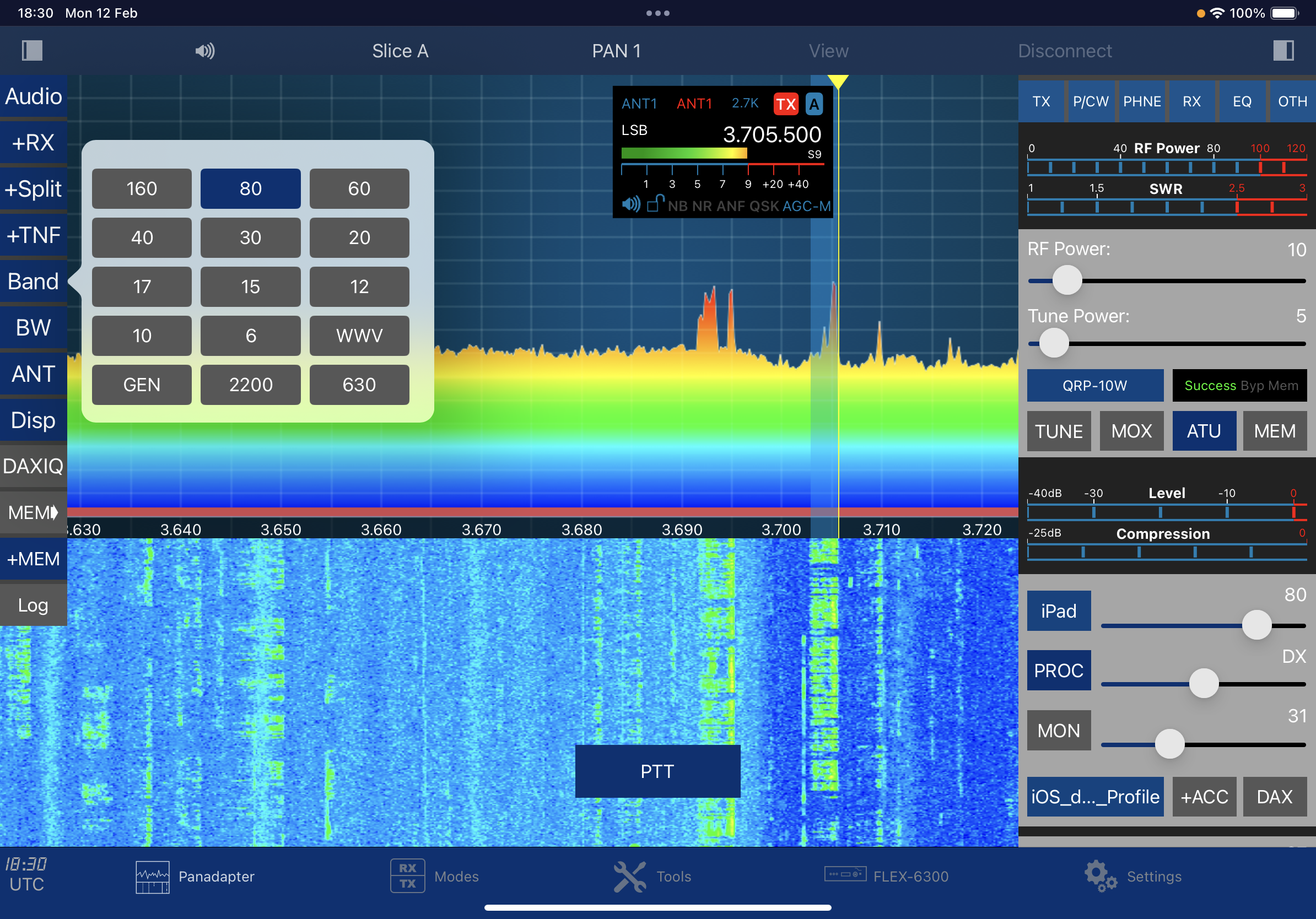
The 6300 is part of the 6000 Signature Series and offers superb performance at a great price-point. This is not a standalone radio though - it will always need to be connected to a computer in order to operate it. Some view such things in a negative light, but in all fairness, every time I get a new radio, the very first thing I do is hook up an SDR receiver such as the RSPdx or the ColibriNano so that I can have a large scope and waterfall and control the radio from my PC, so having a computer-reliant radio is no big deal to me - it's actually a positive! Yes, we all like spinning a dial and pressing knobs and buttons, but I’ve got the wonderful RGO ONE for that.


The 6300 is a HF/6M 100W DDC SDR with some pretty awesome software and my radio runs the very latest V3.7.3 software. It can run two panadapters at once - the more expensive versions can run up to eight and they have preselectors which the 6300 doesn't. The sample I purchased included the £400 optional ATU 👍

Getting the 6300 up and running is a doddle - power, antenna, USB, PC and a network cable. Luckily I have a BT Router in the shack so it's easy to make a direct Ethernet connection. The radio takes about 30 seconds to load up and then you're ready to go. I'd say most people could just get straight into the SmartSDR V3.6.8 software - the basics are pretty intuitive. It's only the more advanced options which get you reaching for the manual.

Of course the performance of great software is dependent upon the performance of the connected computer and for a nice, fluid feel you need to have a decent computer - there's no use trying to get away with a shabby old PC you've had since the 80's, lol. I tried using my cheap Mini-PC and fully expected it to be okay, but it just kinda stuttered along.  Thankfully I have a powerhouse gaming PC (and a fast gaming-laptop that I could use if I wanted to go on a Field Day).

The slimline form factor of the Flex means that it’s easy to find a place for it in the shack - it’s just over a foot square (330x300x70mm). There’s just a single button on the front panel (On/Off) and three sockets for Mic (8-pin), Phones and Key (1/4”).

On the rear you have two antenna ports (SO-239), two USB, an Ethernet RJ-45 socket, Transverter BNC, Speaker socket (3.5mm), Accessory socket (15 pin), Anderson Power Poles and four RCA sockets for ALC, PTT, REM and TX.

The radio has small fans inside and although they're quiet, I would prefer them not to be on all the time. I've read that the PA fan can get quite noisy if you're transmitting at high power levels. Of course with this type of radio you don’t need to have it located right next to your seating position, so if the fans annoy you, you can always move the radio further away.

Rather than have a fist-mic laying around, I decided to use my PC’s desk mic. It’s a Fifine 669 USB mic on a small tripod. It works amazingly well for vocals and is an absolute steal!

With the Flex 6300 you can easily record your outgoing audio which makes setting up your TX audio a total breeze! The SmartSDR software has an 8-Band equaliser which allows you to tailor the frequency response to suit your voice and mic. You can save the settings as a named profiles such as “FiFine DX” or “Heil RagChew”, etc. If you find that your microphone doesn't produce enough 'oomph' you can give it a 20dB boost from one of the menus. You can also switch on or off the BIAS option to suit condenser and electret mics.

SmartSDR presents itself very well onscreen and whereas I usually want to change and customise everything, I was instantly happy with the look and the layout - it's fresh, clean, bright, informative and uncluttered. It looks good at many sizes and even when shrunken to accommodate other software, it remains fully usable.

I like how all the commonly accessed options are readily available, while the infrequently adjustable controls are tucked nicely away (but easy to get to). In particular, I love the way you move around the selected band. It's just so easy and intuitive to zoom into a section of the waterfall or to move from one end of the band to the other.  I'd say it's the best I've used to date - I really like it!

The maximum viewable width of the panadapter is 7MHz which is quite generous and way, way more than I'd ever use anyway. I rarely use more than 1MHz. The ratio between scope and waterfall is obviously adjustable and you can even scroll the waterfall backwards to see the history.

It's nice to be able to have two panadapters running at the same time of you want to monitor two bands and have two antennas connected. If you only have the one antenna, then you'd need to be using two bands which were harmonically related or you'd barely see any signals on one of the scopes.

Each panadapter carries its own control panel to the sides, so you have quick access to everything including all the adjustments of the filters. You can also chose which one will be the TX.

A handy little feature of the 6300 is the ability to record the incoming signals and play them back instantly over the air! This is great when you're chatting with someone who is testing a new mic or processor and wants to hear how they are being received at your end. Nifty!

The 6300's filtering is superb and so too is the DSP. In my shack I get some very annoying pulses and hash at various times of the day/night. I've never been able to track it down and it's only made bearable by good noise reduction - thankfully, SmartSDR provides that in buckets. 

Only yesterday, I was tuned into a weak Brazilian station (PP2CC) and it was right where I have local noise - I switched on the WideNoiseBlanker and boom, the noise was completely gone without any effect on the signal. I got the 5,500 miles contact logged and confirmed thanks to the Flex!  Adjusting the TX profile and switching the PROC to DX+ also made a huge contribution to the success of this 10W QSO💚

Don't get me wrong - these contacts rarely happen and you just have to be in the right place at the right time and have all your ducks lined up. But that's the thrill of it all!! I know people with huge linears who can make these contacts all day long - but that is kinda boring to me. Well, each to their own.

If you have a particularly annoying signal, you can use the SmartSDR Tracking Notch Filter to block it. You simply insert the filter wherever the problem is and choose its depth and width. That filter will then notch out the unwanted signal even if you open a second receive-slice. You'll be able to see the notch filter onscreen (and also the unwanted signal behind it).

On traditional radios I like to use the RF Gain to maximise readability of weak signals and in the main, I end up turning it down to improve the situation rather than turn it up. I find that decreasing gain decreases all the noise and allows me to better detect what the operator is saying. 

On SDR machines, it's a little different and I find that I can achieve great results by adjusting the RF Preamp and the AGC. Adjusting the AGC Threshold in particular, can make a huge difference. If the threshold is set too low, you can be inadvertently amplifying the noise! It takes time and practise to get familiar with making these adjustments on the fly, but it's worth it if you want to pull in that distant signal and be able to read it properly.

The SSDR RTX Equaliser also makes a worthwhile contribution to cleaning up the audio on the Flex. Having a set of sliders onscreen makes it real easy to make alterations and hear the difference immediately.


From an operational point of view, I am more than happy to make all the necessary adjustments using a Logitech Master  mouse, but when it comes to transmitting, I don't find it convenient to have to click the onscreen PTT button and then click it again to stop transmitting. This is because I might have moved my mouse-pointer during the QSO.  

To alleviate this problem I'm going to try using a TechnoFix PTT button connected to the 6300's PTT connector on the back.

I originally bought this button for my Elecraft KX3 and it's been a really handy little accessory. It allows you to easily activate the mic and keeps your other hand free to use the mouse or write notes. It's small and easy to hold in your hand and you operate it intuitively without a second thought. Brilliant.

I later attached my Elgato StreamDeck to the radio and created a profile for it which included a PTT button. You can read about it HERE.

If you want to use DIGI modes, SmartSDR makes thing simple. Unlike the old PowerSDR, there's no need to pull in 3rd-party solutions such as Virtual Audio Cables, etc, it's just a case of using SmartDAX which makes the whole process much more simpler than stitching together external programs and making them all shake hands with one another.  It's a similar story for CAT control with Flex's SmartCAT.  There's a video below which helps explain it all...

Click HERE if video doesn't show

I also like the CWT feature where you can send pre-recorded CW messages using the Function keys on your keyboard or even send them LIVE by typing into a text-box while the radio transmits each character that you type. It's worth pointing out here (for those new to the radio) that when keying, you won't hear a sidetone unless you have headphones plugged in. Or you could do what I did and use a tiny speaker…


The software is very well supported by third-parties and there's a plethora of useful add-ons available. It'll be quite a while before you have explored all the various options on this great platform.

Okay so that leaves us with one of the biggest attractions of Flex ownership - REMOTE OPERATION. Being an ICOM owner, I am already familiar with radios that have built-in servers (7610 and 705) and the ability to operate remotely, but the Flex  system makes everything just so much easier than other radios. And I'm not just talking about LAN - I'm talking WAN too, so it's easy to operate your Flex from anywhere in the world! You can even share your radio with other operators!


With your laptop and a decent internet connection, you can run SmartSDR and operate your radio with ease. There's usually very little latency - certainly not on SSB. The ease with which you can connect remotely is just staggering. It just works!!
 

Even better (in my eyes) is the fabulous IOS version of SmartSDR by Marcus Roskosch. This is just a fantastic app and it is so good that it's lead to people selling their Flex Maestro!! I have an iPad Pro 11 M1 and I can confirm that the software runs magnificently on it and it looks oh so good. Everything is so fluid and the software includes some amazing tools/utilities.  
 
This is a big plus for most people, but for me in particular, it's a boon! My shack becomes unbearably hot in the summer which makes it a no-go zone. Being able to just pick up my iPad and sit somewhere more comfortable is fantastic. And being IOS software, you just know that it will work reliably and without any glitches.


The software costs around £65 which may seem a little expensive to some, but just consider how much a Maestro would cost you! Below is a video of how the Flex works on an iPhone or iPad.  It's not particularly well shot, but it's informative.


There’s a wide range of really useful tools included with the App and everything’s really well stitched together and functions without a fuss.


So, that’s about it for now. I’ve still got lots to explore and I’m enjoying every minute of it. I’d like to discuss the negatives, but I just can’t really find anything of any significance. In my opinion, the Flex 6300 is one of the few bargains available on the secondhand market today. It offers a lot for a little. And now that full remote operation will be permitted on a Foundation License, it's even more attractive.


Leave a comment below.

Many thanks and kind regards,

Tom, M7MCQ.


.


Wednesday, 12 April 2023

QRP TIME!

ALL BAND LISTENING GUIDE

I just spotted something of interest to QRP operators. I’m not sure how successful it’s going to be, but I do believe it has some mileage and I’ll certainly be adding my support to the idea. 


Visit G4ALG’s website for more information.

73, Tom, M7MCQ.

Sunday, 19 February 2023

MINI SHACK PC

FANLESS MINI-PC FOR THE SHACK

My main PC is a gaming machine designed to cope with the insatiable demands of modern Flight Simulations and I decided to move it to a spare room where there's space for all the associated paraphernalia like throttle, stick, rudders, big screen, etc.

In it's place, I put a Laptop in the shack but I really disliked how it took up so much desk space and offered little in the way of display screen, plus it pelted out a fair old amount of fan noise from a side vent. So I had to find a better solution!

Looking around I found some MINI PC's on our local shop's website and was intrigued by their compact size and the fact that they were fanless.

As much as I liked the idea of one of these tiny, silent PC's, I didn't much like the prices - yikes! So I figured there might be some on the second-hand market and started to search eBay for one. There weren't many up for sale and the prices were still a bit on the choppy side.

I then looked on Facebook MarketPlace and spotted someone local selling a mini PC that was small but not quite as tiny as the ones I'd been looking at. Worth a look though, so I went to the seller's house.


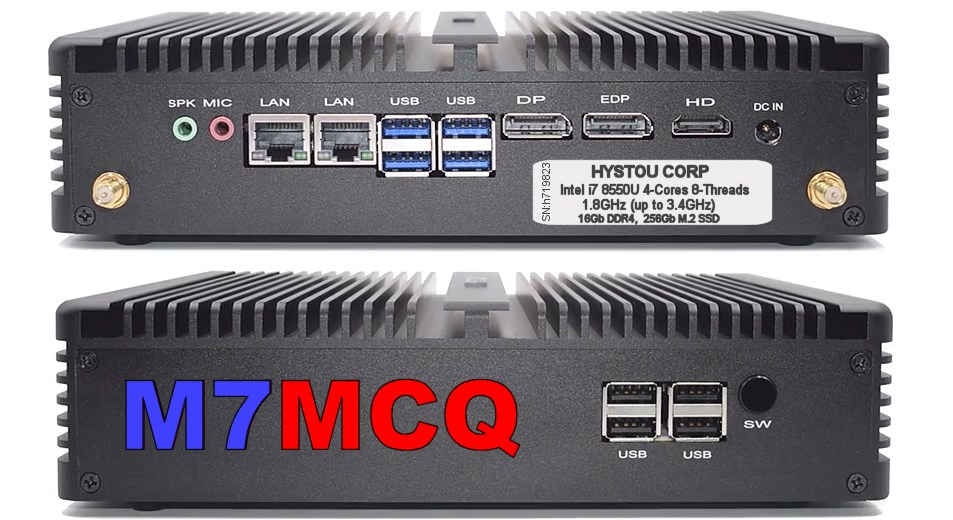
It was a very compact and fanless PC with an Intel i7 CPU running at 1.8GHz which should be fast enough for any of the radio-based software I'd be running. It also had 16Gb of DDR4 RAM which seemed very generous compared to some of the offerings on Scan's Website.

The unit had a 250Gb M.2 SSD which again, was ample for my requirements. It even had a built-in Wi-Fi Router and room inside the case for another drive and extra memory. It was installed with Windows 10 PRO and came with a mouse and keyboard.

EDIT : 26 Feb : A friend had a brand new, boxed 250Gb M.2 SSD and sold it to me for £20, so the storage space has now been doubled! 

The guy showed me he'd paid £500 and was only asking £300 for it which seemed reasonable, so I bought it. Result!

When I got home with it, I had a closer look and was impressed with the 8 USB sockets (four USB2 & four USB3). There were 2 LAN ports, one Display Port, one eDP port and an HDMI port. There was also a handy audio In/Out pair of jacks.

Once I'd installed it in the shack it was time to load some software and see how it performed with my most often used programs such as ELAD FDM SW2, SDR UNO and EXPERT ELECTRONICS SDR2. These can be quite demanding, so I needed to know if the PC was capable of coping without any stuttering and without me having to fuss over the operation.

I noted that although the processor's base speed is 1.8GHz, it appears to be running at over 3 GHz and every test went well. Using my main shack radio (ELAD FDM DUO) and the SW2 software, there were no operational problems whatsoever - even when I had 4 receivers running. I could also open QRZ to access my logbook without any hint of choppiness. 

There was a brief episode of locked mouse-cursor and I couldn't figure out why, but then I discovered it was because I'd inserted a 128Gb Micro SD Card which it didn't like much. As soon as I removed it, everything went back to normal.

 
I'm over the moon with my little bargain. It fits into the shack very well and takes up very little space as you can see in the photo. The fact that's it's fanless is a real bonus because it means there are NO noises (which seems a bit weird at first). 

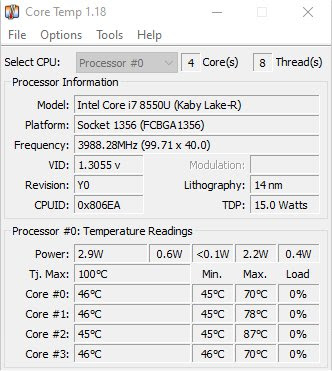
As for temperatures, yes, those cooling fins get quite hot when it's running multiple receivers on a 2K screen (2560x1440) but I use a neat app called CORE TEMP which not only monitors the temperatures of each CPU core, but takes action if things got too hot by putting the computer into sleep mode until things cool down. I've tried my best to overcook the processor by running multiple demanding programs, but it doesn't seem to phase it. Sure, temps get quite high in those circumstances and things go from green to amber, but no red - so far.


So basically, this little gem is perfectly capable of running any of the SDR software that I use and more! It's capable of running three monitors too but to be honest, a 2560 x 1400 desktop is plenty big enough to have multiple windows open such as WSJT-X, GRIDTRACKER and SDR software.

£300 for all this?? That'll do! 😍

Video-Clip of the Mini-PC running ELAD FDM SW2 software...


73, Tom M7MCQ.

Sunday, 12 February 2023

HOBBIES - WHY DO WE DO IT?

Over the years I've had countless conversations with people who almost mockingly ask about my hobbies. And I'm not just talking about strangers - friends and family can be guilty of it too!

Obviously, these negative people have no hobbies themselves and they make their mocking remarks without having any real knowledge or understanding of what they're criticising. 

I used to try and justify why I had hobbies, but in more recent years I just stopped trying and I'd change the conversation away from me and my apparently "strange and anti-social ways".

I must admit I do have a lot of hobbies - perhaps more than most...

  1. MODEL MAKING
    (Plastic - aircraft, cars and bikes)
    (Wood - boats and ships)
     
  2. MOTORBIKES
    (Riding - Sports & Touring)
    (Rebuilding Classics)
     
  3. PAINTING
    (Watercolour, Oil, Acrylics)
    (Digital Painting)
     
  4. PHOTOGRAPHY
    (Formerly Film, now Digital)
      
  5. COMPUTING
     (Using & Building)

  6.  AVIATION
    (General Interest)
    (Flight Simulation)

  7. AMATEUR RADIO
    (Operating QRP Outdoors)
    (HF, VHF, UHF)
    (C4FM, DSTAR, DMR)
    (Analogue & Digital)
    (Electronic Kit Building)
    (Experimenting)
     
  8. ShortWave Listening
    (Aviation, DX Broadcast, etc)
      
  9. READING, WALKING, MUSIC and more that have fell by the wayside.

Well, as you can see, I keep myself pretty busy with one thing or another. I do my best not to become obsessive about one particular hobby and regularly move from one to the other. Because amateur radio has so many facets to it and is ever-changing, I probably spend most of my leisure time messing with radio one way or another.

Anyway, back to the reason WHY?

I have never quite understood why hobbies have attracted me so greatly. When most other people get some leisure time, they sit back, watch TV, go to the pub or scroll their life away on their iPhone.

I just can't do that! All my adult life I've had this "feeling" that time is running out and I should be doing something  worthwhile - something constructive - something creative. Making something! Making something happen!

Is that odd? I really don't know. Maybe it's because my father died when he was just 27 years old. I used to worry about reaching that age and following suit, lol. And then when I had my first child, he too died young (15) so that probably reinforced the idea that I need to crack on with something. Of course having a terminally ill child means that you spend those years meeting other families with terminally ill children, further strengthening this feeling.

As I've got older and "climbed the ladder" at work, I've been under more and more stress. I am now the Operations Director at a small company and that basically means that I'm responsible for everything! I have to succeed in every task - which is not always possible - or it takes much longer than you'd like due to having to learn new skills. The pressure can be intense and there are often failures before success comes along!

And this is where I discovered the answer to the question "Why do I have so many hobbies"?

Success! Hobbies can provide success. As daft as it sounds, that only dawned on me a couple of weeks ago. I'd had a particularly stressful week at work and was feeling drained by the end of it. Over the weekend I decided to build a V-POLE using a couple of cheap telescopic whips I'd purchased from China.

 
The antenna experiment went really well and worked much better than I had anticipated. I was feeling elated and my spirits were lifted!

Almost without you realising, these small successes can provide much needed healing and can counter the damaging effects of stress. Sure, some of my hobbies drive me around the bend with their technical complexity, but unlike work, they're voluntary and I can always walk away or seek help from smarter people.

So now, when someone asks me about my 'geeky hobbies', I have an answer that makes them realise that they're missing out.

Enjoy your hobbies - they're good for you. Ignore the ignorant!

73, Tom, M7MCQ.


Wednesday, 1 February 2023

RuckShack

RuckShack!

Ooow, I invented a new word 😂

For a few years now, I've used a LowePro Camera Bag for transporting my radio gear when outdoors on a Field Day or Sota outing. It's proven to be a fabulous choice, being light, comfortable and accommodating.

It's been very flexible in terms of what can be secured in there. The padded dividers can be configured to fit virtually any item thanks to their Velcro fixings and because there's more than you usually need, you can use spare dividers as covers to prevent stuff falling out when you open the rucksack.

This particular model is the Lowepro LP36892-PWW Tahoe 150  and only costs £60 on Amazon, but I actually paid £40 for mine as a second hand item on Ebay. It was in perfect, as-new condition!. It's had a few years of use and abuse now, but it's proved to be tough as old boots.  

And then lo and behold, I spotted another minter on Facebook MarketPlace yesterday for £30, so I snapped that up too. The guy only lived 4 miles away, so that meant I could check it out before paying.


The Tahoe 150 not only has room for my radios, batteries and accessories, but also has a zipped storage area for all those bits and bats that come in very handy out in the field - a selection of adapters, a pigtail, a compass, knife, etc.

It also stores my SotaBeams/Hawkins antennas in the front cover along with a pencil and notepad. On the side of the rucksack it has a net pocket which holds my telescoping mast and has a quick release strap higher up to keep it stable.

Having found another of these versatile carriers (at a bargain price), I can make up a second 'RuckShack' ready to go, instead of swapping out radios and rearranging the dividers every time.

Highly recommended product!

73, Tom, M7MCQ.


#ruckshack #lowepro #sota #sotabeams #elecraft #icom #pota #camera-bag