Thursday, 13 April 2023

FLEXRADIO 6300 Signature

LATE TO THE GAME?

I've already had a Flex-1500 and a Flex-3000, so I'm not totally unfamiliar with them. Needless to say, the old Flex radios ran PowerSDR and the 6000 Signature Series run the latest version of SmartSDR, so there's new stuff to learn and enjoy.

The 6300 is part of the 6000 Signature Series and offers superb performance at a great price-point. This is not a standalone radio though - it will always need to be connected to a computer in order to operate it. Some view such things in a negative light, but in all fairness, every time I get a new radio, the very first thing I do is hook up an SDR receiver such as the RSPdx or the ColibriNano so that I can have a large scope and waterfall and control the radio from my PC, so having a computer-reliant radio is no big deal to me - it's actually a positive! Yes, we all like spinning a dial and pressing knobs and buttons, but I’ve got the wonderful RGO ONE for that.


The 6300 is a HF/6M 100W DDC SDR with some pretty awesome software and my radio runs the very latest V3.7.3 software. It can run two panadapters at once - the more expensive versions can run up to eight and they have preselectors which the 6300 doesn't. The sample I purchased included the £400 optional ATU 👍

Getting the 6300 up and running is a doddle - power, antenna, USB, PC and a network cable. Luckily I have a BT Router in the shack so it's easy to make a direct Ethernet connection. The radio takes about 30 seconds to load up and then you're ready to go. I'd say most people could just get straight into the SmartSDR V3.6.8 software - the basics are pretty intuitive. It's only the more advanced options which get you reaching for the manual.

Of course the performance of great software is dependent upon the performance of the connected computer and for a nice, fluid feel you need to have a decent computer - there's no use trying to get away with a shabby old PC you've had since the 80's, lol. I tried using my cheap Mini-PC and fully expected it to be okay, but it just kinda stuttered along.  Thankfully I have a powerhouse gaming PC (and a fast gaming-laptop that I could use if I wanted to go on a Field Day).

The slimline form factor of the Flex means that it’s easy to find a place for it in the shack - it’s just over a foot square (330x300x70mm). There’s just a single button on the front panel (On/Off) and three sockets for Mic (8-pin), Phones and Key (1/4”).

On the rear you have two antenna ports (SO-239), two USB, an Ethernet RJ-45 socket, Transverter BNC, Speaker socket (3.5mm), Accessory socket (15 pin), Anderson Power Poles and four RCA sockets for ALC, PTT, REM and TX.

The radio has small fans inside and although they're quiet, I would prefer them not to be on all the time. I've read that the PA fan can get quite noisy if you're transmitting at high power levels. Of course with this type of radio you don’t need to have it located right next to your seating position, so if the fans annoy you, you can always move the radio further away.

Rather than have a fist-mic laying around, I decided to use my PC’s desk mic. It’s a Fifine 669 USB mic on a small tripod. It works amazingly well for vocals and is an absolute steal!

With the Flex 6300 you can easily record your outgoing audio which makes setting up your TX audio a total breeze! The SmartSDR software has an 8-Band equaliser which allows you to tailor the frequency response to suit your voice and mic. You can save the settings as a named profiles such as “FiFine DX” or “Heil RagChew”, etc. If you find that your microphone doesn't produce enough 'oomph' you can give it a 20dB boost from one of the menus. You can also switch on or off the BIAS option to suit condenser and electret mics.

SmartSDR presents itself very well onscreen and whereas I usually want to change and customise everything, I was instantly happy with the look and the layout - it's fresh, clean, bright, informative and uncluttered. It looks good at many sizes and even when shrunken to accommodate other software, it remains fully usable.

I like how all the commonly accessed options are readily available, while the infrequently adjustable controls are tucked nicely away (but easy to get to). In particular, I love the way you move around the selected band. It's just so easy and intuitive to zoom into a section of the waterfall or to move from one end of the band to the other.  I'd say it's the best I've used to date - I really like it!

The maximum viewable width of the panadapter is 7MHz which is quite generous and way, way more than I'd ever use anyway. I rarely use more than 1MHz. The ratio between scope and waterfall is obviously adjustable and you can even scroll the waterfall backwards to see the history.

It's nice to be able to have two panadapters running at the same time of you want to monitor two bands and have two antennas connected. If you only have the one antenna, then you'd need to be using two bands which were harmonically related or you'd barely see any signals on one of the scopes.

Each panadapter carries its own control panel to the sides, so you have quick access to everything including all the adjustments of the filters. You can also chose which one will be the TX.

A handy little feature of the 6300 is the ability to record the incoming signals and play them back instantly over the air! This is great when you're chatting with someone who is testing a new mic or processor and wants to hear how they are being received at your end. Nifty!

The 6300's filtering is superb and so too is the DSP. In my shack I get some very annoying pulses and hash at various times of the day/night. I've never been able to track it down and it's only made bearable by good noise reduction - thankfully, SmartSDR provides that in buckets. 

Only yesterday, I was tuned into a weak Brazilian station (PP2CC) and it was right where I have local noise - I switched on the WideNoiseBlanker and boom, the noise was completely gone without any effect on the signal. I got the 5,500 miles contact logged and confirmed thanks to the Flex!  Adjusting the TX profile and switching the PROC to DX+ also made a huge contribution to the success of this 10W QSO💚

Don't get me wrong - these contacts rarely happen and you just have to be in the right place at the right time and have all your ducks lined up. But that's the thrill of it all!! I know people with huge linears who can make these contacts all day long - but that is kinda boring to me. Well, each to their own.

If you have a particularly annoying signal, you can use the SmartSDR Tracking Notch Filter to block it. You simply insert the filter wherever the problem is and choose its depth and width. That filter will then notch out the unwanted signal even if you open a second receive-slice. You'll be able to see the notch filter onscreen (and also the unwanted signal behind it).

On traditional radios I like to use the RF Gain to maximise readability of weak signals and in the main, I end up turning it down to improve the situation rather than turn it up. I find that decreasing gain decreases all the noise and allows me to better detect what the operator is saying. 

On SDR machines, it's a little different and I find that I can achieve great results by adjusting the RF Preamp and the AGC. Adjusting the AGC Threshold in particular, can make a huge difference. If the threshold is set too low, you can be inadvertently amplifying the noise! It takes time and practise to get familiar with making these adjustments on the fly, but it's worth it if you want to pull in that distant signal and be able to read it properly.

The SSDR RTX Equaliser also makes a worthwhile contribution to cleaning up the audio on the Flex. Having a set of sliders onscreen makes it real easy to make alterations and hear the difference immediately.


From an operational point of view, I am more than happy to make all the necessary adjustments using a Logitech Master  mouse, but when it comes to transmitting, I don't find it convenient to have to click the onscreen PTT button and then click it again to stop transmitting. This is because I might have moved my mouse-pointer during the QSO.  

To alleviate this problem I'm going to try using a TechnoFix PTT button connected to the 6300's PTT connector on the back.

I originally bought this button for my Elecraft KX3 and it's been a really handy little accessory. It allows you to easily activate the mic and keeps your other hand free to use the mouse or write notes. It's small and easy to hold in your hand and you operate it intuitively without a second thought. Brilliant.

I later attached my Elgato StreamDeck to the radio and created a profile for it which included a PTT button. You can read about it HERE.

If you want to use DIGI modes, SmartSDR makes thing simple. Unlike the old PowerSDR, there's no need to pull in 3rd-party solutions such as Virtual Audio Cables, etc, it's just a case of using SmartDAX which makes the whole process much more simpler than stitching together external programs and making them all shake hands with one another.  It's a similar story for CAT control with Flex's SmartCAT.  There's a video below which helps explain it all...

Click HERE if video doesn't show

I also like the CWT feature where you can send pre-recorded CW messages using the Function keys on your keyboard or even send them LIVE by typing into a text-box while the radio transmits each character that you type. It's worth pointing out here (for those new to the radio) that when keying, you won't hear a sidetone unless you have headphones plugged in. Or you could do what I did and use a tiny speaker…


The software is very well supported by third-parties and there's a plethora of useful add-ons available. It'll be quite a while before you have explored all the various options on this great platform.

Okay so that leaves us with one of the biggest attractions of Flex ownership - REMOTE OPERATION. Being an ICOM owner, I am already familiar with radios that have built-in servers (7610 and 705) and the ability to operate remotely, but the Flex  system makes everything just so much easier than other radios. And I'm not just talking about LAN - I'm talking WAN too, so it's easy to operate your Flex from anywhere in the world! You can even share your radio with other operators!


With your laptop and a decent internet connection, you can run SmartSDR and operate your radio with ease. There's usually very little latency - certainly not on SSB. The ease with which you can connect remotely is just staggering. It just works!!
 

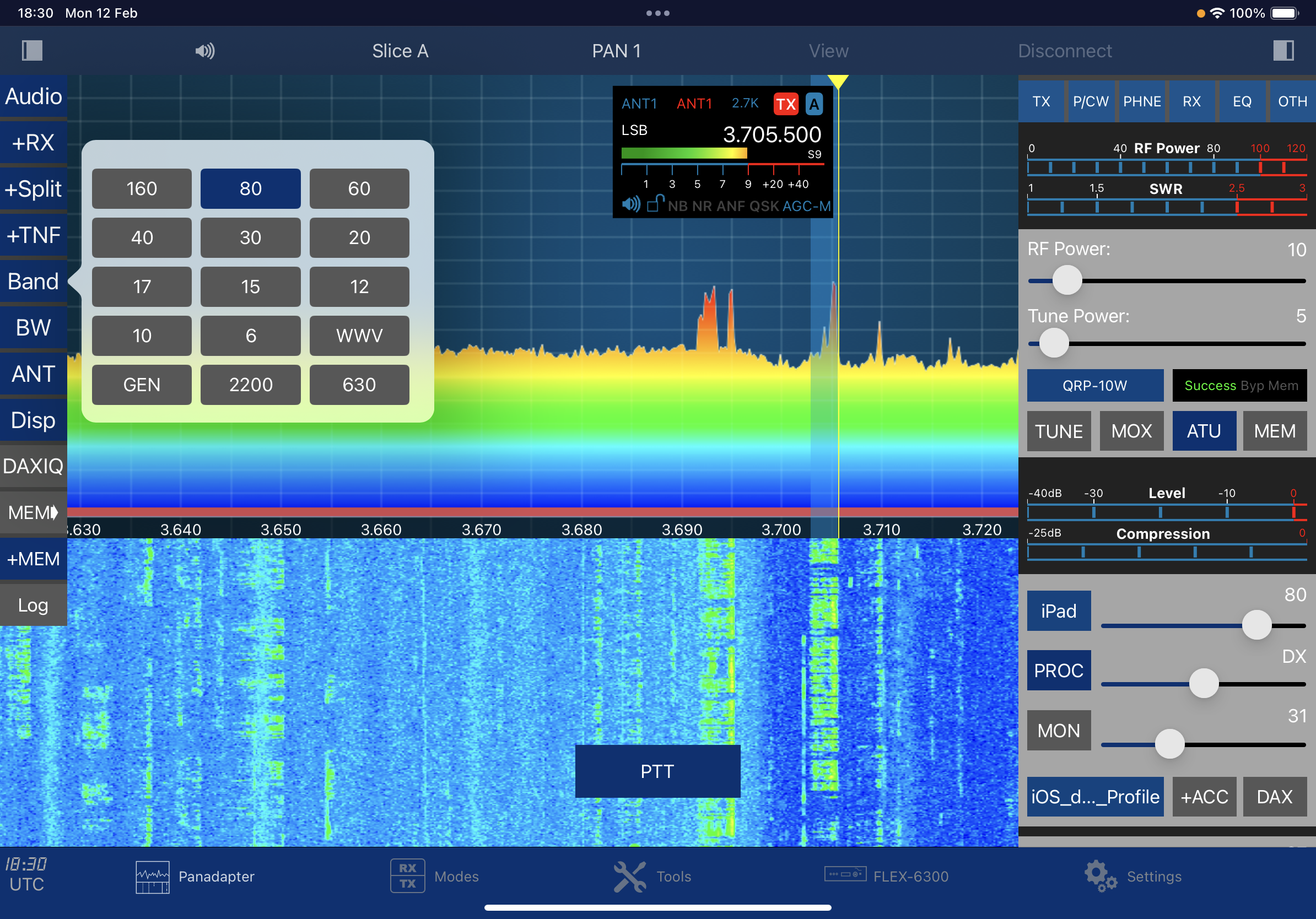
Even better (in my eyes) is the fabulous IOS version of SmartSDR by Marcus Roskosch. This is just a fantastic app and it is so good that it's lead to people selling their Flex Maestro!! I have an iPad Pro 11 M1 and I can confirm that the software runs magnificently on it and it looks oh so good. Everything is so fluid and the software includes some amazing tools/utilities.  
 
This is a big plus for most people, but for me in particular, it's a boon! My shack becomes unbearably hot in the summer which makes it a no-go zone. Being able to just pick up my iPad and sit somewhere more comfortable is fantastic. And being IOS software, you just know that it will work reliably and without any glitches.


The software costs around £65 which may seem a little expensive to some, but just consider how much a Maestro would cost you! Below is a video of how the Flex works on an iPhone or iPad.  It's not particularly well shot, but it's informative.


There’s a wide range of really useful tools included with the App and everything’s really well stitched together and functions without a fuss.


So, that’s about it for now. I’ve still got lots to explore and I’m enjoying every minute of it. I’d like to discuss the negatives, but I just can’t really find anything of any significance. In my opinion, the Flex 6300 is one of the few bargains available on the secondhand market today. It offers a lot for a little. And now that full remote operation will be permitted on a Foundation License, it's even more attractive.


Leave a comment below.

Many thanks and kind regards,

Tom, M7MCQ.


.


Wednesday, 12 April 2023

QRP TIME!

ALL BAND LISTENING GUIDE

I just spotted something of interest to QRP operators. I’m not sure how successful it’s going to be, but I do believe it has some mileage and I’ll certainly be adding my support to the idea. 


Visit G4ALG’s website for more information.

73, Tom, M7MCQ.

Sunday, 19 February 2023

MINI SHACK PC

FANLESS MINI-PC FOR THE SHACK

My main PC is a gaming machine designed to cope with the insatiable demands of modern Flight Simulations and I decided to move it to a spare room where there's space for all the associated paraphernalia like throttle, stick, rudders, big screen, etc.

In it's place, I put a Laptop in the shack but I really disliked how it took up so much desk space and offered little in the way of display screen, plus it pelted out a fair old amount of fan noise from a side vent. So I had to find a better solution!

Looking around I found some MINI PC's on our local shop's website and was intrigued by their compact size and the fact that they were fanless.

As much as I liked the idea of one of these tiny, silent PC's, I didn't much like the prices - yikes! So I figured there might be some on the second-hand market and started to search eBay for one. There weren't many up for sale and the prices were still a bit on the choppy side.

I then looked on Facebook MarketPlace and spotted someone local selling a mini PC that was small but not quite as tiny as the ones I'd been looking at. Worth a look though, so I went to the seller's house.


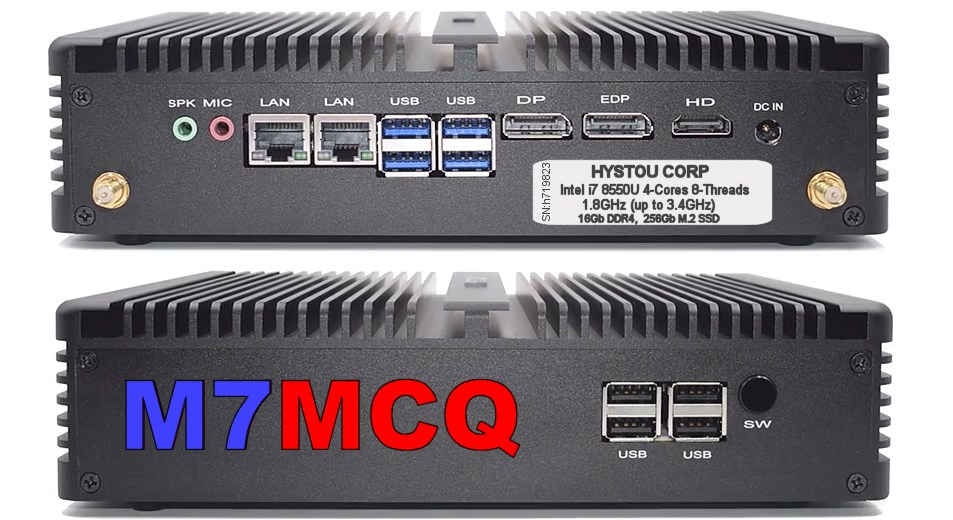
It was a very compact and fanless PC with an Intel i7 CPU running at 1.8GHz which should be fast enough for any of the radio-based software I'd be running. It also had 16Gb of DDR4 RAM which seemed very generous compared to some of the offerings on Scan's Website.

The unit had a 250Gb M.2 SSD which again, was ample for my requirements. It even had a built-in Wi-Fi Router and room inside the case for another drive and extra memory. It was installed with Windows 10 PRO and came with a mouse and keyboard.

EDIT : 26 Feb : A friend had a brand new, boxed 250Gb M.2 SSD and sold it to me for £20, so the storage space has now been doubled! 

The guy showed me he'd paid £500 and was only asking £300 for it which seemed reasonable, so I bought it. Result!

When I got home with it, I had a closer look and was impressed with the 8 USB sockets (four USB2 & four USB3). There were 2 LAN ports, one Display Port, one eDP port and an HDMI port. There was also a handy audio In/Out pair of jacks.

Once I'd installed it in the shack it was time to load some software and see how it performed with my most often used programs such as ELAD FDM SW2, SDR UNO and EXPERT ELECTRONICS SDR2. These can be quite demanding, so I needed to know if the PC was capable of coping without any stuttering and without me having to fuss over the operation.

I noted that although the processor's base speed is 1.8GHz, it appears to be running at over 3 GHz and every test went well. Using my main shack radio (ELAD FDM DUO) and the SW2 software, there were no operational problems whatsoever - even when I had 4 receivers running. I could also open QRZ to access my logbook without any hint of choppiness. 

There was a brief episode of locked mouse-cursor and I couldn't figure out why, but then I discovered it was because I'd inserted a 128Gb Micro SD Card which it didn't like much. As soon as I removed it, everything went back to normal.

 
I'm over the moon with my little bargain. It fits into the shack very well and takes up very little space as you can see in the photo. The fact that's it's fanless is a real bonus because it means there are NO noises (which seems a bit weird at first). 

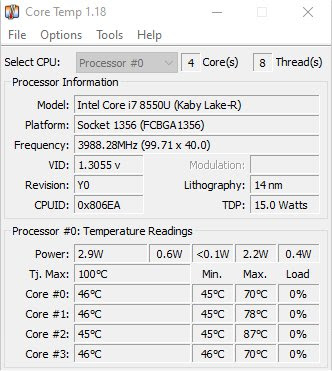
As for temperatures, yes, those cooling fins get quite hot when it's running multiple receivers on a 2K screen (2560x1440) but I use a neat app called CORE TEMP which not only monitors the temperatures of each CPU core, but takes action if things got too hot by putting the computer into sleep mode until things cool down. I've tried my best to overcook the processor by running multiple demanding programs, but it doesn't seem to phase it. Sure, temps get quite high in those circumstances and things go from green to amber, but no red - so far.


So basically, this little gem is perfectly capable of running any of the SDR software that I use and more! It's capable of running three monitors too but to be honest, a 2560 x 1400 desktop is plenty big enough to have multiple windows open such as WSJT-X, GRIDTRACKER and SDR software.

£300 for all this?? That'll do! 😍

Video-Clip of the Mini-PC running ELAD FDM SW2 software...


73, Tom M7MCQ.

Sunday, 12 February 2023

HOBBIES - WHY DO WE DO IT?

Over the years I've had countless conversations with people who almost mockingly ask about my hobbies. And I'm not just talking about strangers - friends and family can be guilty of it too!

Obviously, these negative people have no hobbies themselves and they make their mocking remarks without having any real knowledge or understanding of what they're criticising. 

I used to try and justify why I had hobbies, but in more recent years I just stopped trying and I'd change the conversation away from me and my apparently "strange and anti-social ways".

I must admit I do have a lot of hobbies - perhaps more than most...

  1. MODEL MAKING
    (Plastic - aircraft, cars and bikes)
    (Wood - boats and ships)
     
  2. MOTORBIKES
    (Riding - Sports & Touring)
    (Rebuilding Classics)
     
  3. PAINTING
    (Watercolour, Oil, Acrylics)
    (Digital Painting)
     
  4. PHOTOGRAPHY
    (Formerly Film, now Digital)
      
  5. COMPUTING
     (Using & Building)

  6.  AVIATION
    (General Interest)
    (Flight Simulation)

  7. AMATEUR RADIO
    (Operating QRP Outdoors)
    (HF, VHF, UHF)
    (C4FM, DSTAR, DMR)
    (Analogue & Digital)
    (Electronic Kit Building)
    (Experimenting)
     
  8. ShortWave Listening
    (Aviation, DX Broadcast, etc)
      
  9. READING, WALKING, MUSIC and more that have fell by the wayside.

Well, as you can see, I keep myself pretty busy with one thing or another. I do my best not to become obsessive about one particular hobby and regularly move from one to the other. Because amateur radio has so many facets to it and is ever-changing, I probably spend most of my leisure time messing with radio one way or another.

Anyway, back to the reason WHY?

I have never quite understood why hobbies have attracted me so greatly. When most other people get some leisure time, they sit back, watch TV, go to the pub or scroll their life away on their iPhone.

I just can't do that! All my adult life I've had this "feeling" that time is running out and I should be doing something  worthwhile - something constructive - something creative. Making something! Making something happen!

Is that odd? I really don't know. Maybe it's because my father died when he was just 27 years old. I used to worry about reaching that age and following suit, lol. And then when I had my first child, he too died young (15) so that probably reinforced the idea that I need to crack on with something. Of course having a terminally ill child means that you spend those years meeting other families with terminally ill children, further strengthening this feeling.

As I've got older and "climbed the ladder" at work, I've been under more and more stress. I am now the Operations Director at a small company and that basically means that I'm responsible for everything! I have to succeed in every task - which is not always possible - or it takes much longer than you'd like due to having to learn new skills. The pressure can be intense and there are often failures before success comes along!

And this is where I discovered the answer to the question "Why do I have so many hobbies"?

Success! Hobbies can provide success. As daft as it sounds, that only dawned on me a couple of weeks ago. I'd had a particularly stressful week at work and was feeling drained by the end of it. Over the weekend I decided to build a V-POLE using a couple of cheap telescopic whips I'd purchased from China.

 
The antenna experiment went really well and worked much better than I had anticipated. I was feeling elated and my spirits were lifted!

Almost without you realising, these small successes can provide much needed healing and can counter the damaging effects of stress. Sure, some of my hobbies drive me around the bend with their technical complexity, but unlike work, they're voluntary and I can always walk away or seek help from smarter people.

So now, when someone asks me about my 'geeky hobbies', I have an answer that makes them realise that they're missing out.

Enjoy your hobbies - they're good for you. Ignore the ignorant!

73, Tom, M7MCQ.


Wednesday, 1 February 2023

RuckShack

RuckShack!

Ooow, I invented a new word 😂

For a few years now, I've used a LowePro Camera Bag for transporting my radio gear when outdoors on a Field Day or Sota outing. It's proven to be a fabulous choice, being light, comfortable and accommodating.

It's been very flexible in terms of what can be secured in there. The padded dividers can be configured to fit virtually any item thanks to their Velcro fixings and because there's more than you usually need, you can use spare dividers as covers to prevent stuff falling out when you open the rucksack.

This particular model is the Lowepro LP36892-PWW Tahoe 150  and only costs £60 on Amazon, but I actually paid £40 for mine as a second hand item on Ebay. It was in perfect, as-new condition!. It's had a few years of use and abuse now, but it's proved to be tough as old boots.  

And then lo and behold, I spotted another minter on Facebook MarketPlace yesterday for £30, so I snapped that up too. The guy only lived 4 miles away, so that meant I could check it out before paying.


The Tahoe 150 not only has room for my radios, batteries and accessories, but also has a zipped storage area for all those bits and bats that come in very handy out in the field - a selection of adapters, a pigtail, a compass, knife, etc.

It also stores my SotaBeams/Hawkins antennas in the front cover along with a pencil and notepad. On the side of the rucksack it has a net pocket which holds my telescoping mast and has a quick release strap higher up to keep it stable.

Having found another of these versatile carriers (at a bargain price), I can make up a second 'RuckShack' ready to go, instead of swapping out radios and rearranging the dividers every time.

Highly recommended product!

73, Tom, M7MCQ.


#ruckshack #lowepro #sota #sotabeams #elecraft #icom #pota #camera-bag

Friday, 20 January 2023

ELECRAFT AX1 MOD by AH6X

Elecraft AX1 Review and Modification

By Rob Ramsey, AH6X

I recently purchased and received an Elecraft AX1 antenna. Since then, I’ve tested it and made two significant modifications that I found helpful and wished to share. 

Though the stock antenna configuration works as advertised, through experimentation, I have discovered it is possible to make it resonant on 10, 12, 15, 17, or 20m. 

Elecraft markets the AX1 as a field expedient antenna that supports operation on the 15, 17, and 20m bands with a tuner. Some tradeoffs were made as packaged: a single 13ft radial, the 46.25in whip, and a 20m/17m switched coil assembly. The stock configuration lives up to its branding and delivers an experience proportional to its compromises. However, more is possible. 

The AX1’s vertical element is too short to be resonant on 20m. This limitation can be overcome by adding additional coil or by using a slightly longer whip antenna. 

The single radial is a similar situation; with a 13ft length, it’s not resonant on any specific amateur band. A multi-element radial could be used with resonant lengths for each of the desired operating bands. These trade-offs were probably made for a variety of reasons. 

First, using this antenna in a resonant multi-band configuration requires an antenna analyzer to tune the whip length properly. 

Second, using a longer whip and multi-element radial would increase the cost. 

Third, a longer whip and multi-element radial weighs more and would take up more room than the stock parts. 

Fourth, a longer whip is less stable when mounted to a small tripod or the radio.

Lastly, tuning the antenna and fanning the radials out would take longer than the original deployment strategy, diminishing the antenna’s field expediency. 


Given a choice, many radio amateurs will choose an antenna analyzer over a tuner. Over the last two weeks, I’ve created and tested a 15/17/20m multi-element radial and, with the help of Jon (KG7KMV), an antenna adaptor for the AX1 coil assembly. 

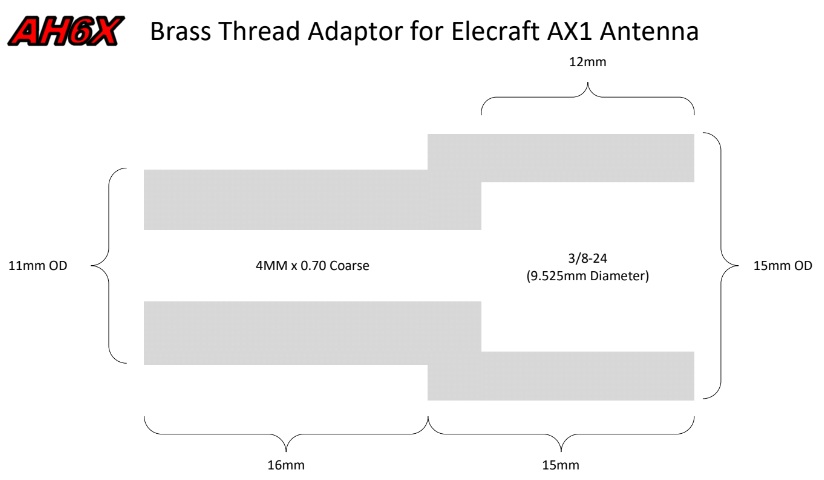
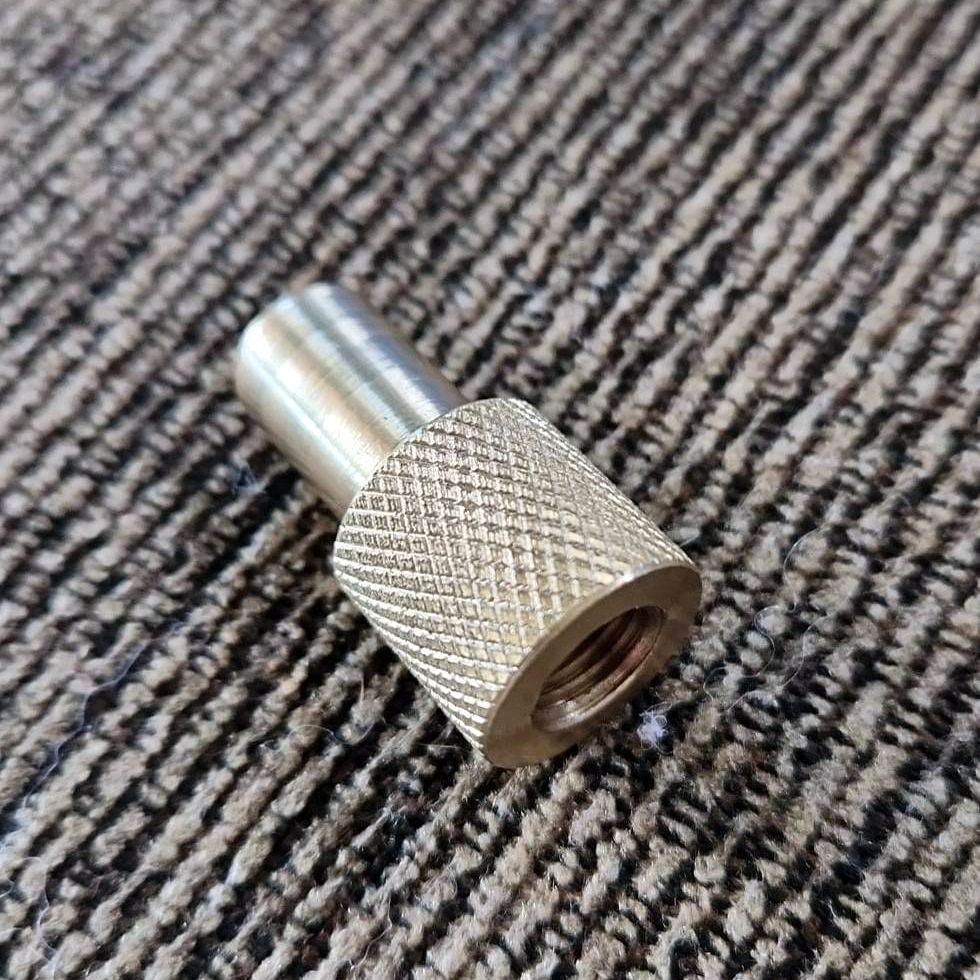
The multi-element radial has been cut per the standard calculations (see charts at bottom of post), and the adaptor allows me to connect any 3/8-24 threaded whip to the 4mm x 0.70 threaded coil assembly.

 The BuddiPole product line has a large variety of telescoping whips. For this project, I used their Featherweight whip, which extends to 72in (6ft) and collapses down to 13in. With it, the antenna can be easily tuned by collapsing or extending the telescoping whip. 

For the multi-element radial, I used Super Antenna MS135 SuperWire with a 14-16 AWG spade connector and some heat shrink tubing. For storage, I wrap the radial around a SOTABeams wire-winder

This custom configuration allows for a 3:1 SWR in the 10, 12, 15, 17, and 20m bands. Overall, I really like the Elecraft AX1 antenna. It’s a good product, made resonant, with just a few adjustments. See images below. 

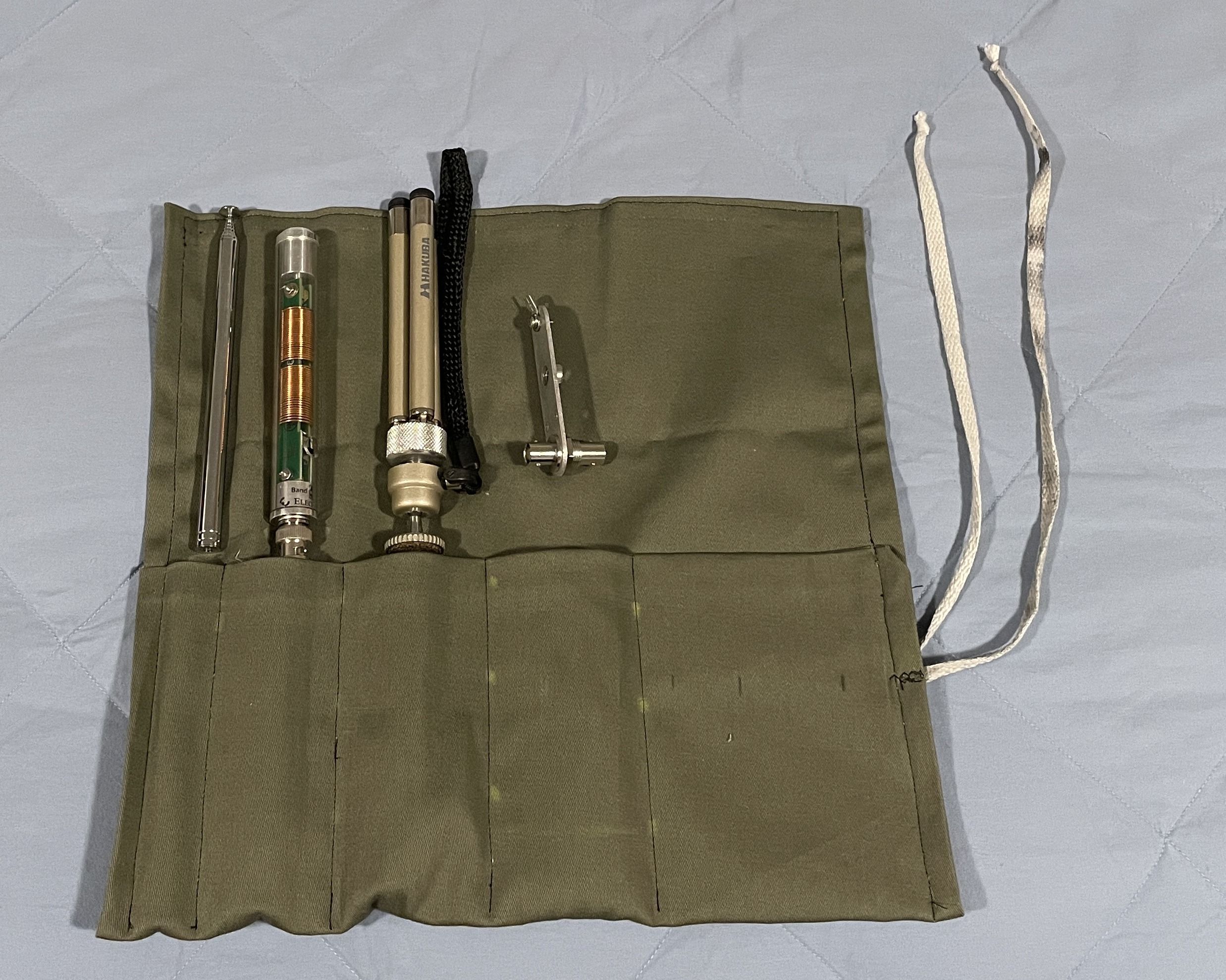
I also made a "tool roll". My mother-in-law showed me how to sew a wrench roll for my Elecraft AX1 antenna. I use a similar setup for my Super Antenna. The fabric is light, protects the parts, and makes antenna transport easy.

Let me know what you think in the comments. Thanks in advance! 

Rob, DE AH6X. 

Many thanks for your contribution to the Blog Rob! 
A very interesting read. I love this sort of stuff.

Tom, M7MCQ.


Elecraft AX1 mini-review HERE

Wednesday, 18 January 2023

ELECRAFT XG3 SIGNAL GENERATOR

ELECRAFT'S BEST KEPT SECRET?


Since starting to mess around building radio-related kits, I've recognised the value of having tools in the shack to assist with the hobby, but things like signal generators are normally too complex (to me anyway), too bulky and too expensive.

A case in point was when I needed to calibrate my PreppComm MMX and had to burden my friend Chris at Cross Country Wireless with the task.

Enter the Elecraft XG3! It certainly addresses two of the issues - size and complexity, but they're still on the expensive side at $300 😮 


The XG3 can be used for a variety of jobs including receiver testing, receiver alignment, RF tracing and a variety of other tasks. Not only does it generate a calibrated continuous wave signal, but it can also be programmed to send RTTY or CW!

With the free downloadable software, you can program the XG3 to act as a Beacon, repeatedly sending a message - ideal for Fox Hunts or RBN tests. I couldn't quite figure out the syntax of the programming language, so I emailed Elecraft Support and the came back immediately with a great response. I now have "CQ TEST CQ TEST M7MCQ M7MCQ" set in Memory #1.

Most of the time though, you'd be using it to test radio equipment and to assist you with that, it has a number of useful presets.

The RF output has 4 presets ranging from -107dBm through to 0dBm and includes a -73 setting which is particularly handy for testing the accuracy of your S-Meters, since -73dBM is equivalent to S9.

There are 12 Band Settings from 160M to 2M. These are preset to certain frequencies but you can adjust these using the computer software mentioned previously. You can change these frequencies to anything ranging from 1.5 to 1400MHz but great accuracy is only guaranteed below 200MHz. Anything above that relies on the harmonics of the fundamental of the RF signal.


Another handy feature of the XG3 is the SWEEP function. Using the PF1 or PF2 buttons, you can initiate a sweep of the signal across a range of frequencies programmed by you.


On the top of the XG3 case is an input for an external power supply, a PC programming port and the RF-Out connector which is BNC. At the rear of the case is a battery tray to carry the 9V PP3 battery. Thankfully, the unit has reverse-polarity protection, because it's oh so easy to put it in wrong 😳

So there you have it. A very nice addition to the shack at a great saving on the new price. I'm quite sure this will be a very handy unit to have around for me and my radio buddies.

73, Tom, M7MCQ.


WM,[15}CQ_TEST_CQ_TEST_M7MCQ_M7MCQ;PF,01,01;